What APK Extractor•APP Share/Backup actually does (from store listing)
The Best And Easy To Use Apk Extractor/App Manager Is Here...
Now BackUp/Send/Restore/Delete Apps On The Go..
Features:
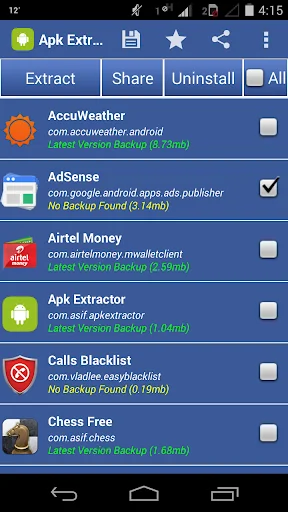
*Can Backup/Share/Restore/Delete Single or Multiple Apps in One Click.
*Compatible With Latest Version Of Android 5.0
*Awesome, Fast, Smooth, Clean and Convenient User Interface.
*No ROOT Access Required.
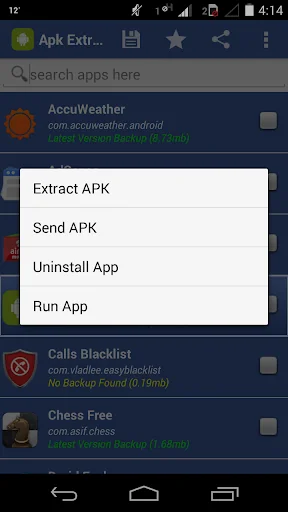
*Easily Back-Up/Extract apk of Installed Applications With Just A Simple Click.
*Easily Send Multiple Apps Via Bluetooth or Email and So On...
*Single or Multiple…
The Best And Easy To Use Apk Extractor/App Manager Is Here...
Now BackUp/Send/Restore/Delete Apps On The Go..
Features:
*Can Backup/Share/Restore/Delete Single or Multiple Apps in One Click.
*Compatible With Latest Version Of Android 5.0
*Awesome, Fast, Smooth, Clean and Convenient User Interface.
*No ROOT Access Required.
*Easily Back-Up/Extract apk of Installed Applications With Just A Simple Click.
*Easily Send Multiple Apps Via Bluetooth or Email and So On...
*Single or Multiple App Uninstall Feature.
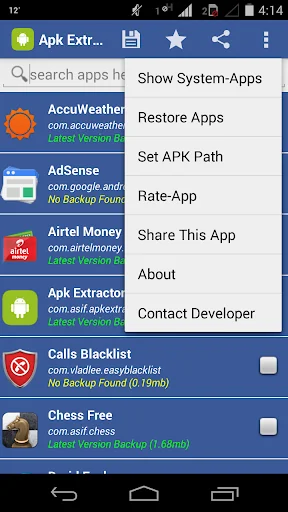
*Restore Apps Section:
-View Already Extracted Apps
-Restore single or multiple Extracted Apps in one click from within the App
-Delete single or multiple Extracted Apk's in one click from within the App
*Ability To Select Your Desired Backup Path To Anywhere In The Internal Or External Memory Easily.
*Shows Whether An App Is Already extracted or not.
*Keeps Backup of Different Versions Of Apps Separately.
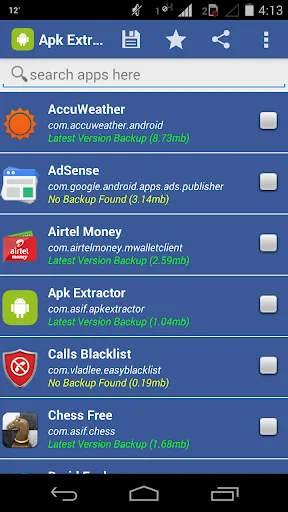
*Displays User-Apps And System-Apps Separately So That You Can Find Any App Quickly.
*Sorts The List Of Apps In Alphabetical Order To Make Finding Any App More Easier.
*MultiSelect Option To Extract Many or All Apks At a Time.
*Search Option To Find Any App Easily.
*Displays ProgressBar While Extraction.
*Displays The Details Of Every Installed App:
-App Name, App Icon, Size, Version, Package Name,Install/Backup Status
*Renames The Extracted App/Apk As, "App Name(Version)(PackageName).apk",
e.g ApkExtractor(3.0)(com.asif.apkextractor).apk
NOTE: The Extracted Apk's Are Stored In "APKBACKUP" Folder.
FAQ:
Why Extraction or Backup failed??
Answer: In 99% Cases Backup/Extraction fails Because of Full Memory i.e No Memory Space left in your Selected Storage Media..
Comparable Android apps
The five apps in Tools with the closest revenue to APK Extractor•APP Share/Backup. Click any to see its detail page.
Each forecast combines App Store rating, ratings count, monetisation model, pricing tier, IAP signals and ad-supported flag.
The base estimate is then multiplied by a per-category scaling factor learned from apps with founder-verified MRR.
Every number on this page comes from public APIs and bumetric's own snapshot history.
Full methodology covers input variables, accuracy bands per category and how we treat apps without comparable anchors.
See also the live data on APK Extractor•APP Share/Backup's tracker page for current rating, reviews and snapshot timeline.
Building something similar? Get a free AI audit with $-revenue forecasts for every recommendation.


 All Language Translator
 Mobile Tracker: Step Counter
 Data Recovery - Restore Files
 e-constat auto
 contacts backup and restore co