Android app
from AppTech Launcher Studios Inc
· Tools
ML forecast★ 4.8 · 282Paid
~2.8K/mo
ML revenue forecast.
Calibrated against 77129 apps in this category.
Confidence band
±15%
High — many comparable apps with verified data
At a glance
Earns 14.84× more than the category median (189/mo).
Ranks #1,622 of 77,129 in Tools (top 2.1% by revenue).
Launched Aug 03, 2020.
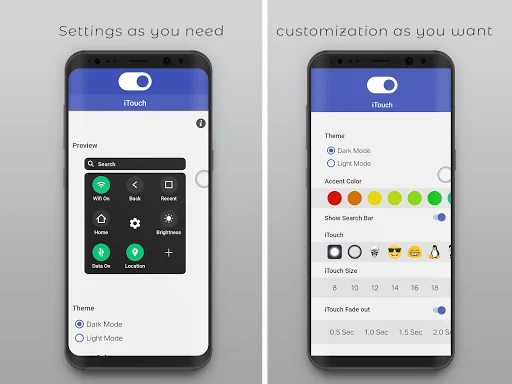
What the app looks like
Live screenshots from the Play Store, captured by our snapshot worker. Tap any image to enlarge.
Assistive iTouch Pro OS 13.1's revenue trajectory
Forecast revenue from snapshot history. Last 1 months.
Where Assistive iTouch Pro OS 13.1 sits in Tools
Revenue distribution of 77129 comparable apps. Assistive iTouch Pro OS 13.1 highlighted.
Assistive iTouch Pro OS 13.1 vs comparable apps
Revenue trajectory side-by-side. Bold = Assistive iTouch Pro OS 13.1, ghosted = peers.
App spec
Version
Varies with device
Launched
Aug 03, 2020
Price
$1.49
Monetization
Paid
What Assistive iTouch Pro OS 13.1 actually does (from store listing)
Get rid off hard buttons on android and shortcuts , protect your keys and make your life smart by using Assistive Touch (iTouch) OS 13.1 & Navigation Bar instead of pressing wasting time to search phone contacts , android phone settings and android apps, also you can customize menu actions of your choice and much more
Exclusive Features on iTouch
->🔥 Drag Drop shortcut keys
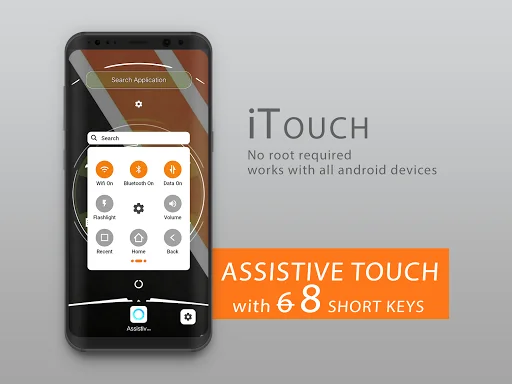
->🔥 8 shortcut keys , others have only 6 keys
->🔥 real i OS 13.1 style
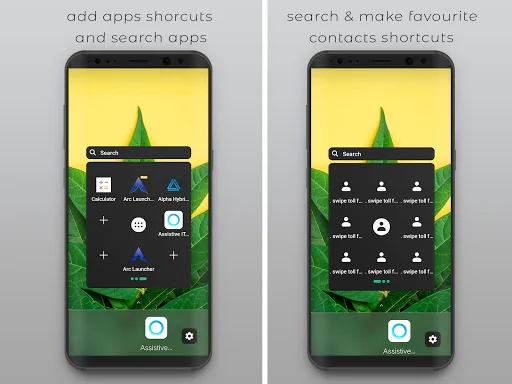
->🔥 All apps search
->🔥 Drag drop contacts…
Get rid off hard buttons on android and shortcuts , protect your keys and make your life smart by using Assistive Touch (iTouch) OS 13.1 & Navigation Bar instead of pressing wasting time to search phone contacts , android phone settings and android apps, also you can customize menu actions of your choice and much more
Exclusive Features on iTouch
->🔥 Drag Drop shortcut keys
->🔥 8 shortcut keys , others have only 6 keys
->🔥 real i OS 13.1 style
->🔥 All apps search
->🔥 Drag drop contacts keys
->🔥 Drag drop app keys
->🔥 Contacts search
->🔥 Light/Dark mode
->🔥Quick setup time for apps,contacts & settings shortcuts
->🔥Light/Dark mode
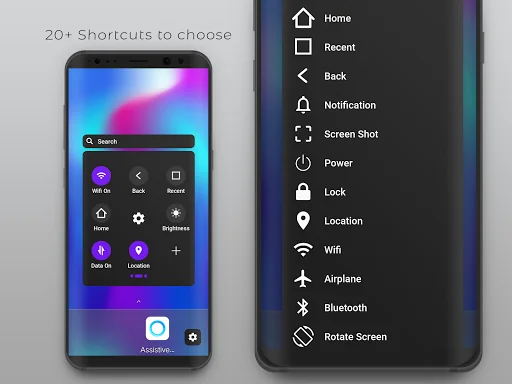
->adjust volume up and down
->ringer/silent
->WiFi On/Off
->Android Phone Data On/Off
->Adjust brightness up and down
-> lock your screen
->use multi-finger gestures
->restart your device
->replace pressing buttons with just a tap
->Recent Apps
->Location GPS
->Screen Shot
->Lock Screen
->Airplane Mode
->Bluetooth
->Rotate Screen
->FlashLight
->Power On/Off (Switch Off and On android phone)
->Open Notification Bar
When you turn on iTouch Assistive Touch, you'll see a button appear onscreen. You can drag it to any position on the screen, where it will stay until you move it again. By default, tapping the button once will open the iTouch Assistive Touch menu. Tapping once anywhere outside of the menu will close it.
Access menus and controls that require onscreen gestures like:
Control Center
Notification Center
Spotlight
Home
App Switcher
Speak Screen
The menu gives you access to functions that would otherwise be controlled by pressing physical buttons or moving the device. Here's some of what you can do:
Activate the Accessibility Shortcut
Lock the screen
Adjust the volume
Voice Assistant
Restart the device
Capture a screenshot
Simulate shaking the device
Go to Settings > Accessibility > Touch, then select iTouch Assistive Touch to turn it on.
Accessibility API Requirement : Enable Accessibility Service to perform global actions like going back, opening notifications taking screen shot, double tap to lock screen. Please be assured that this app will not collect any personal information
Comparable Android apps
The five apps in Tools with the closest revenue to Assistive iTouch Pro OS 13.1. Click any to see its detail page.
Each forecast combines App Store rating, ratings count, monetisation model, pricing tier, IAP signals and ad-supported flag.
The base estimate is then multiplied by a per-category scaling factor learned from apps with founder-verified MRR.
Every number on this page comes from public APIs and bumetric's own snapshot history.
Full methodology covers input variables, accuracy bands per category and how we treat apps without comparable anchors.
See also the live data on Assistive iTouch Pro OS 13.1's tracker page for current rating, reviews and snapshot timeline.
Building something similar? Get a free AI audit with $-revenue forecasts for every recommendation.

 Smart TV APK downloader
 A2 - Area Measurement
 Google app for Android TV
 Live Location
 Copy to SIM Card Pro