ML revenue forecast.
Calibrated against 77129 apps in this category.
Confidence band
±15%
High — many comparable apps with verified data
At a glance
Tracks close to the Android app category median (189/mo).
Ranks #27,493 of 77,129 in Tools (top 35.6% by revenue).
Launched Nov 27, 2019.
What the app looks like
Live screenshots from the Play Store, captured by our snapshot worker. Tap any image to enlarge.
Auto Tap & Swipe on Screen's revenue trajectory
Forecast revenue from snapshot history. Last 1 months.
Where Auto Tap & Swipe on Screen sits in Tools
Revenue distribution of 77129 comparable apps. Auto Tap & Swipe on Screen highlighted.
Auto Tap & Swipe on Screen vs comparable apps
Revenue trajectory side-by-side. Bold = Auto Tap & Swipe on Screen, ghosted = peers.
App spec
Version
Varies with device
Launched
Nov 27, 2019
Price
Free
Monetization
Free
What Auto Tap & Swipe on Screen actually does (from store listing)
Easily set <b>Auto Tap & Swipe on Screen</b> using this unique and multi-feature Android app. Enable various features of <b>Easy Set Auto Tap & Swipe on Screen</b> like single click, multiple click, swipe targets, preview actions to efficiently make use of the app!
Components:
- Single Target
- Multiple Target
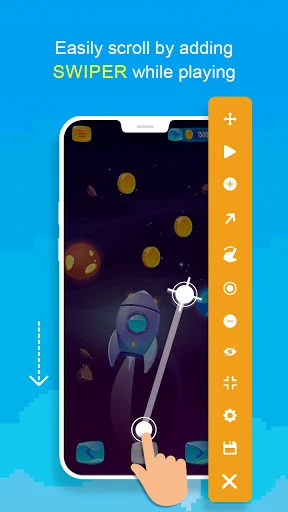
- Swiper Mode (Supports multiple tapping points, multiple swipes)
- Curve Swipe
- Configurations
- Minimize/Maximize Controller Bar
Automatic tap & Auto Swipe is a feature-dr…
Easily set Auto Tap & Swipe on Screen using this unique and multi-feature Android app. Enable various features of Easy Set Auto Tap & Swipe on Screen like single click, multiple click, swipe targets, preview actions to efficiently make use of the app!
Automatic tap & Auto Swipe is a feature-driven Android app. Auto Tapping perfectly works for taping games and while using app in your mobile. Auto Swapper on Screen app is one of the finest Auto Swiper Android apps that serves its users the best user experience with Auto Swipe clicker.
Features of Auto Tap & Swipe on Screen: - Readily available Auto swipe tool.
- Instant click executions.
- Single Target
- Multiple Target
- Swiper Mode
- Configurations
- Minimize/Maximize Controller Bar
- Manually set delay time before do next click.
- Start after start condition.
- Stop after stop condition.
- Directly save from control bar.
- Can preview the settings.
- Click or long press.
- Scroll up/down
- Curve scroll
Functions of control bar: - Tap 4-way arrow icon to move the floating menu.
- Click on play buttons to run clicks
- Tap on circle icon to preview tapping actions.
- On tapping on target icon clickers get added.
- To end the event tap on cross icon.
- Tap on up directed arrow for up/down OR vice versa scroll.
- On tapping on hand icon you can set curve scroll
- By tapping on minus(-) the recent added tapper will be removed.
- By tapping zoom In/Out the control bar gets Minimize/Maximize.
- Tap on invisible content icon to invisible target point.
- Tap on save icon to save Configure Auto Tapper clicks.
- On setting icon you fet all settting configuration.
- Tap on cross icon to close controller bar & exit auto tap script.
Settings Option Includes: Common setting Default values:
1. Delay
- The delay time before performing next click.
2. Number of Repetitions
- You can set the number of time action should repeat.
3. Tap Duration
- Hold time for clicker in ms
4. Swipe Duration
- Duration in ms for the swipe action.
Start script: 1. Specify number
- Script will start from specified number
2. Start script after
- Script will start after given delay time
Stop script: Specify after
- You can add condition run infinitely, Auto run duration in HH:MM::SS & auto run cycles in number.
Loop delay: - Duration in ms after which loop start repeating.
Personalization 1. Controller settings
- It includes control bar size, control bar opacity and control bar item arrangements.
2. Pointer settings
- This option includes view size and Opacity.
Configuration - This option shows saved configuration.
Advantages:
- Free to install.
- Quick installation process.
- Lightweight application.
- Easy to understand.
- Simple and pleasant theme.
- Easy-to-use functionality.
This app requires overlay permission to function over other apps & also accessibility permission for initialization of its functionality.
Install the Auto Tap & Swipe on Screen app NOW!!!
Accessibility permission:
- This application requires the Accessibility Services API to implement its core functions, such as performing clicks, swipes, and other core functions.
- We do not collect and/or share personal or sensitive data using the accessibility capabilities.
Comparable Android apps
The five apps in Tools with the closest revenue to Auto Tap & Swipe on Screen. Click any to see its detail page.
Each forecast combines App Store rating, ratings count, monetisation model, pricing tier, IAP signals and ad-supported flag.
The base estimate is then multiplied by a per-category scaling factor learned from apps with founder-verified MRR.
Every number on this page comes from public APIs and bumetric's own snapshot history.
Full methodology covers input variables, accuracy bands per category and how we treat apps without comparable anchors.
See also the live data on Auto Tap & Swipe on Screen's tracker page for current rating, reviews and snapshot timeline.
Building something similar? Get a free AI audit with $-revenue forecasts for every recommendation.





 Electron Microscope - 25x UHD
 GPS Camera - DateTime Location
 Nous Smart
 Calculator Note
 U Zaw Converter