What Autostamper custom camera actually does (from store listing)
Get 5 in 1 stamps on photo options in one single App! Add stamp from auto
stamper in-app custom camera specially designed for stamping Activities. You can make your photo informative as well as communicating with the help of an auto Stamping application.
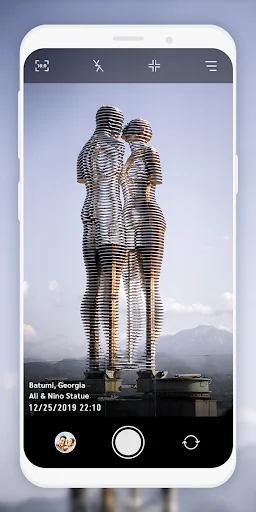
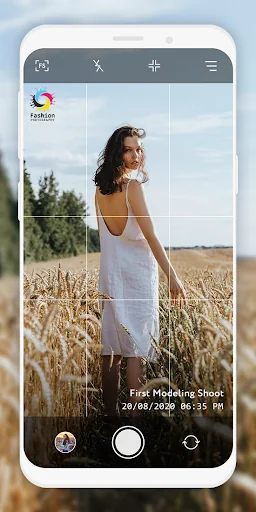
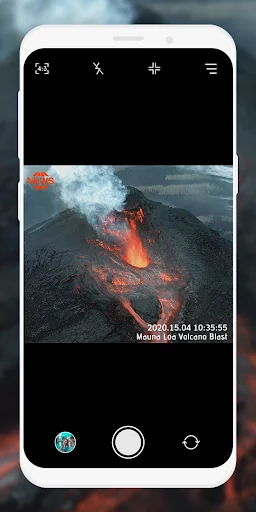
5 different stamps - Date time stamp, Signature stamp, Location stamp, Logo stamp, Sequence stamp available to add on photos clicked with Auto stamper time stamp camera application.
How Autostamper custom camera: Add Geotag & Timestamp …
Get 5 in 1 stamps on photo options in one single App! Add stamp from auto
stamper in-app custom camera specially designed for stamping Activities. You can make your photo informative as well as communicating with the help of an auto Stamping application.
5 different stamps - Date time stamp, Signature stamp, Location stamp, Logo stamp, Sequence stamp available to add on photos clicked with Auto stamper time stamp camera application.
How Autostamper custom camera: Add Geotag & Timestamp Application works?
➽ When you open Application, You will get Custom camera of Auto stamper to click photos.
➽ You can change Camera settings
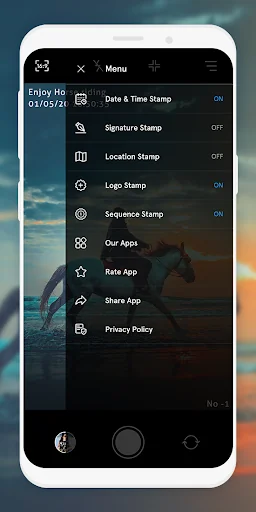
➽ From Menu, you can ON/OFF Stamps that you require on your photos from Date stamper, Signature stamp, Logo Stamp, GPS location Stamp & Sequence Stamp.
➽ For each stamps, you can set and edit style, format, size, position of stamps
➽ You will get all selected stamps on your photo when you click from date and time stamper camera.
Interesting Features:
You can set or change camera Settings for:
⧪ Ratio
⧪ Grid
⧪ Flash
⧪ Rotate
You can directly turn on/off Date and Time stamp, Location stamp, Logo stamp, Signature stamp on camera screen for stamper photo by clicking on stamp setting option.
In Date and time stamp camera settings following features available:
➤ On/Off Toggle
➤ Change Date & Time Format
➤ Adjustable Stamp Size
➤ Variant Stamp Style
➤ Set Stamp position
➤ Change Stamp color
➤ Check preview by clicking on 👁️.
From signature Stamp settings, following changes are possible:
➤ On/Off Toggle
➤ Add custom signature text
➤ Adjustable Stamp Size
➤ Variant Stamp Style
➤ Set Stamp position
➤ Change Stamp color
➤ Check preview by clicking on 👁️.
For Logo stamp settings, following options are available:
➤ On/Off Toggle
➤ Upload/change logo image
➤ Set transparency level
➤ Adjustable Stamp Size
➤ Variant Stamp Style
➤ Set Stamp position
➤ Check preview by clicking on 👁️
In GPS Location Stamp settings, you can add following changes:
➤ On/Off Toggle
➤ Add custom / current Location
➤ Adjustable Stamp Size
➤ Variant Stamp Style
➤ Set Stamp position
➤ Change Stamp color
➤ Check preview by clicking on 👁️.
In Sequence Stamp settings, you can add following changes:
➤ On/Off Toggle
➤Change Sequence Format
⊿Add Sequence Number
⊿Select Sequence type as increasing / Decreasing
⊿Set suffix/ prefix number
⊿Add sequence Repeat number
⊿Select Sequence number Unit
➤ Adjustable Stamp Size
➤ Variant Stamp Style
➤ Set Stamp position
➤ Change Stamp color
➤ Check preview by clicking on 👁️.
Why do you need to have *Auto stamper custom camera : Add Geotag & Timestamp* application in your smartphone?
➽ To Add Date time stamp on Photo
➽ Auto time stamp options with stamper camera
➽ To have GPS stamp & geo tags on clicked pictures
➽ get date stamp, text stamp, image stamp, location stamp easily.
➽ date time stamper for easy photo stamping
➽ Easy picture stamp with Custom camera
➽ Auto stamper for photos - edit your photo having stamps
➽ Timestamp camera with advanced features at one place
Click pictures by using this Application, and share with your family and friends. Use this application for multiple purposes and explore the world with this handy tool easily available in your smartphone.
Comparable Android apps
The five apps in Photography with the closest revenue to Autostamper custom camera. Click any to see its detail page.
Each forecast combines App Store rating, ratings count, monetisation model, pricing tier, IAP signals and ad-supported flag.
The base estimate is then multiplied by a per-category scaling factor learned from apps with founder-verified MRR.
Every number on this page comes from public APIs and bumetric's own snapshot history.
Full methodology covers input variables, accuracy bands per category and how we treat apps without comparable anchors.
See also the live data on Autostamper custom camera's tracker page for current rating, reviews and snapshot timeline.
Building something similar? Get a free AI audit with $-revenue forecasts for every recommendation.

 TimeLab - Video Rendering
 Photo Tips: Learn Photography
 Mini Photo Editor
 Posing App Posica Photography
 Facelapse - Face Timelapse