What Bangla Voice Typing Keyboard actually does (from store listing)
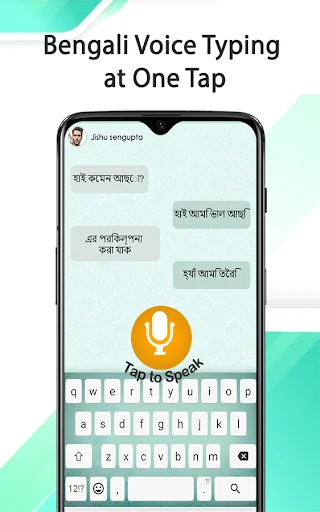
<b>Bengali voice typing keyboard</b> provides you the opportunity to send text through speech. The user interface and functionality of the Bangla voice keyboard is easy to interact and contains no complexity. It converts speech to text through its voice recognition function. It enables the user to send Bengali text quickly without doing any effort for typing it. It has no limitations, and you can convert speech to text through Bengali voice typing as much as you want to send.
The Bangla keyb…
Bengali voice typing keyboard provides you the opportunity to send text through speech. The user interface and functionality of the Bangla voice keyboard is easy to interact and contains no complexity. It converts speech to text through its voice recognition function. It enables the user to send Bengali text quickly without doing any effort for typing it. It has no limitations, and you can convert speech to text through Bengali voice typing as much as you want to send.
The Bangla keyboard with voice input can also be utilized at any social media apps, email and for SMS. To text in Bengali, it also offers a keyboard with Bangla translator to type with all the Bengali alphabets. The Bengali or Bangladeshi speaking keyboard is developed for the people that speak Bengali language and like to operate and text in it. Therefore, it is the best voice typing app for use to get rid of traditional way of writing text.
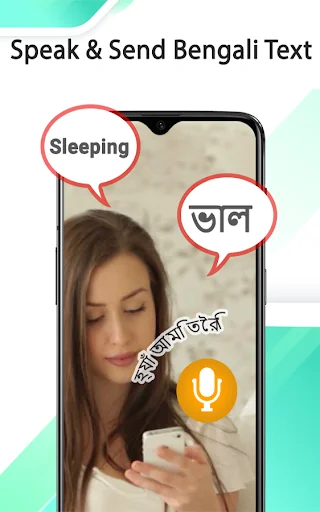
One can send long texts effortlessly in Bengali language by just speaking the message he/she wants to send. It will automatically convert the spoken Bengali words into text by recognizing the voice. In this way, it will be easier for the person to focus on thoughts rather on keyboard while texting.
Bangla voice typing with Translator Features: - You can write Bangla Text with the help of a fancy key on Bengali speech keyboard.
- Share your thoughts and cute emoji’s fun fonts with your friends by using Bengali typing Bangla smart word keyboard 2020.
- The Bangla language keyboard is the great combination of typing keyboard symbols, word flow, smiley central, fun emoji and functionality.
- You can convert text from Bangla to English in Bengali keyboard app.
How to Use the App?
Step#1
Download the app from the google play store.
Step#2
Open the app and allow the Bengali keyboard to get access in your device.
Step#3
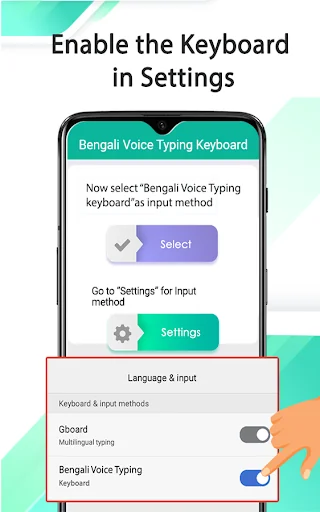
Click on enable button and choose the Bengali Voice typing Keyboard from available options.
Step#4
Open any app and use Bengali keyboard for speech to text.
Note: To disable the keyboard with Bengali language voice input, open the app and click over the disable button.
This voice typing keyboard works as default keyboard in android phones/tablets to write Bangla and English together. Very easy to switch from Bangla to English or from English to Bangla. 😍
And for safety and security, we do not save any keystroke on the phone. So, it is 100% safe, reliable, and fast Bangla typing solution for you daily need. 😍
Just tap on the mic and speak the message you want to send. Moreover, the converted text can also be utilized for the other apps. It is great for the users with the busy schedule with less time in offering for chatting and other purposes. The Bengali voice typing app has an easier to use interface and settings features which can be done in few simple steps.
Now Bangla voice messaging is much easier using this Bangla Keyboard for android phone and tablets. Share Bangla text as well as Bangla number like cricket score and internet MB. 😍
Type from English to Bangla language
✔Write words or sentences in English
✔Enable fast conversion from English to Bangla
✔Send/share/Forward the Bangla text and translation
Type in Bangla Voice only
✔Tap to enable Bangla alphabets and characters
✔Type words or sentences in Bangla language
✔You’re good to go!
Comparable Android apps
The five apps in Productivity with the closest revenue to Bangla Voice Typing Keyboard. Click any to see its detail page.
Each forecast combines App Store rating, ratings count, monetisation model, pricing tier, IAP signals and ad-supported flag.
The base estimate is then multiplied by a per-category scaling factor learned from apps with founder-verified MRR.
Every number on this page comes from public APIs and bumetric's own snapshot history.
Full methodology covers input variables, accuracy bands per category and how we treat apps without comparable anchors.
See also the live data on Bangla Voice Typing Keyboard's tracker page for current rating, reviews and snapshot timeline.
Building something similar? Get a free AI audit with $-revenue forecasts for every recommendation.


 Bengali Voice Typing Keyboard
 Unroll.Me - Inbox Mail Cleaner
 BizConnect - Card Scanner
 Chat Translator Keyboard
 bVNC: Secure VNC Viewer