What Bead Pattern Creator actually does (from store listing)
Bead Pattern Creator for your mobile device.
Comes with 5 free bead patterns. Download is free. To activate creation is $2.99.
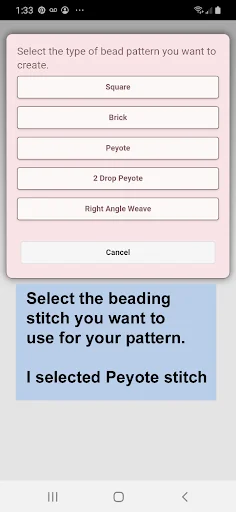
Create bead patterns for Square Stitch, Brick Stitch, Peyote Stitch, 2 drop Peyote Stitch and Right Angle Weave.
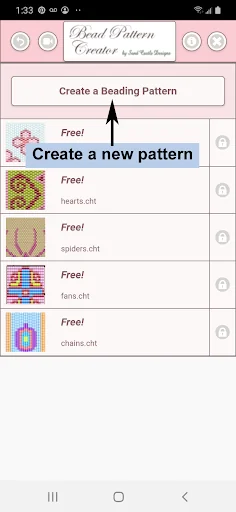
To create bead patterns, select Create a Beading Pattern button.
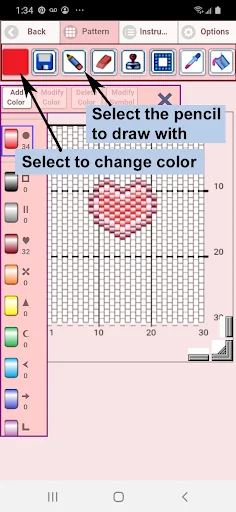
The Bead Pattern Editor will appear. Fill in the squares with beads of any color.
To get started - Use the pencil to add beads to your bead pattern. Use the Eraser to remove beads fr…
Comes with 5 free bead patterns. Download is free. To activate creation is $2.99.
Create bead patterns for Square Stitch, Brick Stitch, Peyote Stitch, 2 drop Peyote Stitch and Right Angle Weave.
To create bead patterns, select Create a Beading Pattern button.
The Bead Pattern Editor will appear. Fill in the squares with beads of any color.
To get started - Use the pencil to add beads to your bead pattern. Use the Eraser to remove beads from your bead pattern.
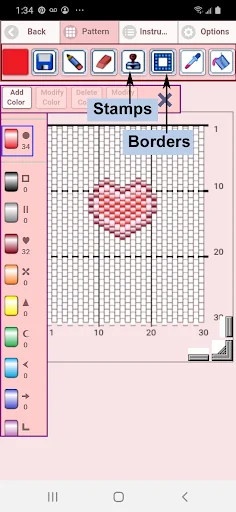
You also can select from over 400 stamps, inserts and borders to apply to your bead pattern.
Icons from left to right in the icon bar are:
Color icon - use to add new beads with different colors to your bead list.
Save icon - use to save your bead pattern
Pencil icon - use to add beads to your bead pattern
Eraser icon - use to remove beads from your bead pattern
Inserts icon - selectable list of bead patterns to add to your pattern (like roses)
Stamps icon - selectable little stamps (little bead designs) to add to your bead pattern
Borders icon - selectable borders to add to your pattern. Borders automatically wrap around your bead pattern.
Dropper icon - lets you extract a bead color from your pattern and add more of that bead to your bead pattern
Bucket icon - use to fill selected area with beads of the current color
Trim icon - remove squares from your bead pattern.
Undo icon - undo each last change you made to the bead pattern.
Redo icon - redo each changes you undid.
Cut icon - remove some beads from the pattern
Copy icon - copy some beads from the pattern
Paste icon - paste copied beads to the pattern
Rotate - rotated selection of the bead pattern
Flip right/left - flip selection of the bead pattern
Flip top/bottom - flip selection of the bead pattern
Zoom in icon - magnify the bead pattern
Zoom out icon - minify the bead pattern
Symbols icon - display a unique symbol on the bead to indicate it's color value
Camera icon - take a picture using your mobile device camera and convert to a beading pattern
Picture icon - select a picture from your device and convert to a pattern
Social media icon - use social media to share your pattern (email, text etc.)
Resize bars - resize bars are display at the bottom right corner of your pattern. Drag them to resize your bead pattern
Comparable Android apps
The five apps in Art & Design with the closest revenue to Bead Pattern Creator. Click any to see its detail page.
Each forecast combines App Store rating, ratings count, monetisation model, pricing tier, IAP signals and ad-supported flag.
The base estimate is then multiplied by a per-category scaling factor learned from apps with founder-verified MRR.
Every number on this page comes from public APIs and Bumetric's own snapshot history.
Full methodology covers input variables, accuracy bands per category and how we treat apps without comparable anchors.
See also the live data on Bead Pattern Creator's tracker page for current rating, reviews and snapshot timeline.
Building something similar? Get a free AI audit with $-revenue forecasts for every recommendation.

 Learn Drawing and Coloring
 AppLock LiveTheme Kaleidoscope
 AppLock Theme Cherry
 Tutorial Drawing Cartoon Chara
 Wings Photo Editor