What 성경 다이어리 (성경읽기표) - Bible Diary actually does (from store listing)
▶ Main Functions
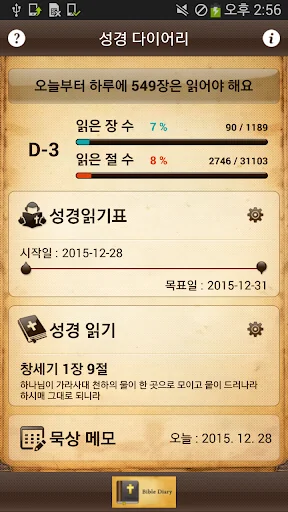
● Home screen
- The number of days remaining until the target date and day display targets
- Bible read through Goal Setting: Goal setting naljjagwa start date. Read Status function provides initialization
- Reading set: Provides font size, line spacing, paragraph spacing, the language setting function
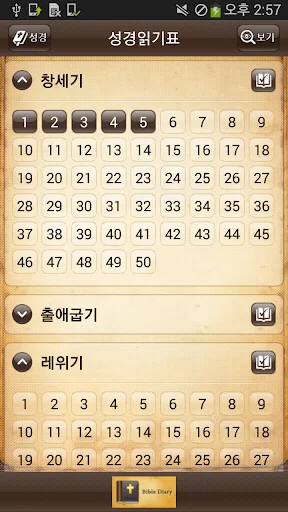
● Reading Table
- Read the status of the entire Bible show at a glance
- Go to the provision of 66
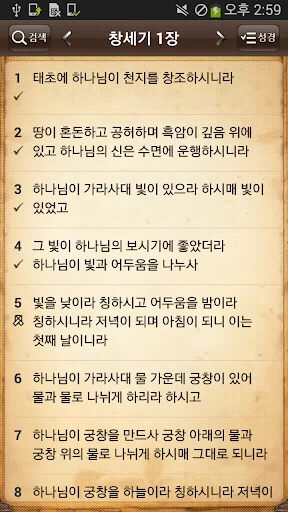
● Reading
- American Standard Hangul,…
▶ Main Functions
● Home screen
- The number of days remaining until the target date and day display targets
- Bible read through Goal Setting: Goal setting naljjagwa start date. Read Status function provides initialization
- Reading set: Provides font size, line spacing, paragraph spacing, the language setting function
● Reading Table
- Read the status of the entire Bible show at a glance
- Go to the provision of 66
● Reading
- American Standard Hangul, providing full KJV translation without an Internet connection
- Read verses checking (read the progress reflected)
- Provide highlighting
- Provides contemplation Memo
- Search Features
- KakaoTalk, email, and provides shared features
● meditate notes
1. The start and goal in calendar days, check the date of attendance available
2. cacao story can be shared
▶ How to use
Reading the table:
- Setting goals
➊ Set the table, right-click the icon to read the Bible icon.
➋ to change the start date and the target date (the date and the end date defaults today.)
➌ Press the OK button.
➍ You can check the daily target amount and the D-Day on the Home screen.
- Check to read Chapter
➊ from the Home screen, click the Table icon to read the Bible.
➋ Click the Edit button.
➌ Click on the chapter read, and then press the OK button.
➍ You can check the status of a color not read / read / read each chapter.
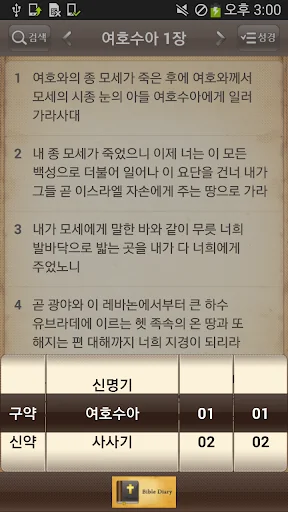
- Scripture Shortcuts
➊ Click the button to the Bible.
➋ Click the button you want to go in the Bible, slide the screen.
➌ Go to the book.
- Setting the Bible reading experience
➊ Click the Settings icon on the right to read the Bible.
➋ font size, line spacing, paragraph spacing, set the language.
➌ from the Home screen, click the icon to read the Bible.
- Find Bible
➊ Click on the icon to read the Bible. Start reading from the last verse ildeon.
➋ Click on the icon Bible.
If you select New / Old Testament, chapter, section ➌ on the bottom to move to the desired phrase.
- Bible Search
➊ Click on the icon to read the Bible.
➋ Click the Search icon.
➌ enter a search term and click on the search button.
➍ Click the desired Bible in search results.
Go to the verse found ➎.
Other more detailed usage can be found on the homepage.
http://blog.naver.com/PostList.nhn?blogId=batteau00&from=postList&categoryNo=1&parentCategoryNo=1
♣ Please report typos are found closer read - I'll just modified.
http://blog.naver.com/batteau00/220378807258
Comparable Android apps
The five apps in Books & Reference with the closest revenue to 성경 다이어리 (성경읽기표) - Bible Diary. Click any to see its detail page.
Each forecast combines App Store rating, ratings count, monetisation model, pricing tier, IAP signals and ad-supported flag.
The base estimate is then multiplied by a per-category scaling factor learned from apps with founder-verified MRR.
Every number on this page comes from public APIs and Bumetric's own snapshot history.
Full methodology covers input variables, accuracy bands per category and how we treat apps without comparable anchors.
See also the live data on 성경 다이어리 (성경읽기표) - Bible Diary's tracker page for current rating, reviews and snapshot timeline.
Building something similar? Get a free AI audit with $-revenue forecasts for every recommendation.


 Kolędy. Wielki śpiewnik.
 Biblia Kadosh en español
 Hum Dil Se Haray Hain Novel by
 ПЦУ Православний Молитовник
 Фауст, Гете