What Bluetooth Gamepad VR & Tablet actually does (from store listing)
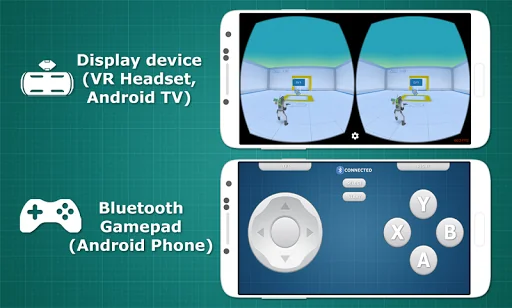
<b><u>Requires Install and Run this app on both of Android devices: one for Displaying Game (VR Headset or Android Tablet) and other for Gaming Controller (Android Phone) </u></b>
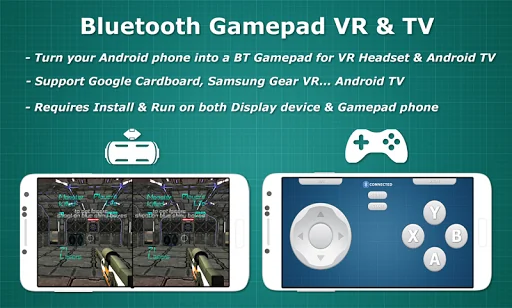
☆ <b>Bluetooth Gamepad</b> is application that turn your <b>Android Phone</b> become a <b>Bluetooth Gamepad</b>, help you control your VR Headset or Android Tablet via Bluetooth. The phone will <b>vibrates</b> when you touch on the buttons
☆ This application help you creates a bridge between two Android devices, …
Requires Install and Run this app on both of Android devices: one for Displaying Game (VR Headset or Android Tablet) and other for Gaming Controller (Android Phone)
☆ Bluetooth Gamepad is application that turn your Android Phone become a Bluetooth Gamepad, help you control your VR Headset or Android Tablet via Bluetooth. The phone will vibrates when you touch on the buttons
☆ This application help you creates a bridge between two Android devices, one for Displaying Game and the other one for Gaming Controller.
☆ Bluetooth Gamepad is compatible with VR Headset(Google Cardboard, Samsung Gear VR and others VR headset) or Android Tablet ☆ This application using Standard Gamepad Layout so it will be compatible with a large amount of games. Now you can play Games on Google Play, Oculus store...(Some games do not have proper Gamepad support)
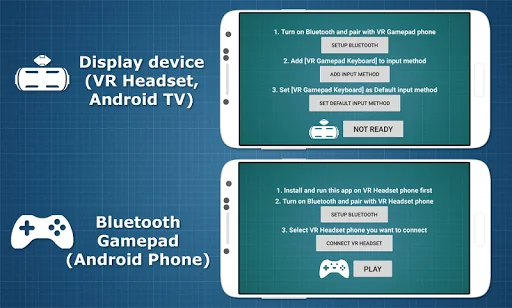
How to use: ► Requires 2 Android devices to work, one for Displaying Game and other for Gaming Controller ► Install and run this application on both of devices
► Pair 2 devices via Bluetooth, change the Default Input Method of keyboard (watch the instruction video) then enjoy the game.
Note: - If this app not work well, Restart this app on both phones and try again
- This application using Standard Gamepad Layout, so it may not support for some special games.
- In some special games, only some keys was support (up/down/left/right, jump, fire, reload...)
List Supported Games: (We did test and it worked well with [Bluetooth Gamepad])
✔ Hardcode VR Game (forward/back/left/right, Y - fire, A - jump, B - change weapon)
✔ Temple Run VR (forward/back/left/right, jump)
✔ Zombiestan VR (setup gamepad at Setting before play)
✔ Zombie Alien Hunter VR (forward/back/left/right, A/Y - fire)
✔ Star VR Racer (up/down to move)
✔ Smash VR (X/A/Y - strike, B - exit)
✔ Sniper VR (B - zoom, X - fire)
✔ JetFlyHigh (left/right)
✔ Nitro Nation Cardboard (left/right/up)
✔ House of Terror VR (B - run, X - menu)
✔ VR Fantasy (forward/back/left/right, X - strike)
✔ The Dark Inside VR (forward/back/left/right)
✔ Alien Attack VR (X - fire)
✔ Sharks VR (forward/back/left/right, Y,B)
✔ Crossy VR (A - jump)
✔ Snow Strike VR (A - fire)
✔ Skeet shoot VR (A - fire)
✔ Jurrasic VR (jump)
.....
☆ If you want to run Cardboard apps and games on Samsung Gear VR, download Play Cardboard apps on Gear VR tool of KunKunSoft on Google Play
☆ We would love to hear from our customers. If you have any problem, questions or feedback about this app please contact us at [kunkunsoft@gmail.com]
Comparable Android apps
The five apps in Entertainment with the closest revenue to Bluetooth Gamepad VR & Tablet. Click any to see its detail page.
Each forecast combines App Store rating, ratings count, monetisation model, pricing tier, IAP signals and ad-supported flag.
The base estimate is then multiplied by a per-category scaling factor learned from apps with founder-verified MRR.
Every number on this page comes from public APIs and bumetric's own snapshot history.
Full methodology covers input variables, accuracy bands per category and how we treat apps without comparable anchors.
See also the live data on Bluetooth Gamepad VR & Tablet's tracker page for current rating, reviews and snapshot timeline.
Building something similar? Get a free AI audit with $-revenue forecasts for every recommendation.

 The Tarot of Vampyres
 Pony Style Box
 Gilded Reverie Lenormand
 Book of Shadows Tarot As Above
 Decide Now