ML revenue forecast.
Calibrated against 77129 apps in this category.
Confidence band
±15%
High — many comparable apps with verified data
At a glance
Tracks close to the Android app category median (189/mo).
Ranks #40,909 of 77,129 in Tools (top 53.0% by revenue).
Launched Nov 15, 2020 · last updated Mar 31, 2025.
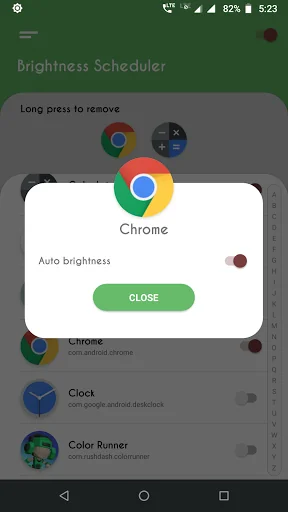
What the app looks like
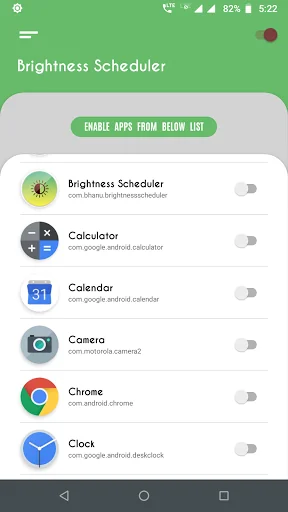
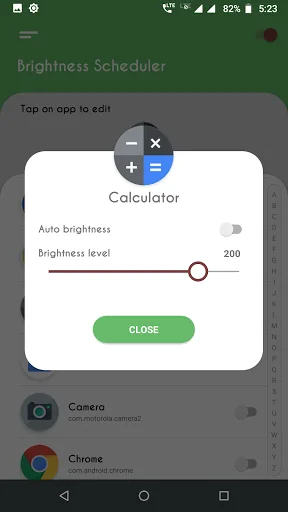
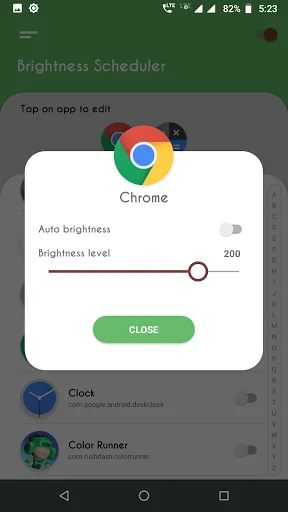
Live screenshots from the Play Store, captured by our snapshot worker. Tap any image to enlarge.
Brightness Control per app's revenue trajectory
Forecast revenue from snapshot history. Last 1 months.
Where Brightness Control per app sits in Tools
Revenue distribution of 77129 comparable apps. Brightness Control per app highlighted.
Brightness Control per app vs comparable apps
Revenue trajectory side-by-side. Bold = Brightness Control per app, ghosted = peers.
App spec
Version
2.1.1
Last update
Mar 31, 2025
Launched
Nov 15, 2020
Price
Free
Monetization
Free
What Brightness Control per app actually does (from store listing)
<h3>Brightness Increaser: Screen Dimmer - The Ultimate Brightness Control Tool!</h3>Brightness Increaser: Screen Dimmer—take control over your screen brightness. The app offers the possibility of setting and fine-tuning any application separately. No more manual changes needed—just an automated process through which to breeze using brightness tailored just for you. Brightness Increaser: Screen Dimmer is here to make your device truly adaptable.
Whether in a dimly lit room or outdoors in brigh…
Brightness Increaser: Screen Dimmer - The Ultimate Brightness Control Tool!
Brightness Increaser: Screen Dimmer—take control over your screen brightness. The app offers the possibility of setting and fine-tuning any application separately. No more manual changes needed—just an automated process through which to breeze using brightness tailored just for you. Brightness Increaser: Screen Dimmer is here to make your device truly adaptable.
Whether in a dimly lit room or outdoors in bright sunlight, Brightness Increaser: Screen Dimmer ensures your screen is always at the optimal level.
📄 Key Features of Brightness Increaser: Screen Dimmer: 📄
🎛️Configure settings for specific apps effortlessly;
🎛️Automatically adjusts screen light when you open selected apps;
🎛️Default settings for apps without custom configurations;
🎛️Intuitive and user-friendly interface for quick setup.
Why Choose Brightness Increaser: Screen Dimmer?
Screen Brightness Dimmer offers a unique solution for precisely managing your screen's levels. By enabling automatic adjustments, you no longer need to fiddle with settings whenever you switch between apps.
This app also includes advanced options to handle devices with maximum levels exceeding standard limits. Navigate to the settings menu to find and fix your device's maximum level, ensuring the best results for your screen.
How to Use Screen Brightness Dimmer: ✔️Grant the necessary permissions for the app.
✔️Enable specific apps for custom settings.
✔️Use the toggle switch next to the app name to configure screen light.
✔️Choose your desired level or enable auto mode.
✔️Enjoy seamless control with minimal effort.
With Screen Brightness Dimmer, you can also configure default settings for apps that are not explicitly set up. This feature ensures a smooth transition back to your preferred level when you exit configured apps.
Transform Your Device with Brightness Increaser: Screen Dimmer! Experience the ease and efficiency of Adjust Brightness Control. Say goodbye to constant manual adjustments and let the app handle your changes. Whether you need Screen Brightness Dimmer for specific apps or Adjust Brightness Control for the entire device, this app has you covered. Download now and enjoy effortless management!
Optimize Your Experience with Adjust Brightness Control
Adjust Brightness Control requires background services to be active for real-time adjustments. Permissions such as "Modify System Settings" and "Usage Access" are necessary to ensure the app works as intended. These permissions enable the app to automatically check running apps and apply the appropriate settings.
Additional Notes: ✔️Make sure the Brightness Manager switch is enabled for the app to function.
✔️Default brightness settings can be turned on in the app settings for a hassle-free experience.
✔️Auto-brightness mode prevents manual adjustments for configured apps, keeping your device optimized.
Comparable Android apps
The five apps in Tools with the closest revenue to Brightness Control per app. Click any to see its detail page.
Each forecast combines App Store rating, ratings count, monetisation model, pricing tier, IAP signals and ad-supported flag.
The base estimate is then multiplied by a per-category scaling factor learned from apps with founder-verified MRR.
Every number on this page comes from public APIs and bumetric's own snapshot history.
Full methodology covers input variables, accuracy bands per category and how we treat apps without comparable anchors.
See also the live data on Brightness Control per app's tracker page for current rating, reviews and snapshot timeline.
Building something similar? Get a free AI audit with $-revenue forecasts for every recommendation.

 GWN
GWN
 End Zip Toad Fly
 Contacts to SIM
 My IP Address
 Barcode And QR Code Generator