What Brother Print Service Plugin actually does (from store listing)
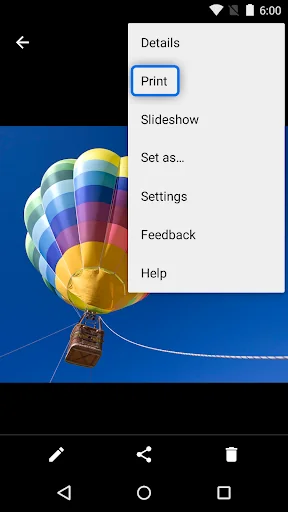
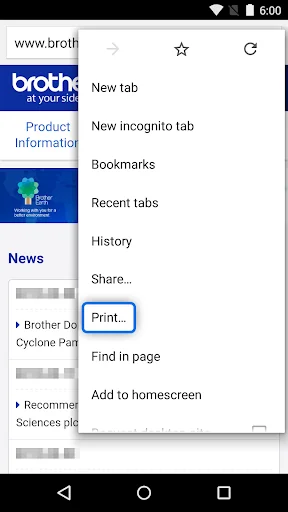
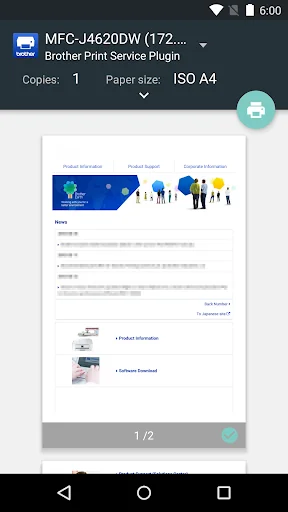
The Brother Print Service Plugin enables you to print directly from your Android devices (Android 5.0 or later), to your Brother printer through a Wi-Fi network. As this is a plugin application, you can print using the "Print" option of supported Android apps. Please see below for supported applications (as of March 2015):
- Chrome Browser
- Gmail
- Photos
- Google Sheets
- Google Slides
- Google Docs
- Google Drive
The following print options are available (compatible options will depen…
The Brother Print Service Plugin enables you to print directly from your Android devices (Android 5.0 or later), to your Brother printer through a Wi-Fi network. As this is a plugin application, you can print using the "Print" option of supported Android apps. Please see below for supported applications (as of March 2015):
- Chrome Browser
- Gmail
- Photos
- Google Sheets
- Google Slides
- Google Docs
- Google Drive
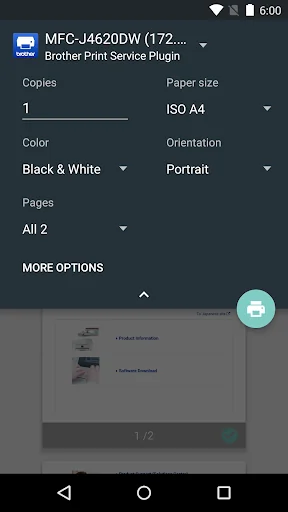
The following print options are available (compatible options will depend on the selected device):
- Copies
- Paper Size
- Color/Mono
- Orientation
- Media Type
- Quality
- Layout
- 2-sided
- Borderless
After installing this application, you must activate it in one of the following ways:
- Tap the icon displayed in the notification area immediately after installation, and enable it in the displayed screen.
- Tap "Settings" on your Android device and tap "Printing", then select "Brother Print Service Plugin". Enable it in the displayed screen.
Please visit your local Brother website for supported models.
To help us improve the application, send your feedback to Feedback-mobile-apps-lm@brother.com. Please note that we may not be able to respond to individual emails.
Comparable Android apps
The five apps in Productivity with the closest revenue to Brother Print Service Plugin. Click any to see its detail page.
Each forecast combines App Store rating, ratings count, monetisation model, pricing tier, IAP signals and ad-supported flag.
The base estimate is then multiplied by a per-category scaling factor learned from apps with founder-verified MRR.
Every number on this page comes from public APIs and Bumetric's own snapshot history.
Full methodology covers input variables, accuracy bands per category and how we treat apps without comparable anchors.
See also the live data on Brother Print Service Plugin's tracker page for current rating, reviews and snapshot timeline.
Building something similar? Get a free AI audit with $-revenue forecasts for every recommendation.


 PDF Viewer & Book Reader
 Calculator
 Calendar N
 Max it – Maroc
 BlackBerry UEM Client