What Business Calendar Pro actually does (from store listing)
Business Calendar Pro has everything you need in a calendar app: It provides an excellent overview of your appointments, it’s easy to use and it gives you powerful tools to create and manipulate your events.
★ "Our favorite calendar app on Android, due to its flexibility and ease of use." - Lifehacker 01/2014 ★
★ "One of the best Calendar Apps for 2014" - FastCompany ★
<b>Features</b>
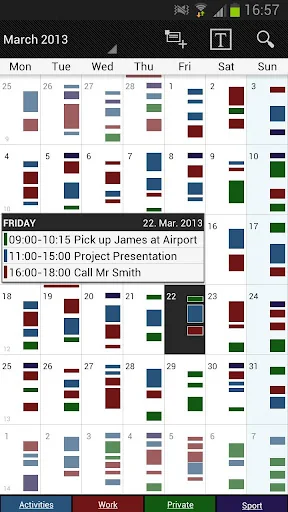
▪ Quick Day View: for a fast overview of all events of the day
▪ Favorite Bar: for direct access to all…
Business Calendar Pro has everything you need in a calendar app: It provides an excellent overview of your appointments, it’s easy to use and it gives you powerful tools to create and manipulate your events.
★ "Our favorite calendar app on Android, due to its flexibility and ease of use." - Lifehacker 01/2014 ★
★ "One of the best Calendar Apps for 2014" - FastCompany ★
Features ▪ Quick Day View: for a fast overview of all events of the day
▪ Favorite Bar: for direct access to all your calendars
▪ smooth scroll and zoom: for better, intuitive interaction
Customization down to the last detail ▪ adapt all views & widgets to your liking
▪ individual reminders with vibration, sounds, repetitions, intervals, LED
▪ adjustable font sizes for the app & widgets
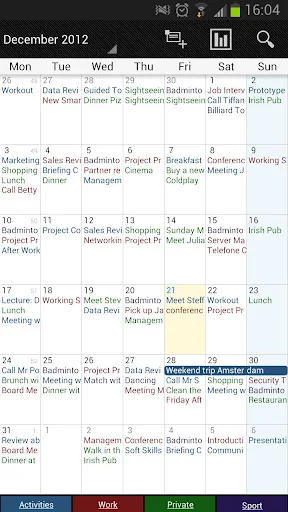
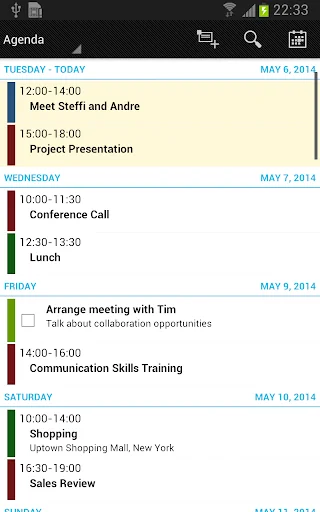
Details ▪ month, week, day, agenda and event view
▪ color-coded year view
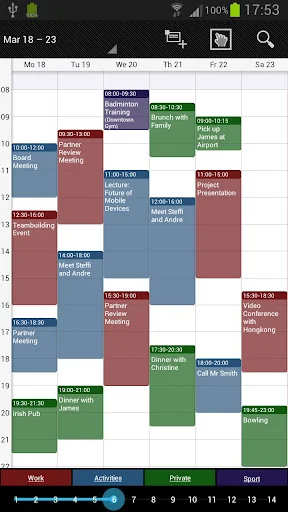
▪ scroll- and zoomable multi-day view (1-14 days)
▪ easy switching between timeline bars and event titles in month view
▪ search function
▪ sync your events with Google Calendar, Microsoft Outlook, Exchange etc. using the Android calendar synchronization
▪ professional widgets for month, week, agenda and day view
▪ intuitive handling: just move your finger over some days of interest in month view to open them in multi-day view
▪ many options for recurrent events (e.g. an event that takes place every other week on Tuesday and Thursday)
▪ birthday calendar
▪ context-sensitive help system to optimize your workflow
Additional features in this pro version ▪ manage contacts: link contacts to your events
▪ customizable templates: create your own templates for new events
▪ multi-selection: delete, move or copy multiple events at once
▪ drag&drop: move and copy events easily in the multi-day view
▪ tasks add-on: use the integrated task-management tool to sync with Google Tasks & Toodledo
▪ notifications: comprehensive reminder functionality
▪ app theming: light and dark theme for the app
▪ advanced widgets: set colors, font sizes and individual calendars
▪ import & export: quickly import or export all your calendars in .ics format
We also offer a free, ad-supported version of Business Calendar, which we kindly advise you to test for the functionality and the general workflow of the app! We hope that in the long term the pro version result as indispensable for you if you use your mobile calendar regularly.
Comparable Android apps
The five apps in Productivity with the closest revenue to Business Calendar Pro. Click any to see its detail page.
Each forecast combines App Store rating, ratings count, monetisation model, pricing tier, IAP signals and ad-supported flag.
The base estimate is then multiplied by a per-category scaling factor learned from apps with founder-verified MRR.
Every number on this page comes from public APIs and bumetric's own snapshot history.
Full methodology covers input variables, accuracy bands per category and how we treat apps without comparable anchors.
See also the live data on Business Calendar Pro's tracker page for current rating, reviews and snapshot timeline.
Building something similar? Get a free AI audit with $-revenue forecasts for every recommendation.


 aCalendar+ Calendar & Tasks
 SafeInCloud 1
 Root Explorer
 Easy Voice Recorder Pro
 DigiCal+ Calendar