What CalcTape Calculator with Tape actually does (from store listing)
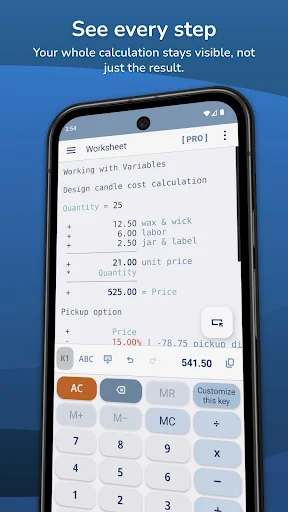
CalcTape is the calculator that works the way you think: type your whole calculation, see every figure, and change anything at any time.
What if a standard calculator, a classic desktop adding machine, and a notes app were rolled into one? That's CalcTape - your companion for everyday math, from a quick sum to a long, multi-step calculation. (CalcTape is not a scientific calculator - and for daily use, who really needs one?)
Ever run a long calculation and wondered:
"Did I enter that last…
CalcTape is the calculator that works the way you think: type your whole calculation, see every figure, and change anything at any time.
What if a standard calculator, a classic desktop adding machine, and a notes app were rolled into one? That's CalcTape - your companion for everyday math, from a quick sum to a long, multi-step calculation. (CalcTape is not a scientific calculator - and for daily use, who really needs one?)
Ever run a long calculation and wondered:
"Did I enter that last number correctly?"
"Why does the result look off?"
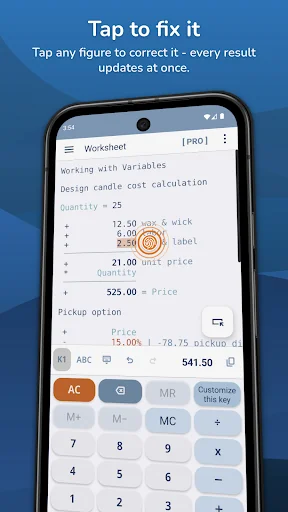
With CalcTape you keep the full overview. Every number and operator stays visible, so you can check your work - and correct any figure right in place, with all following results updating automatically. Forgot a value? Just add a new line where it belongs.
Place the cursor anywhere in the calculation and edit it freely, like a note. The moment you change a number or an operator, everything recalculates. Think of it as a spreadsheet with a calculator interface.
WHY YOU'LL LIKE IT
• Edit any figure in place - results update automatically
• See your entire calculation, not just the last result
• Comment your numbers and results so it still makes sense weeks later
• Build reusable templates: swap the figures, get the answer in a breeze
• Percentages, thousands separators (including Indian digit grouping)
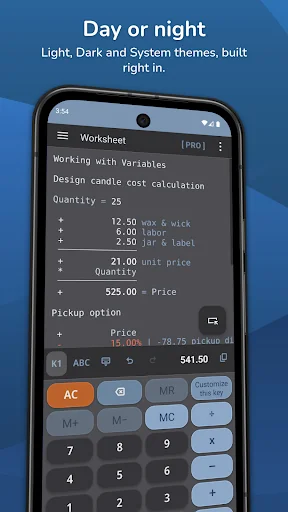
• Day, Night and System themes
• Reliable Undo/Redo and smooth editing, even in long calculations
MAKE IT YOURS
Keep only the buttons you actually use on your keypad, and create your own functions - for example, add a specific percentage with a single tap.
FREE VS PRO
CalcTape comes as a free version with the full tape calculator on your worksheet. The Pro upgrade adds:
• Save calculations as documents and manage multiple files
• Import, export, backup and restore
• Print your calculations
• Share via email and other apps
• Unlimited variables
• Fully customizable keypads — reassign any button, change button sizes, create your own
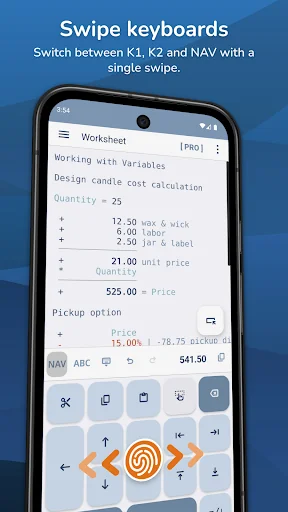
• Multiple keypad layouts, including a numbers-free function keypad (three keypads are reachable right from the main screen)
Found a problem or have an idea? We'd love to hear from you. Telling us your Android version and phone model helps us fix things faster.
Comparable Android apps
The five apps in Finance with the closest revenue to CalcTape Calculator with Tape. Click any to see its detail page.
Each forecast combines App Store rating, ratings count, monetisation model, pricing tier, IAP signals and ad-supported flag.
The base estimate is then multiplied by a per-category scaling factor learned from apps with founder-verified MRR.
Every number on this page comes from public APIs and Bumetric's own snapshot history.
Full methodology covers input variables, accuracy bands per category and how we treat apps without comparable anchors.
See also the live data on CalcTape Calculator with Tape's tracker page for current rating, reviews and snapshot timeline.
Building something similar? Get a free AI audit with $-revenue forecasts for every recommendation.


 Banco Bolivariano
 Bulbank Mobile
 뱅크샐러드
뱅크샐러드
 baha: Stocks, Markets & News
 Ibercaja