How much does Camera Go: Fast Video Recorder earn?
Android app
from NeroX
· Photography
ML forecast★ 5.0 · 170Free
~123/mo
ML revenue forecast.
Calibrated against 20485 apps in this category.
Confidence band
±15%
High — many comparable apps with verified data
At a glance
Earns 1.6× less than the category median (192/mo).
Ranks #15,821 of 20,485 in Photography (top 77.2% by revenue).
Launched Oct 19, 2020 · last updated May 13, 2026.
What the app looks like
Live screenshots from the Play Store, captured by our snapshot worker. Tap any image to enlarge.
Camera Go: Fast Video Recorder's revenue trajectory
Forecast revenue from snapshot history. Last 1 months.
Where Camera Go: Fast Video Recorder sits in Photography
Revenue distribution of 20485 comparable apps. Camera Go: Fast Video Recorder highlighted.
Camera Go: Fast Video Recorder vs comparable apps
Revenue trajectory side-by-side. Bold = Camera Go: Fast Video Recorder, ghosted = peers.
App spec
Version
3.0.4
Last update
May 13, 2026
Launched
Oct 19, 2020
Price
Free
Monetization
Free
What Camera Go: Fast Video Recorder actually does (from store listing)
Discover the App that made videography great again 🩵
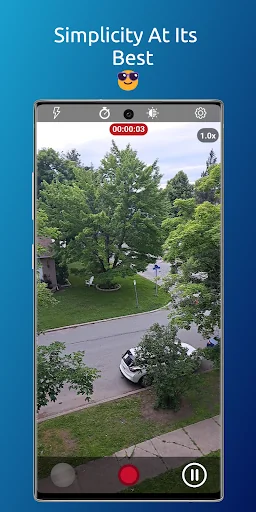
Camera Go features a stunning, straightforward, and user-friendly interface. It enables you to start recording instantly upon launching the app and also supports background video capture.
CGO is available in 12 languages: English, Arabic , Bengali, German, Spanish, French, Hindi, Italian, Japanese, Korean, Portuguese and Russian.
CGO Key Features:
👉🏻 Auto recording: All you have to do is launching the app and it gonna start recording a vid…
Discover the App that made videography great again 🩵
Camera Go features a stunning, straightforward, and user-friendly interface. It enables you to start recording instantly upon launching the app and also supports background video capture.
CGO is available in 12 languages: English, Arabic , Bengali, German, Spanish, French, Hindi, Italian, Japanese, Korean, Portuguese and Russian.
CGO Key Features:
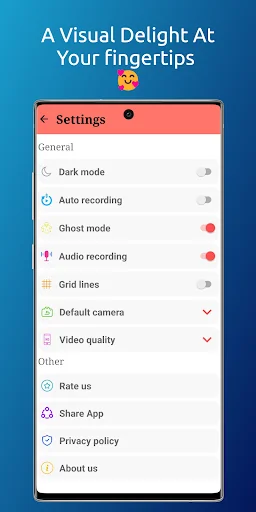
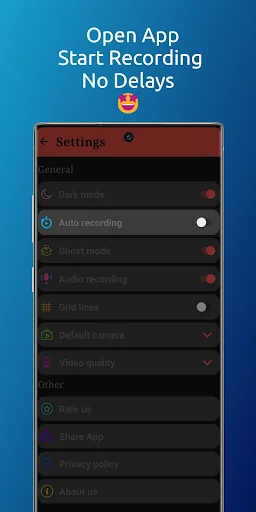
👉🏻 Auto recording: All you have to do is launching the app and it gonna start recording a video automatically (no time to waste). You can achieve this feature by activating the "Auto recording" in Settings.
👉🏻 Ghost mode: Turn the App into a ghost and start recording videos in the Background. You can achieve this feature by activating the "Ghost mode" in the Settings, start recording a video, exit the App while recording and the App will automatically start recording a video in the background with a notification saying that the video recording is in progress.
👉🏻 Audio recording: this feature allows you to mute the audio while recording.
👉🏻 Default camera: Choose your default camera when launching the app ( Front or Back camera).
👉🏻 Video quality: Choose your quality and it could include: HD resolution , Full HD resolution (FHD), Ultra HD resolution (UHD), 4K resolution .
In order to activate a quick launcher you have 2 options (you can do both) :
1.Through the lock screen shortcut:
The way of doing it depends on the smart phone model that you have. Here’s how you can do it on a Samsung Galaxy phone:
👉🏻Tap your lock screen to wake it up, and then touch and hold it.
👉🏻Enter your credentials if prompted.
👉🏻Tap the shortcut you’d like to change.
👉🏻Select the app you want to add as a shortcut. Note that some apps may require unlocking the device before they open fully.
👉🏻Tap Done when finished.
2.Through the side key/button:
The way of doing it depends on the smart phone model that you have. Here’s how you can do it on a Samsung Galaxy phone:
👉🏻Open Settings.
👉🏻Select Advanced features.
👉🏻Tap on Side button/key.
👉🏻Select Open app and click on the gearwheel on the side and choose Camera Go.
You can use the App as :
👉🏻 Video recorder
👉🏻 Background video recorder
👉🏻 Video capture tool
👉🏻 Camera launcher
👉🏻 Prompt video recorder
👉🏻 Fast video camera app
👉🏻 Instant recording video app
👉🏻 Quick video capture
👉🏻 Hidden camera recorder
👉🏻 OffScreen video recorder
👉🏻 high quality video recorder
PS: For a better user experience, the Auto Recording mode and the Ghost mode cannot work simultaneously. Therefore, the activation of one feature will lead to the deactivation of the other.
Disclaimer: The feature of "Ghost mode" is built for the purpose of switching between the Apps while recording. Therefore, it must be used as permitted by law.
Comparable Android apps
The five apps in Photography with the closest revenue to Camera Go: Fast Video Recorder. Click any to see its detail page.
Each forecast combines App Store rating, ratings count, monetisation model, pricing tier, IAP signals and ad-supported flag.
The base estimate is then multiplied by a per-category scaling factor learned from apps with founder-verified MRR.
Every number on this page comes from public APIs and bumetric's own snapshot history.
Full methodology covers input variables, accuracy bands per category and how we treat apps without comparable anchors.
See also the live data on Camera Go: Fast Video Recorder's tracker page for current rating, reviews and snapshot timeline.
Building something similar? Get a free AI audit with $-revenue forecasts for every recommendation.


 Twin photo maker
 샤샤샷 - 스크린샷
 Fashion Boy Photo Suit
 Jewellery photo editor frames
 PicsHub