What Classic Notes Lite - Notepad actually does (from store listing)
Classic Notes is designed to be a straightforward and simple to use notepad application yet powerful and feature rich at the same time. Classic Notes is much more than a standard notepad. Also included is a vast assortment of utilities which can be found in the extras section. Think of this application as a sort of multi-tool. Please continue reading to learn more.
* Notepad Features *
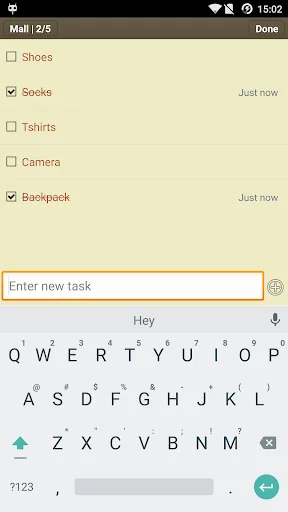
- In addition to standard notes and memos, Classic Notes also includes shopping lists, paint or sketch not…
Classic Notes is designed to be a straightforward and simple to use notepad application yet powerful and feature rich at the same time. Classic Notes is much more than a standard notepad. Also included is a vast assortment of utilities which can be found in the extras section. Think of this application as a sort of multi-tool. Please continue reading to learn more.
* Notepad Features *
- In addition to standard notes and memos, Classic Notes also includes shopping lists, paint or sketch notes, and to-do lists.
- As mentioned above, one of the goals when designing this application was to be feature rich but with ease of use in mind. To access additional features when writing a note simply click the edit button located at the top left to gain access to a wide array of additional options.
- Some of these options include: attaching audio, video, and image files, tagging, setting priority based on urgency, reminders and alarms, password protection, comments also known as sub-notes, linking notes and to-do's together, pinning notes to the status bar or home screen, detailed note information such as word and character count, you can even look at the history of a note and revert to previous states. This is just a small handful of what's available. There are many more features to explore!
- Also included is a trash bin so you never have to worry about accidentally deleting a note again.
* Extras *
- In addition to being a notepad, Classic Notes also features numerous useful utilities which can be accessed from the extras menu. This is where the multi-tool part comes in.
- Some of these utilities include an extremely capable unit converter with over 100 different types of conversions and thousands of different units to choose from, a powerful random number generator utility, full-featured finance, numerical, fitness, and audio calculators, and a days until countdown timer are just a small handful of what's available.I could on and on about all the features and utilities available but I'd run out of space.
- Utilities also include the option to make a note of the data for later use. For instance, say one is using the fitness calculator to look up their target heart rate. There is no need to copy and paste the results, simply click the note option and all values are recorded into a new note for easy access whenever you want it.
Comparable Android apps
The five apps in Productivity with the closest revenue to Classic Notes Lite - Notepad. Click any to see its detail page.
Each forecast combines App Store rating, ratings count, monetisation model, pricing tier, IAP signals and ad-supported flag.
The base estimate is then multiplied by a per-category scaling factor learned from apps with founder-verified MRR.
Every number on this page comes from public APIs and bumetric's own snapshot history.
Full methodology covers input variables, accuracy bands per category and how we treat apps without comparable anchors.
See also the live data on Classic Notes Lite - Notepad's tracker page for current rating, reviews and snapshot timeline.
Building something similar? Get a free AI audit with $-revenue forecasts for every recommendation.



 remember to do
 Free Money: Cash App
 Curriculum vitae europeu PREM
 BFast BFree - Earn BTC
 Cute Note DDay Todo