ML revenue forecast.
Calibrated against 1744 apps in this category.
Confidence band
±15%
High — many comparable apps with verified data
At a glance
Earns 9.92× more than the category median (1.4K/mo).
Ranks #156 of 1,744 in Photo & Video (top 8.9% by revenue).
Launched Feb 15, 2009 · last updated Sep 20, 2024.
24 months of snapshot history tracked.
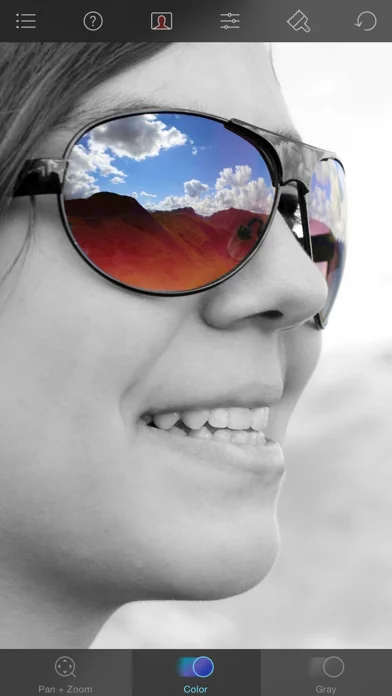
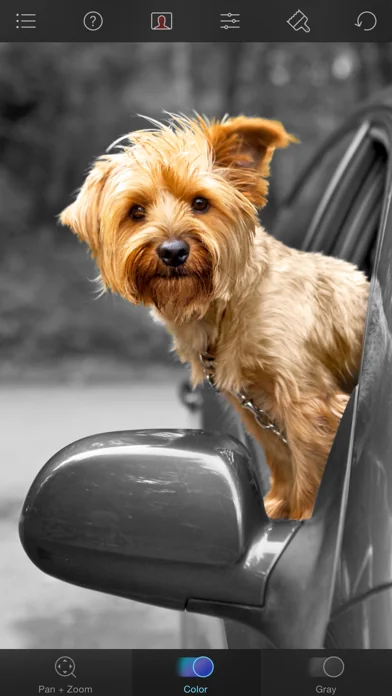
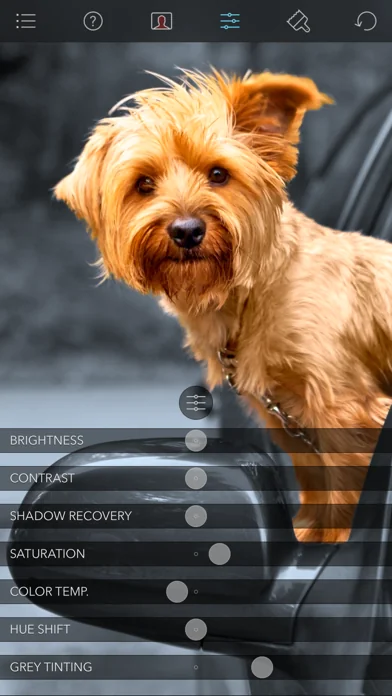
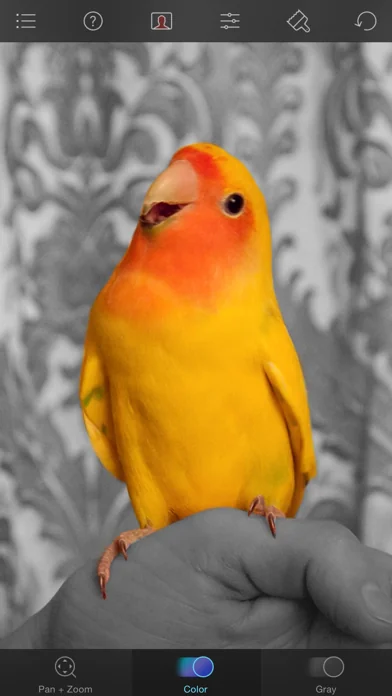
What the app looks like
Live screenshots from the App Store, captured by our snapshot worker. Tap any image to enlarge.
Color Splash's revenue trajectory
Forecast revenue from snapshot history. Last 24 months.
Where Color Splash sits in Photo & Video
Revenue distribution of 1744 comparable apps. Color Splash highlighted.
Color Splash vs comparable apps
Revenue trajectory side-by-side. Bold = Color Splash, ghosted = peers.
App spec
Version
3.14
Last update
Sep 20, 2024
Launched
Feb 15, 2009
Min OS
15.6
Rating
4+
Price
Free
Monetization
Paid
Languages
EN, FR, JA
What Color Splash actually does (from App Store listing)
Color Splash lets you give photos a dramatic look by converting them to black and white, while keeping your chosen details in color. This effect draws the viewers' attention to the colored areas, creating striking images.
The intuitive and responsive multi-touch user interface makes Color Splash amazingly easy and fun to use. Use your finger as a brush to "paint" sections of your image black and white, or to bring back the original color. Zooming in and out using the two-finger pinching gestur…
Color Splash lets you give photos a dramatic look by converting them to black and white, while keeping your chosen details in color. This effect draws the viewers' attention to the colored areas, creating striking images.
The intuitive and responsive multi-touch user interface makes Color Splash amazingly easy and fun to use. Use your finger as a brush to "paint" sections of your image black and white, or to bring back the original color. Zooming in and out using the two-finger pinching gesture allows you to work on details with pixel-accuracy.
Features: - Short tutorial videos explain the use of all features and will have you editing your images in minutes. - Choose photos to edit from your iPhone photo library or from Dropbox or Flickr. - Save multiple sessions to resume your work later. - Email your creations to friends, share them on Flickr or save them to your Dropbox. - Undo any number of accidental brush strokes. - An alternative view mode highlights the regions that will remain in color with a red tint. This makes it easier to see and adjust the boundaries between color and black & white regions. - Choose from 4 different brushes (hard or soft edged, opaque or transparent) and adjust the brush size. - Hide the toolbars in full screen mode.
🆕 What's new · v3.14
Updated the app for iOS 18, adding dark and tinted variants of the app icon for your customized home screens and fixed a few minor issues
Comparable iOS apps
The five apps in Photo & Video with the closest revenue to Color Splash. Click any to see its detail page.
Each forecast combines App Store rating, ratings count, monetisation model, pricing tier, IAP signals and ad-supported flag.
The base estimate is then multiplied by a per-category scaling factor learned from apps with founder-verified MRR.
Every number on this page comes from public APIs and bumetric's own snapshot history.
Full methodology covers input variables, accuracy bands per category and how we treat apps without comparable anchors.
See also the live data on Color Splash's tracker page for current rating, reviews and snapshot timeline.
Building something similar? Get a free AI audit with $-revenue forecasts for every recommendation.


 KI-Fotoeditor,Objekt entfernen
 Screen Mirroring+ App
 Insta360
 Touchpix · Photo & Video Booth
 ElevenLabs: AI Voice Generator