What CPU/GPU/Battery Monitor & Noti actually does (from store listing)
AndroidInsight - System Monitor and Notification!
Have you ever wondered what is your CPU or GPU doing now, how much battery current is, what is battery's health, what are the temperatures of your CPU or GPU or Battery, how much memory is currently available and so on? Usually to do this you have to quit your app and switch to other app to see this data. But by the time of switching data is already irrelevant!
With help of this CPU/GPU/Battery Monitor & Notification you can have all this d…
Have you ever wondered what is your CPU or GPU doing now, how much battery current is, what is battery's health, what are the temperatures of your CPU or GPU or Battery, how much memory is currently available and so on? Usually to do this you have to quit your app and switch to other app to see this data. But by the time of switching data is already irrelevant!
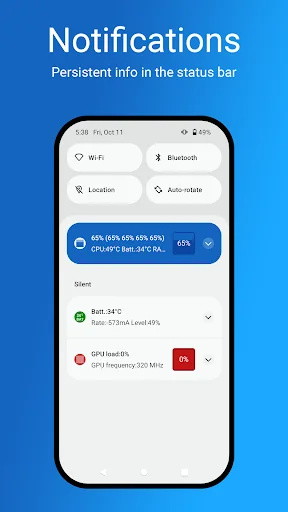
With help of this CPU/GPU/Battery Monitor & Notification you can have all this data as permanent notification and you can access it in a single swipe.
The app shows:
1. Name of app (or process) consuming most CPU cycles now*
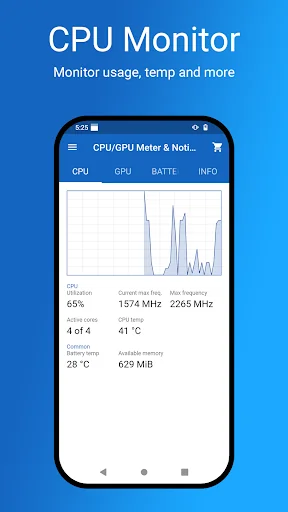
2. CPU utilization - total, per core and per core type (E - efficient, H - high performance, P - prime)
3. CPU frequency - current, maximum and average
4. CPU active cores
5. CPU running cores
6. CPU temperature*
7. Battery temperature
8. Available memory
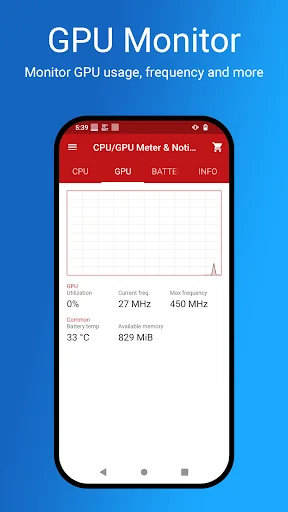
9. GPU utilization*
10. GPU frequency - current and maximum*
11. Battery charge/discharge rate
AND ALL THAT SIMULTANEOUSLY AS NOTIFICATION!
Additional app's features:
1. Monitor battery remaining capacity.
2. Monitor how fast your battery changes/discharges.
3. Charge alarm (it can be used to notify when battery charge reaches certain level).
4. Customize what data is visible in the notification(s).
5. Battery overheat alarm.
6. Customize app's theme.
7. Show information about device's hardware.*
Supports Android 16
The application is crafted by team based in Europe which pays attention to the hardware details. We are curious about what exactly the hardware is doing at every moment in order to utilize it more efficiently. It was initially created for personal use but later decided that it could be useful for everybody.
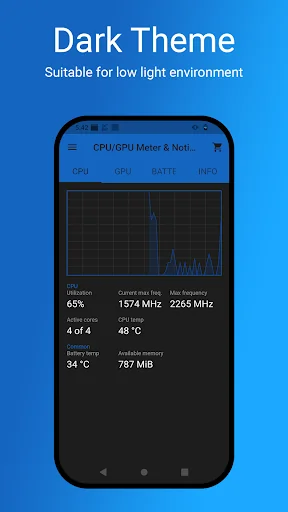
As the application grows we developed a dark theme for it. It was also inspired by other utility application that our team built with love - https://nighteye.app
* DISCLAIMER: GPUs are rarely supported on latest Android versions. This is because of permission issues. Also because of permissions issues with some custom ROMs (like Linage OS) other options marked with * may not be supported as well. Sorry for this inconvenient. If there is someway to solve it, we will. Data shown in the application is for information only. For accurate specification please refer to the manufacturer.
If you wish other functionality in the app, feel free to write an email to our support team!
Thanks!
Change log: https://androidinsight.app/changelog
Roadmap: https://androidinsight.app/roadmap/
Comparable Android apps
The five apps in Tools with the closest revenue to CPU/GPU/Battery Monitor & Noti. Click any to see its detail page.
Each forecast combines App Store rating, ratings count, monetisation model, pricing tier, IAP signals and ad-supported flag.
The base estimate is then multiplied by a per-category scaling factor learned from apps with founder-verified MRR.
Every number on this page comes from public APIs and bumetric's own snapshot history.
Full methodology covers input variables, accuracy bands per category and how we treat apps without comparable anchors.
See also the live data on CPU/GPU/Battery Monitor & Noti's tracker page for current rating, reviews and snapshot timeline.
Building something similar? Get a free AI audit with $-revenue forecasts for every recommendation.


 AppLock - Fingerprint Lock
 SIM Manager
 location changer for map
 Momentum
 Quick Telugu Keyboard