ML revenue forecast.
Calibrated against 36598 apps in this category.
Confidence band
±15%
High — many comparable apps with verified data
At a glance
Earns 2.1× more than the category median (154/mo).
Ranks #6,886 of 36,598 in Finance (top 18.8% by revenue).
Launched Jul 14, 2017 · last updated Feb 17, 2021.
What the app looks like
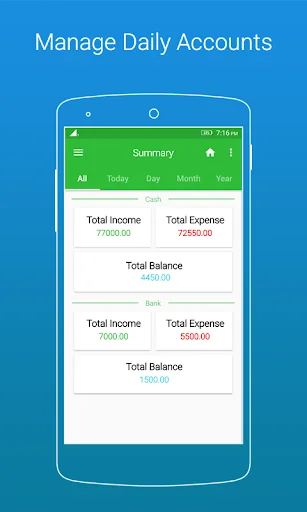
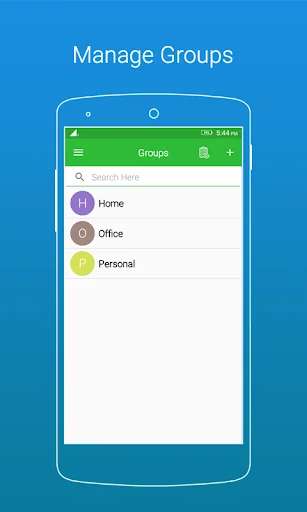
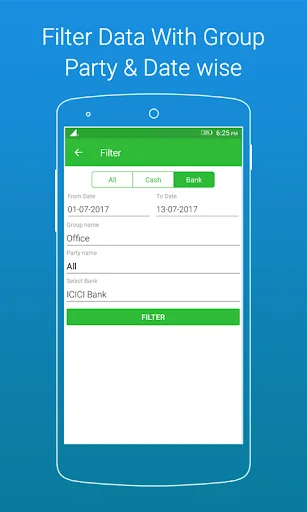
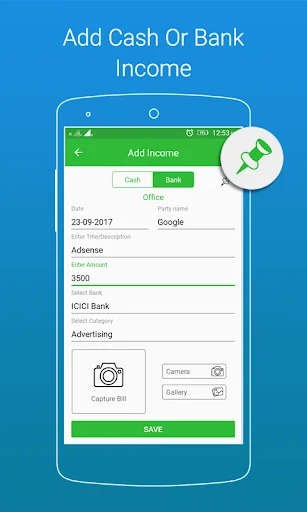
Live screenshots from the Play Store, captured by our snapshot worker. Tap any image to enlarge.
Daily Income & Expense Book - 's revenue trajectory
Forecast revenue from snapshot history. Last 1 months.
Where Daily Income & Expense Book - sits in Finance
Revenue distribution of 36598 comparable apps. Daily Income & Expense Book - highlighted.
Daily Income & Expense Book - vs comparable apps
Revenue trajectory side-by-side. Bold = Daily Income & Expense Book - , ghosted = peers.
App spec
Version
1.0.22
Last update
Feb 17, 2021
Launched
Jul 14, 2017
Price
Free
Monetization
Free
What Daily Income & Expense Book - actually does (from store listing)
In this app user keep and manage his/her daily account transaction with safe n secure.
<b>Basic three menus with many useful features which are as following.</b>
<b>1. Group</b>
<b>2. Summary (Detail Custom Report)
<b>3. Settings
<b>1. Group:</b> In group user can keep and manage daily account records group and party wise.
select your group and inside this section at bottom of page footer there are three buttons are available (A)Add Income,(B)Add Expense,(C)Filter(Custom search).
…
In this app user keep and manage his/her daily account transaction with safe n secure.
Basic three menus with many useful features which are as following. 1. Group 2. Summary (Detail Custom Report)
3. Settings
1. Group: In group user can keep and manage daily account records group and party wise.
select your group and inside this section at bottom of page footer there are three buttons are available (A)Add Income,(B)Add Expense,(C)Filter(Custom search).
(A)Add Income >Addition your savings income money by Add Income button option.
>Select your incom type like "Cash" or "Bank".
>Select "Date" for your income. current date is shown by default.
>Select Account or Party or Person Name.
>Enter income "Title/Description".
>Enter income "Amount".
>Now user can select Income category from list and also add more own income catagory from top right corner + sign and from app settings.
>If users income type is bank then select bank from bank name list or also add more banks from top right corner + sign and from app settings.
Note : If user want to pinned transaction record then in this section top right show pin option. all pinned record shows in Pinned Transactions.
(B)Add Expense >Addition your Expense money by Add Expense button option.
>Select your Expence type like "Cash" or "Bank".
>Select "Date" for your Expense. current date is shown by default.
>Select Account or Party or Person Name.
>Enter expense "Title/Description".
>Enter expense "Amount".
>Now user can select Expense category from list and also add more own Expense catagory from top right corner + sign and from app settings.
>If users Expense type is bank then select bank from bank name list or also add more banks from top right corner + sign and from app settings.
Note : If user want to pinned transaction record then in this section top right show pin option. all pinned record shows in Pinned Transactions.
(c)Filter >User can search custom All,Cash,Bank transaction data with from to till date and party wise summary.
2. Summary: Just swipe menu and click on Summary it'll shows you All,Today,Day,Month and Year wise account transaction data with search bar.
top right corner shows three dots just tap on it here four menu are define if you want to export date, party, group wise summary report as PDF please click on it.
3. Settings: In this menu shows Income & Expense Category, Bank Name, Party Name, Group, View PDF File, Select Language, Change Password with fingerprint if available, Change email and online Drive Data Backup & Restore options.
Unlimited free fetures like transactions, add bank, add income n expense category, add party, and unlimited export pdf files with account data backup and restore.
Comparable Android apps
The five apps in Finance with the closest revenue to Daily Income & Expense Book - . Click any to see its detail page.
Each forecast combines App Store rating, ratings count, monetisation model, pricing tier, IAP signals and ad-supported flag.
The base estimate is then multiplied by a per-category scaling factor learned from apps with founder-verified MRR.
Every number on this page comes from public APIs and bumetric's own snapshot history.
Full methodology covers input variables, accuracy bands per category and how we treat apps without comparable anchors.
See also the live data on Daily Income & Expense Book - 's tracker page for current rating, reviews and snapshot timeline.
Building something similar? Get a free AI audit with $-revenue forecasts for every recommendation.


 Audit Standards-SA SQC SRE SRS
 PO Interest Calculator Pro
 Volkswagen Bank photoTAN
 InvestorsHub (iHub) Stock Chat
 MassMutual FCU