What Darker Pro actually does (from store listing)
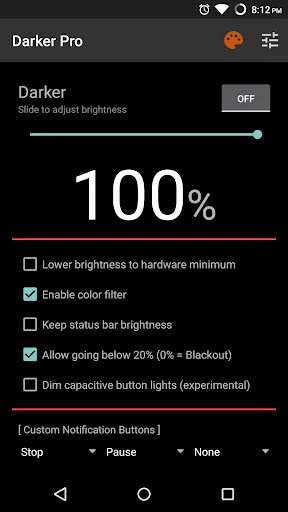
Darker can lower your screen brightness to extremely low levels, to help prevent eyestrain during the night. Use the built-in color filter* to adjust the color of your display, perfect for filtering out harsh white backgrounds during the night.
Users can either upgrade the free version to Pro through in-app purchase, or directly purchase this version (for countries that don't support In-app purchases) - both are the same in terms of functionality.
Features only in the Pro version:
» Aut…
Darker can lower your screen brightness to extremely low levels, to help prevent eyestrain during the night. Use the built-in color filter* to adjust the color of your display, perfect for filtering out harsh white backgrounds during the night.
Users can either upgrade the free version to Pro through in-app purchase, or directly purchase this version (for countries that don't support In-app purchases) - both are the same in terms of functionality.
Features only in the Pro version:
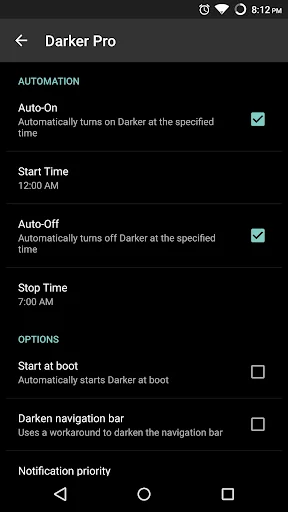
» Auto-On & Auto-Off
» Start at boot
» Lower brightness below 20%
» Darken navigation bar
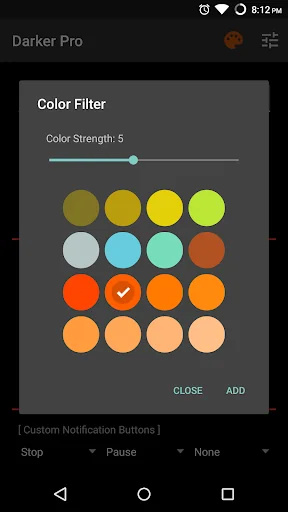
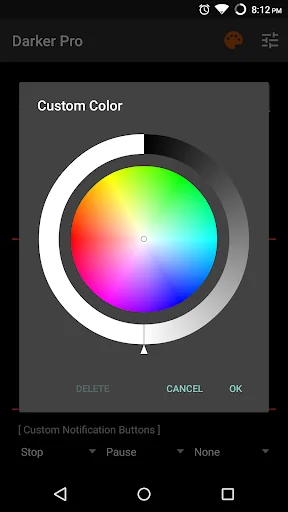
» Custom filter colors
» Root mode
» Customizable notification buttons
• Up to three buttons can be added for quick access.
• Buttons to increase and decrease the brightness (+5%, -5%, +10%, -10%)
• Buttons to set a specific brightness (@0%, @10%, @20%, ... , @90%, @100%)
• Quick toggles (stop, pause, reset, color filter)
Note: When manually installing APK files, Android blocks the "Install" button from being pressed when Darker is running. This is NOT a bug. It's a protective measure to prevent malicious apps from camouflaging the install button. Pausing Darker will solve this.
Darker requires the use of accessibility services to darken the screen, no data will be accessed or shared via the AccessibilityService API.
*The color filter is similar to how the desktop version of f.lux works. Selecting a redder color will reduce more bluelight emitted from the display.
Tasker Support Darker has Tasker support, use these intents to send commands to Darker:
Add the above intents to Tasker by going to Action Category→System→Send Intent→Action, leave the other fields default, and note that the intents are case sensitive.
These two intents below need an additional parameter in the "Extra" field
darkerpro.SETCOLOR "Extra" field: COLOR:1~16 (Colors are numbered left to right, top to bottom)
darkerpro.COLORSTRENGTH "Extra" field: STRENGTH:1~10
The intent below needs the "Target" field set to "Service"
darkerpro.START
Comparable Android apps
The five apps in Health & Fitness with the closest revenue to Darker Pro. Click any to see its detail page.
Each forecast combines App Store rating, ratings count, monetisation model, pricing tier, IAP signals and ad-supported flag.
The base estimate is then multiplied by a per-category scaling factor learned from apps with founder-verified MRR.
Every number on this page comes from public APIs and bumetric's own snapshot history.
Full methodology covers input variables, accuracy bands per category and how we treat apps without comparable anchors.
See also the live data on Darker Pro's tracker page for current rating, reviews and snapshot timeline.
Building something similar? Get a free AI audit with $-revenue forecasts for every recommendation.


 ランニング応援ゲーム ねんしょう!2
 Food Intolerances
 WomanLog Baby Pro
 PostureScreen Lite
 Essential Oils for doTERRA