What Data Usage Monitor actually does (from store listing)
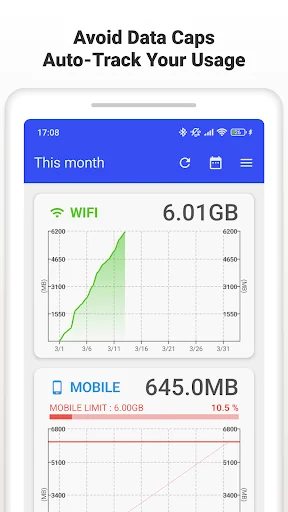
Stop hitting data caps. This app auto-measures mobile and Wi‑Fi traffic, graphs your daily/weekly/monthly usage, and warns you before throttling kicks in. Keep speeds steady and bills predictable.
MAIN FEATURES
* Automatic tracking: uses Android background API; keeps measuring after device reboot; minimal battery impact.
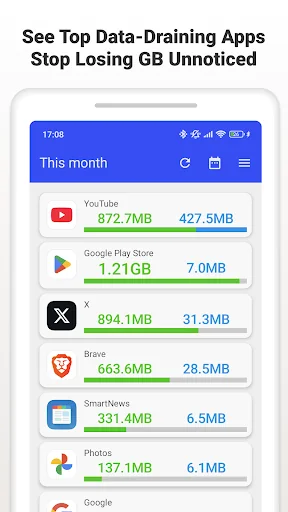
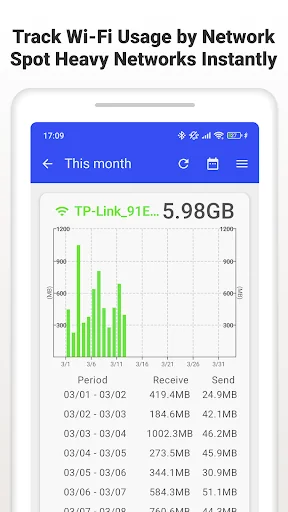
* Precise breakdown: separate mobile / Wi‑Fi totals; per-SSID stats; app-by-app usage so you can spot data hogs.
* Clear analytics: trend graphs by day/week/month with col…
Stop hitting data caps. This app auto-measures mobile and Wi‑Fi traffic, graphs your daily/weekly/monthly usage, and warns you before throttling kicks in. Keep speeds steady and bills predictable.
MAIN FEATURES
* Automatic tracking: uses Android background API; keeps measuring after device reboot; minimal battery impact.
* Precise breakdown: separate mobile / Wi‑Fi totals; per-SSID stats; app-by-app usage so you can spot data hogs.
* Clear analytics: trend graphs by day/week/month with color cues for approaching limits.
* Smart alerts: push notifications when nearing the cap; customizable thresholds.
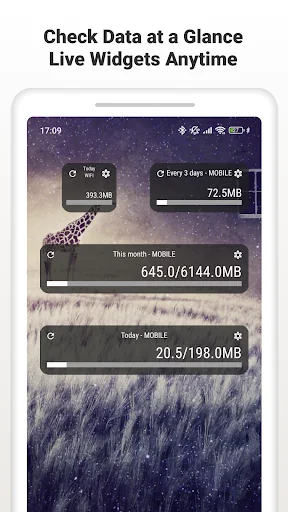
* Widgets & status bar: live remaining data on home screen and in the notification bar.
PREMIUM
* Ad-free experience.
* Always-on status bar meter and enhanced widgets.
SUPPORTED CARRIERS
Works with major carriers and MVNOs: Verizon, AT&T, T-Mobile, Docomo, au, SoftBank, Rakuten, UQ, Y!mobile, IIJmio, OCN, BIGLOBE, mineo, and more.
PERMISSIONS
* Usage Access: required for per-app data stats.
* Wi‑Fi info & Location: needed by Android to read SSID for Wi‑Fi usage.
* Network access: ads and anonymized improvement data.
* Run at startup: resume background tracking after reboot.
* Google Play Billing: premium purchase.
FAQ
* How do I set the alert limit?
Settings > Data Alerts to set cap and warning levels.
* Widget not updating?
Disable battery saver for the app and allow background activity.
SUPPORT
Enjoying it? Please rate ★★★★★. Questions or feedback: reach us via the in-app contact form for a quick reply.
Comparable Android apps
The five apps in Tools with the closest revenue to Data Usage Monitor. Click any to see its detail page.
Each forecast combines App Store rating, ratings count, monetisation model, pricing tier, IAP signals and ad-supported flag.
The base estimate is then multiplied by a per-category scaling factor learned from apps with founder-verified MRR.
Every number on this page comes from public APIs and bumetric's own snapshot history.
Full methodology covers input variables, accuracy bands per category and how we treat apps without comparable anchors.
See also the live data on Data Usage Monitor's tracker page for current rating, reviews and snapshot timeline.
Building something similar? Get a free AI audit with $-revenue forecasts for every recommendation.


 5G 4G LTE Network Switch
 WiFi scanner pro
 FlyVPN - Secure & Fast VPN
 WT Tracker - Web Scanner
 Auto Call Recorder PRO