What Developer Options Shortcut actually does (from store listing)
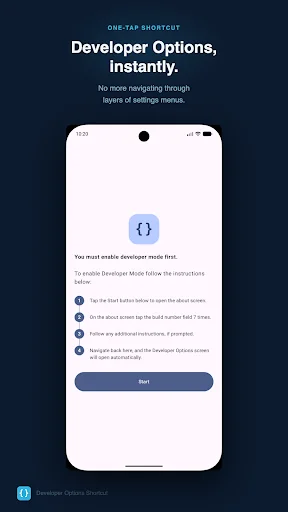
Skip the menu. Open Developer Options in a single tap.
Developer Options Shortcut is a direct shortcut to the Android Developer Options screen, eliminating the need to navigate through multiple layers of the Settings menu every time you need access. Built for Android developers, QA engineers, and power users who work with developer mode regularly, the app is lightweight, focused, and built to do one thing well.
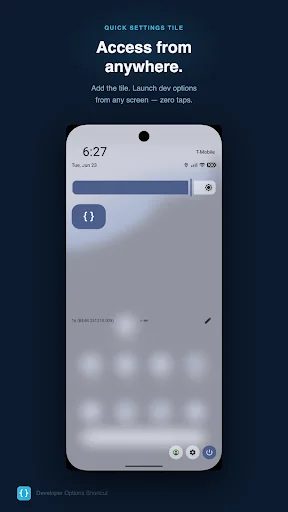
<b>New: Quick Settings tile</b>
A Quick Settings tile is now available. Add th…
Skip the menu. Open Developer Options in a single tap.
Developer Options Shortcut is a direct shortcut to the Android Developer Options screen, eliminating the need to navigate through multiple layers of the Settings menu every time you need access. Built for Android developers, QA engineers, and power users who work with developer mode regularly, the app is lightweight, focused, and built to do one thing well.
New: Quick Settings tile
A Quick Settings tile is now available. Add the tile to your notification shade and launch Developer Options directly from anywhere on your device — no need to open an app drawer or home screen first. Whether you're toggling USB debugging between builds or adjusting animation scale during a design review, it's the fastest path to dev options available on Android.
Key features
- One-tap shortcut to the Developer Options screen
- Quick Settings tile for instant access from any screen
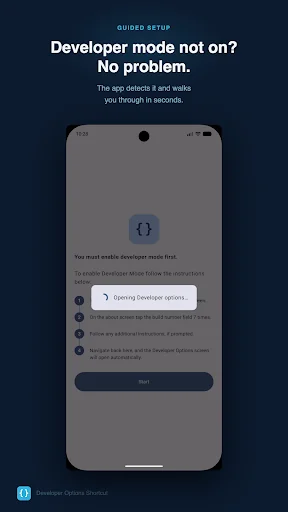
- Guided setup if Developer Options isn't enabled yet — the app detects it and walks you through unlocking developer mode
- Lightweight footprint with no unnecessary permissions
- Clean, distraction-free design
- No ads, no tracking
Built for the settings you actually use
Developer Options Shortcut is designed around the workflows of people who live in dev options every day:
- Enable or disable USB debugging before connecting to ADB
- Toggle mock location for testing location-aware features
- Adjust animation scale to speed up your device or record demo videos
- Turn on show layout bounds to inspect UI rendering
- Change background process limits while profiling performance
- Switch debug mode settings during QA passes
Instead of opening Settings, scrolling to System, expanding Advanced, and tapping into Developer Options every single time, you get there in one tap — or zero, from the Quick Settings tile.
Who it's for
- Android developers building, testing, and debugging apps
- QA engineers running test passes that require ADB, USB debugging, or mock location
- Power users who customize animation scale, developer mode flags, and advanced system behavior
- Anyone who frequently opens Developer Options and wants a faster shortcut
Stop scrolling through settings. Add the tile, tap the icon, and get straight to work.
Comparable Android apps
The five apps in Tools with the closest revenue to Developer Options Shortcut. Click any to see its detail page.
Each forecast combines App Store rating, ratings count, monetisation model, pricing tier, IAP signals and ad-supported flag.
The base estimate is then multiplied by a per-category scaling factor learned from apps with founder-verified MRR.
Every number on this page comes from public APIs and Bumetric's own snapshot history.
Full methodology covers input variables, accuracy bands per category and how we treat apps without comparable anchors.
See also the live data on Developer Options Shortcut's tracker page for current rating, reviews and snapshot timeline.
Building something similar? Get a free AI audit with $-revenue forecasts for every recommendation.



 Mobile KD
 Pause it
 闪电回国VPN-免注册,一键翻墙回国,解锁网易云优酷爱奇艺
 Smart Switch -Phone Clone Data
 Cast Screen on TV--1001 TVs