ML revenue forecast.
Calibrated against 53506 apps in this category.
Confidence band
±15%
High — many comparable apps with verified data
At a glance
Earns 21.83× more than the category median (228/mo).
Ranks #1,061 of 53,506 in Personalization (top 2.0% by revenue).
Launched May 06, 2015 · last updated Jan 05, 2026.
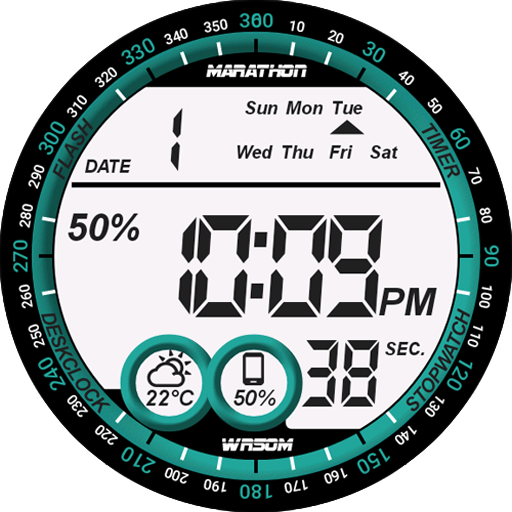
What the app looks like
Live screenshots from the Play Store, captured by our snapshot worker. Tap any image to enlarge.
Digital One Watch Face's revenue trajectory
Forecast revenue from snapshot history. Last 1 months.
Where Digital One Watch Face sits in Personalization
Revenue distribution of 53506 comparable apps. Digital One Watch Face highlighted.
Digital One Watch Face vs comparable apps
Revenue trajectory side-by-side. Bold = Digital One Watch Face, ghosted = peers.
App spec
Version
Varies with device
Last update
Jan 05, 2026
Launched
May 06, 2015
Price
$0.99
Monetization
Paid
What Digital One Watch Face actually does (from store listing)
Digital One Watch Face for Wear OS!
<u><b>★ Features of Digital One Watch Face ★</b></u>
- Choose design colors
- Day & Month
- Watch battery
- Mobile battery (requires phone app)
- Weather (requires phone app)
The settings of the watch face are located in the "Wear OS" app of your mobile.
Just hit the gear icon over the watch face preview and the settings screen will show up!
<u><b>★ Settings ★</b></u>
<u>🔸Wear OS 2.X / 3.X / 4.X</u>
- Choose design colors on watch & mo…
The settings of the watch face are located in the "Wear OS" app of your mobile.
Just hit the gear icon over the watch face preview and the settings screen will show up!
★ Settings ★
🔸Wear OS 2.X / 3.X / 4.X - Choose design colors on watch & mobile
- Define heartbeat frequency refresh rate
- Define weather refresh rate
- Weather unit
- 12 / 24 hours mode
- Define interactive mode duration
- Choose the ambient mode b&w and eco luminosity
- Choose to display a leading zero on hours
- Switch between éco / simple b&w / full ambient mode
- Data:
+ Change the indicator to display on the 2 positions
+ Choose between up to 8 indicators (Daily step count, Heartbeat frequency, Unread Email from Gmail, etc...)
+ Complication (wear 2.0 & 3.0)
- Interactivity
+ Access to detailed data by touching a widget
+ Switch the displayed data by touching a widget
+ Change the shortcut to execute on the 4 positions
+ Choose your shortcut among all applications installed on your watch!
+ Choose to display the interactive areas
🔸Wear OS 6.X - Choose design colors
- Display shortcuts or not
- Display watch battery indicator or not
- Complication data:
+ Set the data you want on the widgets
+ Touch the widgets to start the data activity if available
- Interactivity
+ Access to detailed data by touching a widget
+ Modify the shortcuts: choose your shortcut among all applications installed on your watch!
- ... and more
★ Additional settings on phone ★
- Notifications for new designs
- Access to support
- ... and more
★ Installation ★
🔸Wear OS 2.X / 3.X / 4.X A notification will be displayed on your watch, right after your mobile installation. You just have to hit it to start the installation process of the watch face.
If the notification did not display for some reason, you can still install the watch face by using the Google Play Store available on your watch: just search the watch face by its name.
🔸Wear OS 6.X Install the watch app to manage the watchface: the free version is automatically installed. Then use the "MANAGE" button in the top right shortcut of the watchface to update/upgrade your watch face.
★ More watch faces ★
Visit my watch faces collection for Wear OS on the Play Store at https://goo.gl/CRzXbS
** If you have any issues or questions, feel free to contact me by email (English or French language) before giving a bad rating. Thanks!
Each forecast combines App Store rating, ratings count, monetisation model, pricing tier, IAP signals and ad-supported flag.
The base estimate is then multiplied by a per-category scaling factor learned from apps with founder-verified MRR.
Every number on this page comes from public APIs and Bumetric's own snapshot history.
Full methodology covers input variables, accuracy bands per category and how we treat apps without comparable anchors.
See also the live data on Digital One Watch Face's tracker page for current rating, reviews and snapshot timeline.
Building something similar? Get a free AI audit with $-revenue forecasts for every recommendation.



 Victory Substratum Theme +Oreo
 Nova Launcher: Home Screen
 Eclectic Icons
 InEclectic - Material Icons
 Corvy Icons