What Disable Screen Timeout actually does (from store listing)
■How to use
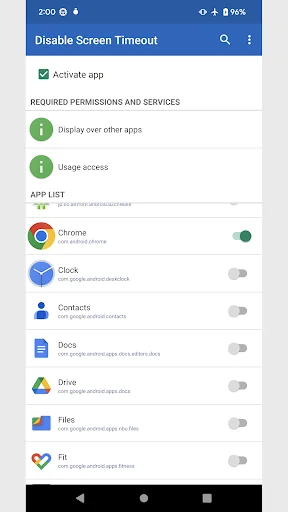
1. When you launch it, a list of apps installed on your device will be displayed.
2. Turn on the app you want to disable screen timeout.
Screen timeout on smartphones is disabled while applications that are turned on are running.
■Options
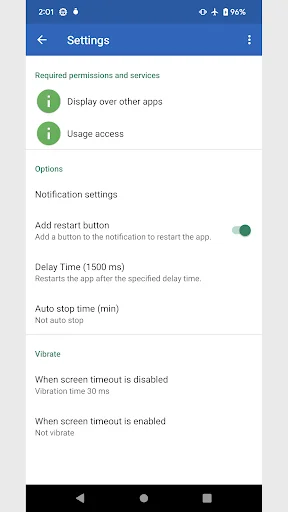
・Add restart button
Adds a button to the notification that forces the app to restart.
・Auto stop time
Time to automatically stop disabling screen timeouts.
If set to 0 minutes, it will not stop automatically.
■Run manually
Long pr…
■How to use
1. When you launch it, a list of apps installed on your device will be displayed.
2. Turn on the app you want to disable screen timeout.
Screen timeout on smartphones is disabled while applications that are turned on are running.
■Options
・Add restart button
Adds a button to the notification that forces the app to restart.
・Auto stop time
Time to automatically stop disabling screen timeouts.
If set to 0 minutes, it will not stop automatically.
■Run manually
Long press the app icon and tap the shortcut that appears.
Running manually, screen timeout disable will continue instead of per app.
To stop, tap the shortcut again or tap the stop button in the notification.
■About permissions
This app uses the following permissions to provide various services. Personal information will not be sent outside the app or provided to third parties.
・Post Notifications
Required to realize the main functionality of the app.
・Get list of apps
Required to get information about running apps and to disable screen timeout.
■Notes
Please note that we are not responsible for any troubles or damages caused by this app.
This app is a utility tool designed to disable screen timeout and manage the display state.
Comparable Android apps
The five apps in Tools with the closest revenue to Disable Screen Timeout. Click any to see its detail page.
Each forecast combines App Store rating, ratings count, monetisation model, pricing tier, IAP signals and ad-supported flag.
The base estimate is then multiplied by a per-category scaling factor learned from apps with founder-verified MRR.
Every number on this page comes from public APIs and bumetric's own snapshot history.
Full methodology covers input variables, accuracy bands per category and how we treat apps without comparable anchors.
See also the live data on Disable Screen Timeout's tracker page for current rating, reviews and snapshot timeline.
Building something similar? Get a free AI audit with $-revenue forecasts for every recommendation.




 Web Traffic Bot
 e-liggare Personalliggare bygg
 Beyaz Tahta - White Board
 MobileHelper
 Velneo vClient