What Division Memorizer actually does (from store listing)
<b>Division Memorizer</b> helps you memorize the 12 x 12 division tables.
<b>General Features</b>
+ Provides interactive lists covering each of the 12 division tables.
+ A practice area to improve accuracy.
+ A timed area to improve speed.
+ Keeps track of overall progress and best times.
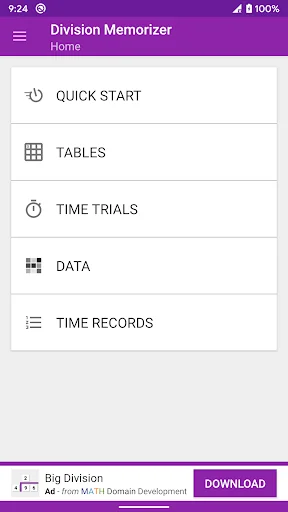
There are five general areas:
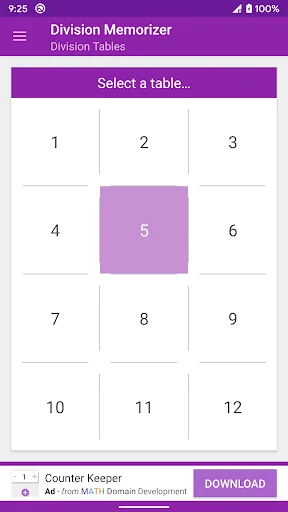
<b>Division Tables</b> provides a stress free learning environment. It's a modern take on division flash cards. This area displays the entire division table, a "row" a…
Division Memorizer helps you memorize the 12 x 12 division tables.
General Features + Provides interactive lists covering each of the 12 division tables.
+ A practice area to improve accuracy.
+ A timed area to improve speed.
+ Keeps track of overall progress and best times.
There are five general areas:
Division Tables provides a stress free learning environment. It's a modern take on division flash cards. This area displays the entire division table, a "row" at a time. You can show or hide the answers to any division problem at any time. There are no questions, no time limit, no data tracking.
Practice is where your division memorization is tested. Questions are randomly generated. It's your job to enter the answer digit by digit (there is no multiple choice). The number of correct and incorrect attempts are tracked and saved for each division fact. Incorrect problems are listed at the end of each session and you'll have the option to repeat all the questions, repeat only on the incorrect attempts, or shuffle the questions all together.
Time Trials is where you put all that practice to the test: How fast can you answer 12 division questions? Compete against yourself or compare your times with friends and people all over the world!
Time Records keeps track of your top 10 fastest completion times for each division problem set attempted in the Time Trials area. Displays your rank, initials, time, and date for each record. Note: to set a record, you must answer 10 of the 12 questions correctly!
Data is where you can see how you're doing for each division fact. The result for each fact is displayed as a colored box inside a division chart. The colors range from green to red (with green meaning good and red meaning not-so-good). Pressing a box will show more details for that fact: Number Correct, Total Attempts, Percentage, and Grade.
Look for more division games and features to be added in the future!
This is a free-to-download, ad-supported app.
Thanks for recommending and leaving a review.
MATH Domain Development
Comparable Android apps
The five apps in Educational with the closest revenue to Division Memorizer. Click any to see its detail page.
Each forecast combines App Store rating, ratings count, monetisation model, pricing tier, IAP signals and ad-supported flag.
The base estimate is then multiplied by a per-category scaling factor learned from apps with founder-verified MRR.
Every number on this page comes from public APIs and bumetric's own snapshot history.
Full methodology covers input variables, accuracy bands per category and how we treat apps without comparable anchors.
See also the live data on Division Memorizer's tracker page for current rating, reviews and snapshot timeline.
Building something similar? Get a free AI audit with $-revenue forecasts for every recommendation.

 SuperSUS CIDADÃO
 CollectA AR
 Fraction for beginners
 Game for preschool kids 3,4 yr
 Kids Cursive Handwriting HWTC