ML revenue forecast.
Calibrated against 77129 apps in this category.
Confidence band
±15%
High — many comparable apps with verified data
At a glance
Earns 2.18× more than the category median (189/mo).
Ranks #14,461 of 77,129 in Tools (top 18.7% by revenue).
Launched May 31, 2018 · last updated Sep 17, 2024.
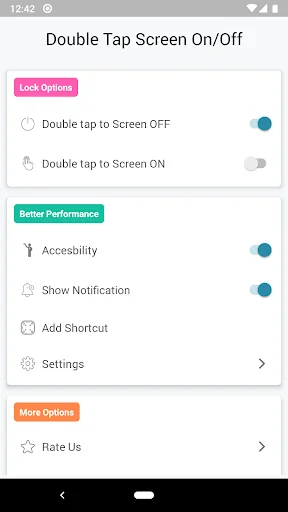
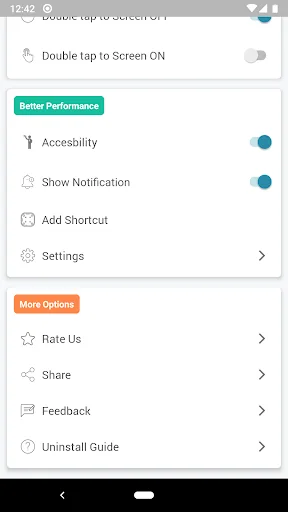
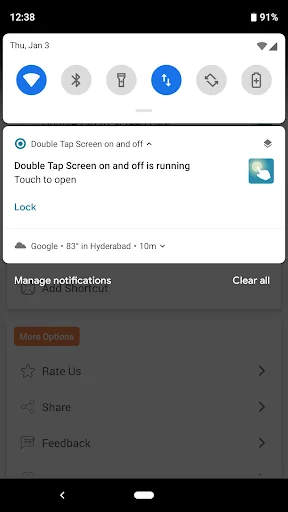
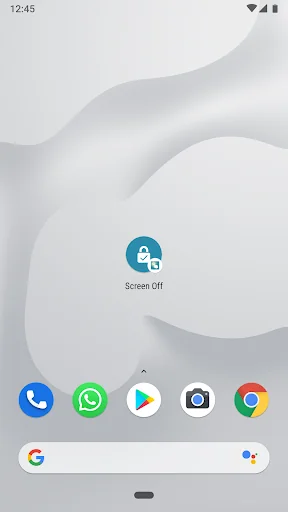
What the app looks like
Live screenshots from the Play Store, captured by our snapshot worker. Tap any image to enlarge.
Double Tap Screen on and off's revenue trajectory
Forecast revenue from snapshot history. Last 1 months.
Where Double Tap Screen on and off sits in Tools
Revenue distribution of 77129 comparable apps. Double Tap Screen on and off highlighted.
Double Tap Screen on and off vs comparable apps
Revenue trajectory side-by-side. Bold = Double Tap Screen on and off, ghosted = peers.
App spec
Version
3.9.31
Last update
Sep 17, 2024
Launched
May 31, 2018
Price
Free
Monetization
Free
What Double Tap Screen on and off actually does (from store listing)
Double Tap Screen On and Off is an easy and best application, through which you can Double Tap on the Home Screen to on or off the mobile screen rather than tapping power button. Double Tap Screen On and Off will help you to reduce the usage of power button to a great extent.
<b>Features are:</b>
a. Double Tap to Screen lock so you can avoid power button usage.
b. Customise the number of clicks to lock the screen.
c. Option to allow double tap on the home screen to lock the device.
Dou…
Double Tap Screen On and Off is an easy and best application, through which you can Double Tap on the Home Screen to on or off the mobile screen rather than tapping power button. Double Tap Screen On and Off will help you to reduce the usage of power button to a great extent.
Features are: a. Double Tap to Screen lock so you can avoid power button usage.
b. Customise the number of clicks to lock the screen.
c. Option to allow double tap on the home screen to lock the device.
Double Tap Screen On and Off is a free and best application for better and easy usage to lock the screen without using power button.
Click Install to enjoy the Double Tap Screen On and Off on your mobile.
Permission Required:
1. Double Tap Screen On and Off uses Accessibility Service to lock your device. If Android version greater than Android P. We also using Accessibility Service to detect the typing and avoid locking the screen.
2. Double Tap Screen On and Off uses Device Administration permission to lock your device above Android KitKat and below Android Pie versions.
3. Double Tap Screen On or Off uses draw overlay permission to detect taps.
4. We also ask for permissions like auto start based on the device type to make sure Double Tap Screen On and Off service is always available to the users.
6. We've provided uninstall guide at the bottom on the main screen of the application. If you've any trouble please go to the system settings and search admin then disable any app from admin access list. After that you can uninstall any app normally. If you have any doubts regarding this we're more than happy to help. Reach out to us via support/feedback option in the app.
Double Tap Screen On and Off uses foreground service to monitor the double tap all the time by running a foreground service. Once we detect the double tap, we’ll lock the screen as per the user's chosen behavior. This is the core functionality of the application.
Double Tap Screen On and Off starts the foreground service only after obtaining proper consent from the user. For this purpose, we are requesting FOREGROUND_SERVICE_SPECIAL_USE permission in the application.
We do not use any of the above permission to access your personal data but those permissions are required for the app to work as mentioned.
Comparable Android apps
The five apps in Tools with the closest revenue to Double Tap Screen on and off. Click any to see its detail page.
Each forecast combines App Store rating, ratings count, monetisation model, pricing tier, IAP signals and ad-supported flag.
The base estimate is then multiplied by a per-category scaling factor learned from apps with founder-verified MRR.
Every number on this page comes from public APIs and bumetric's own snapshot history.
Full methodology covers input variables, accuracy bands per category and how we treat apps without comparable anchors.
See also the live data on Double Tap Screen on and off's tracker page for current rating, reviews and snapshot timeline.
Building something similar? Get a free AI audit with $-revenue forecasts for every recommendation.


 MyOgero
 Blue Light Filter - Night Mode
 SmartRicicla
 Ctronics
 French Keyboard Plugin