ML revenue forecast.
Calibrated against 77129 apps in this category.
Confidence band
±15%
High — many comparable apps with verified data
At a glance
Earns 3.06× more than the category median (189/mo).
Ranks #9,928 of 77,129 in Tools (top 12.9% by revenue).
Launched Jan 31, 2019 · last updated Aug 07, 2025.
What the app looks like
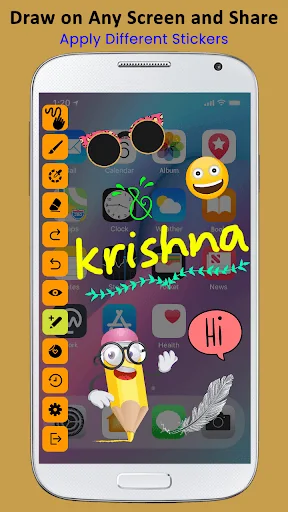
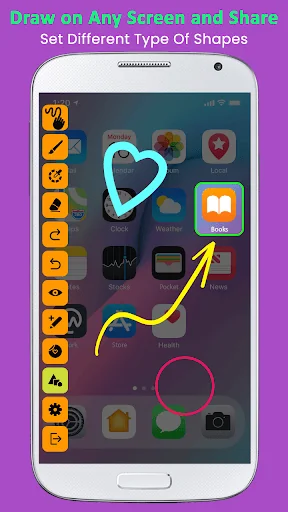
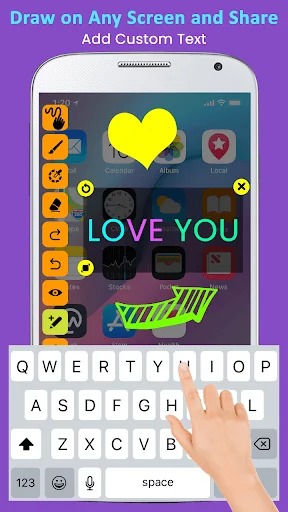
Live screenshots from the Play Store, captured by our snapshot worker. Tap any image to enlarge.
Draw on Any Screen and Share's revenue trajectory
Forecast revenue from snapshot history. Last 1 months.
Where Draw on Any Screen and Share sits in Tools
Revenue distribution of 77129 comparable apps. Draw on Any Screen and Share highlighted.
Draw on Any Screen and Share vs comparable apps
Revenue trajectory side-by-side. Bold = Draw on Any Screen and Share, ghosted = peers.
App spec
Version
11.0
Last update
Aug 07, 2025
Launched
Jan 31, 2019
Price
Free
Monetization
Free
What Draw on Any Screen and Share actually does (from store listing)
Draw on Any Screen and Share app is work as drawing pad. which allows you to draw anywhere (other app or game) on your device screen during run-time.
Activate the draw mode, draw or mark something on your screen and click on the screenshot button. You can take screenshot instantly and share with other.
This draw on screen app is quick accessible to take screenshot. Whatever you are doing on the screen, you can always turn on or off the drawing mode easily.
Draw on screen is perfect for…
Draw on Any Screen and Share app is work as drawing pad. which allows you to draw anywhere (other app or game) on your device screen during run-time.
Activate the draw mode, draw or mark something on your screen and click on the screenshot button. You can take screenshot instantly and share with other.
This draw on screen app is quick accessible to take screenshot. Whatever you are doing on the screen, you can always turn on or off the drawing mode easily.
Draw on screen is perfect for presentations, video tutorials or screenshots to highlight texts or images on the screen.
Draw on Any Screen and Share provide drawing pad with floating toolbar and you can use this tools without leave the current running app.
Change menu position of draw on screen at top and bottom of your mobile screen, so you can draw on screen easily.
This drawing pad app is helps to add text, add sticker, add image from gallery or camera, also add different shape to mark text or image on your mobile screen and take screenshot of your drawing and share it with social sites.
Features :-
- Draw on any screen anywhere.
- Draw with different colors.
- Draw with different sizes.
- Undo and Redo easily.
- Erase whatever drawn on screen.
- Select shape line, rectangle,circle, eclipse, qubic bezier, quadratic bezier.
- Shake device to take screenshot.
- Reset drawing.
- Change menu bar position.
- Floating toolbar.
- Add image, text, sticker and different shape on screen.
- Take screenshot with single click.
Comparable Android apps
The five apps in Tools with the closest revenue to Draw on Any Screen and Share. Click any to see its detail page.
Each forecast combines App Store rating, ratings count, monetisation model, pricing tier, IAP signals and ad-supported flag.
The base estimate is then multiplied by a per-category scaling factor learned from apps with founder-verified MRR.
Every number on this page comes from public APIs and bumetric's own snapshot history.
Full methodology covers input variables, accuracy bands per category and how we treat apps without comparable anchors.
See also the live data on Draw on Any Screen and Share's tracker page for current rating, reviews and snapshot timeline.
Building something similar? Get a free AI audit with $-revenue forecasts for every recommendation.


 Translator - Fast and Easy
 HiKam
HiKam
 XIM APEX Manager
 Taxi Control
 Vivitar Smart Security 2