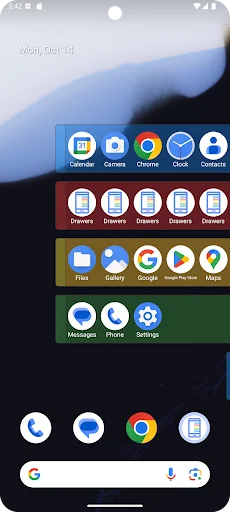
Transform the way you organize and access your apps with Drawers, the ultimate solution for a clutter-free home screen. With Drawers, you can create customizable drawers along the sides of your screen, ensuring that your favorite apps are always just a swipe away.
Key Features:
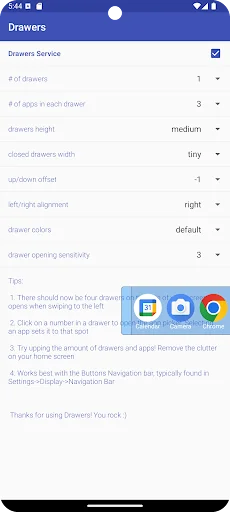
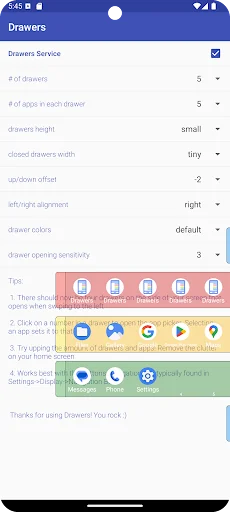
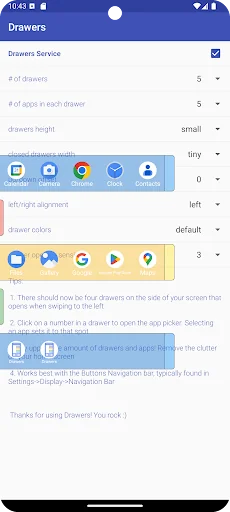
- Customizable Drawers: Personalize drawers with colors and icons to match your style. Adjust the size and position of the drawers to fit perfectly on your screen.
- Flexible Placement: Choose which side of the…
Transform the way you organize and access your apps with Drawers, the ultimate solution for a clutter-free home screen. With Drawers, you can create customizable drawers along the sides of your screen, ensuring that your favorite apps are always just a swipe away.
Key Features:
- Customizable Drawers: Personalize drawers with colors and icons to match your style. Adjust the size and position of the drawers to fit perfectly on your screen.
- Flexible Placement: Choose which side of the screen you want your drawers to appear on. Whether you prefer the left or right side of the screen, Drawers adapts to your preference.
- Quick Access: Enjoy instant access to your most-used apps without cluttering your home screen. Simply swipe to reveal your organized drawers.
- Enhanced Functionality: Move and delete icons within the drawers effortlessly. Arrange your apps exactly how you like them for maximum efficiency.
- Gesture Controls: Use intuitive gestures to open and close drawers, making navigation seamless and smooth. Customize hotzone sizes to avoid accidental touches.
- System Integration: Easily select your system camera or other essential apps for quick access.
Why Choose Drawers?
Drawers offers a sleek, user-friendly interface designed to enhance your mobile experience. Whether you're looking to streamline your workflow or simply keep your home screen neat, Drawers provides the tools you need to stay organized.
Recent Updates:
We’ve listened to your feedback and have made significant improvements:
- Fixed issues with the app closing or hanging.
- Added more customization options, including color choices, app quantity for drawers, and flexible drawer placement.
- Enhanced stability and performance across various devices, including the latest Android versions.
How to Use Drawers:
1. Install the App: Download Drawers from the Google Play Store.
2. Set Up Your Drawers: Open the app and start creating your custom drawers.
3. Personalize: Choose colors, adjust sizes, and position the drawers as per your liking.
4. Access Your Apps: Swipe to access your neatly organized drawers anytime.
Support and Feedback:
We are committed to continuous improvement and value your feedback. If you encounter any issues or have suggestions for new features, please contact our support team at drawersfeedback@gmail.com. Your input helps us enhance the app and provide you with the best experience possible.
Download Drawers today and enjoy a more organized, efficient, and personalized home screen!
Comparable Android apps
The five apps in Tools with the closest revenue to Drawers. Click any to see its detail page.
Each forecast combines App Store rating, ratings count, monetisation model, pricing tier, IAP signals and ad-supported flag.
The base estimate is then multiplied by a per-category scaling factor learned from apps with founder-verified MRR.
Every number on this page comes from public APIs and bumetric's own snapshot history.
Full methodology covers input variables, accuracy bands per category and how we treat apps without comparable anchors.
See also the live data on Drawers's tracker page for current rating, reviews and snapshot timeline.
Building something similar? Get a free AI audit with $-revenue forecasts for every recommendation.


 HotSpot Tethering & Share File
 Mobile Network Quality Test
 MediaInfo
 Aviation Weather with Decoder
 CoolAlarm:Music alarm clock