ML revenue forecast.
Calibrated against 8430 apps in this category.
Confidence band
±15%
High — many comparable apps with verified data
At a glance
Tracks close to the Android app category median (170/mo).
Ranks #4,945 of 8,430 in Art & Design (top 58.7% by revenue).
Launched Apr 21, 2021 · last updated Dec 29, 2025.
What the app looks like
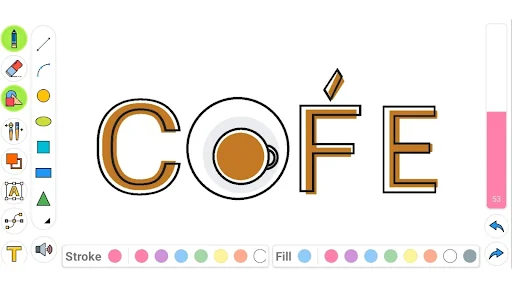
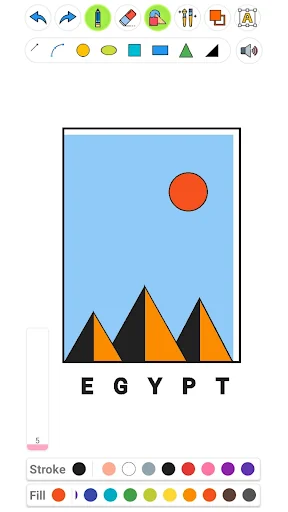
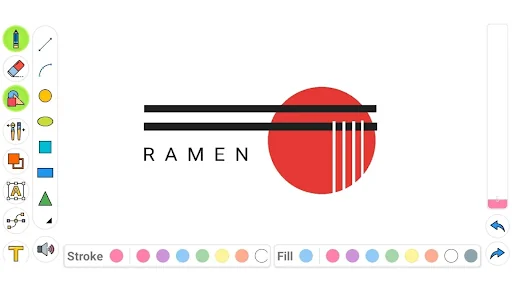
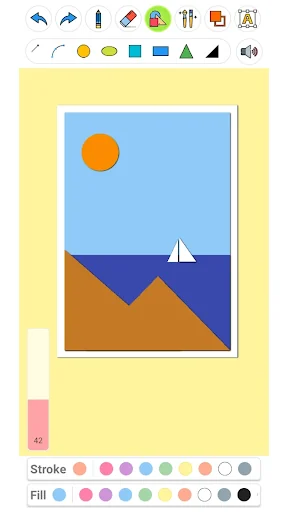
Live screenshots from the Play Store, captured by our snapshot worker. Tap any image to enlarge.
Drawing Pad Pro - Sketchpad's revenue trajectory
Forecast revenue from snapshot history. Last 1 months.
Where Drawing Pad Pro - Sketchpad sits in Art & Design
Revenue distribution of 8430 comparable apps. Drawing Pad Pro - Sketchpad highlighted.
Drawing Pad Pro - Sketchpad vs comparable apps
Revenue trajectory side-by-side. Bold = Drawing Pad Pro - Sketchpad, ghosted = peers.
App spec
Version
4.3.4
Last update
Dec 29, 2025
Launched
Apr 21, 2021
Price
Free
Monetization
Free
What Drawing Pad Pro - Sketchpad actually does (from store listing)
<h1>Drawing pad for everyone</h1>
Drawing pad pro is one of the best drawing apps on the market! Enjoy making beautiful drawings and sketches with the drawing pad pro - a sketchbook software with a collection of brushes, pens, and shapes.
Have an incredible drawing experience with the drawing desk app.🎨
Whether you want to paint, draw, or give your kids a doodle pad, the drawing pad has everything—a personal draw pad app where you can even type text and draw shapes.
Unlock drawing app…
Drawing pad pro is one of the best drawing apps on the market! Enjoy making beautiful drawings and sketches with the drawing pad pro - a sketchbook software with a collection of brushes, pens, and shapes.
Have an incredible drawing experience with the drawing desk app.🎨
Whether you want to paint, draw, or give your kids a doodle pad, the drawing pad has everything—a personal draw pad app where you can even type text and draw shapes.
Unlock drawing apps' unique features and show off your sketchpad art!🖼
Amazing drawing desk features: ✅ Drawing pad - Suitable for kids and adults!
✅ Kid Friendly - doodle pad for children.
✅ Brushes - Sketchbook has different types of brushes!
✅ Shapes - draw pad pro has different geometrical shapes and vectors!
✅ Colors - choose any color you want for your sketch pad work.
✅ Easy sharing - Save your sketchbook art and share it wherever!
Doodle Pad for all ages This drawing pad can easily be used as a doodle pad for kids. User-friendly and colorful, the draw pad app can be used by anyone.
Use the doodle pad app to teach your children different shapes and colors and have them draw their first paintings. Let your children unlock their creative minds with the doodle pad app!🧒
Personal Sketchbook Utilize drawing apps' features as your sketchbook. Choose the color and size of the pen on your sketch pad and create beautiful art.
No need to bother with paper anymore because this sketchpad app has everything you need for a sketchbook replacement!✏
Creative drawing desk app!
Experience powerful drawing apps' abilities. Drawing pad lets you use your sketch pad in either portrait or landscape mode. Use your creative side to make unique art with this drawing desk replacement!
Draw pad brush types: The drawing pad has a vast collection of brushes. Choose from a simple brush design to a more detailed shaded or blurred brush; drawing apps' features are unlimited.
Play around with different colors on the draw pad, and use the rotate and scale options to compose the perfect picture. The drawing desk app allows you to be creative and have fun.
Unique experience. The Drawing apps shape features let you explore the world of geometry. Use shapes like squares, circles, and triangles to create unique geometry art! Paint straight and curved lines with the drawing pad pro.
Choose if you want to draw the shape's stroke, fill, or both. You can have the colors of the stroke and fill be different. That's just one of the ways you can make use of drawing apps' features!
Draw pad text features. Drawing pad pro has text features where you can make fantastic word art. The drawing desk app lets you choose the color of the text, and after you write your word, the sketchpad will allow you to resize it, scale it or even rotate it.
Even if you don't like what you made, the drawing desk app has an eraser function so you can clean your drawing pad's canvas.
Download the Drawing Pad Pro app and feel your creative juices start to flow. Take advantage of many features and impress your friends with your sketchpad artwork.
Start your creative journey today!
Comparable Android apps
The five apps in Art & Design with the closest revenue to Drawing Pad Pro - Sketchpad. Click any to see its detail page.
Each forecast combines App Store rating, ratings count, monetisation model, pricing tier, IAP signals and ad-supported flag.
The base estimate is then multiplied by a per-category scaling factor learned from apps with founder-verified MRR.
Every number on this page comes from public APIs and bumetric's own snapshot history.
Full methodology covers input variables, accuracy bands per category and how we treat apps without comparable anchors.
See also the live data on Drawing Pad Pro - Sketchpad's tracker page for current rating, reviews and snapshot timeline.
Building something similar? Get a free AI audit with $-revenue forecasts for every recommendation.


 Mod Bussid ( Truk, Mobil, Moto
 Christian Wallpapers for Phone
 SketchPad Pro Draw, Sketch
 Embroidery Designer
 DrawScope Color Mixer