What DSC Auto Rename actually does (from store listing)
<b>This application can be used to rename ALL the images and clips files taken by the camera.</b>
<b>Read carefully all description!</b>
<b>Android 11: This application DOESN'T work on Android 11!</b>
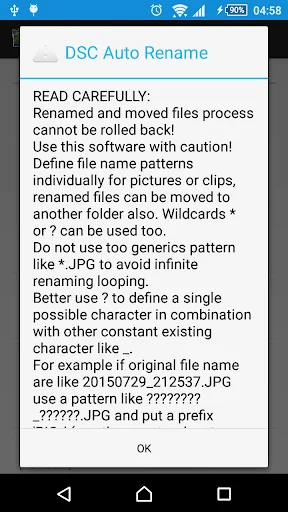
<b>Renamed and moved files process cannot be rolled back! Use this software with caution!</b>
The application do not store the old names because will cause conflicts: the default camera application use a counter which is reset each time when files are removed/renamed. As a workaround can be …
This application can be used to rename ALL the images and clips files taken by the camera. Read carefully all description! Android 11: This application DOESN'T work on Android 11!
Renamed and moved files process cannot be rolled back! Use this software with caution! The application do not store the old names because will cause conflicts: the default camera application use a counter which is reset each time when files are removed/renamed. As a workaround can be selected the option "Append original name".
If you have issues, try to reinstall the application.
I developed this application for an oldest phone, for KitKat and Lollipop I use Android Emulator so I can not test the application on real devices due to costs.
KitKat advice Application can rename files stored on internal memory only! The application do not have access on SD card files by default.
Read paragraph: "What changed after KitKat?" from http://goo.gl/0xr7qI
Lollipop advice Please uninstall and reinstall the application!
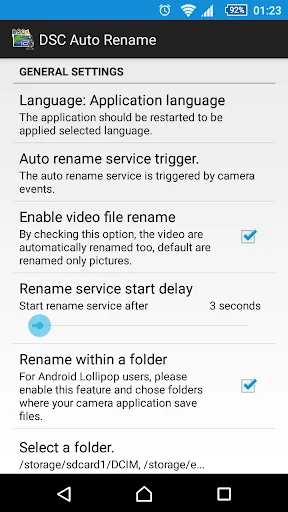
As on KitKat case, the application can rename files from internal memory. For external memory should be enabled the "Rename within a folder" and should be selected which folder are used by your camera app to save files. For consistency please select also folders from internal memory.
If you have issues on Lollipop, select only DCIM folder and not the subfolder, like 100ANDRO, make a selection only like: SD Card/DCIM
Android 7 (Nougat ) advice Set the rename service trigger to "Media content observer" to have files automatically renamed if the service is not triggered when the camera events it is selected.
Description I made this application to rename pictures and clips from my phone Sony Xperia V automatically based on date and time of file, from DSC_0001.JPG or MOV_0001.mp4 to 20150414_213616.JPG or 20150414_090523.mp4.
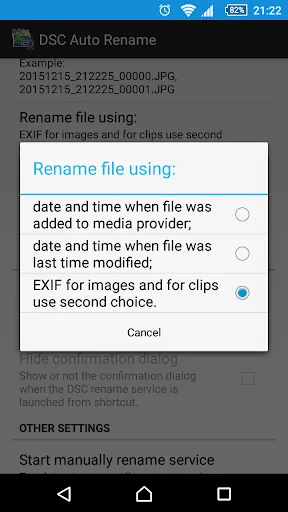
Rename file using the date and time: - when the file was added to the media provider;
- when the file was last modified;
- ONLY for the pictures can be used EXIF info, clips do not have support for it.
The user can limit the rename process within some desired folders, including the subfolders, using the option: "Rename within a folder".
The file rename format use Java date and time formats:
- yyyy for years;
- MM for month;
- dd for day;
- HH for hour;
- mm for minutes;
- ss for seconds;
- SSS for milliseconds.
See more format information: http://docs.oracle.com/javase/6/docs/api/java/text/SimpleDateFormat.html
Unfortunately due to EXIF specifications and Android file name date time the milliseconds are not used internally.
Define file name patterns individually for pictures or clips. Wildcards * or ? can be used too, the pattern matching is not case sensitive so can be used lower or upper case or combined, the result will be the same.
Do not use too generics pattern like *.JPG to avoid infinite renaming looping.
The rename service, if is enabled, automatically is triggered when the image or movie file is saved on the device media storage using two ways:
1. events send by the camera, but the camera application must send com.android.camera.NEW_PICTURE or android.hardware.action.NEW_PICTURE, otherwise, the rename service is not triggered.
2. events send by the Media content changes, this imply a service which observ all changes on the media content.
The application sources are available at: https://github.com/ciubex/dscautorename
The oldest APK versions are available on the page https://github.com/ciubex/dscautorename/commits/master/apk
I made this application for my own proposes and I want to share with other users.
For translations please use: https://hosted.weblate.org/projects/dsc-auto-rename/strings/
Original English file: https://goo.gl/6D13FR
Thank you for your support and feedback!
Comparable Android apps
The five apps in Tools with the closest revenue to DSC Auto Rename. Click any to see its detail page.
Each forecast combines App Store rating, ratings count, monetisation model, pricing tier, IAP signals and ad-supported flag.
The base estimate is then multiplied by a per-category scaling factor learned from apps with founder-verified MRR.
Every number on this page comes from public APIs and bumetric's own snapshot history.
Full methodology covers input variables, accuracy bands per category and how we treat apps without comparable anchors.
See also the live data on DSC Auto Rename's tracker page for current rating, reviews and snapshot timeline.
Building something similar? Get a free AI audit with $-revenue forecasts for every recommendation.

 Device Info: IMEI & Hardware
 Like Survey
 Qibla Finder Compass
 Handwriter: text to assignment
 Dorch - Front & Back Flashligh