What Easy Call Forwarding actually does (from store listing)
<b>Easy Call Forwarding</b>
<b>Simple. Smart. Effortless Call Control.</b>
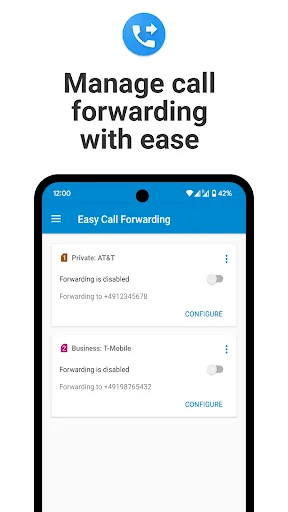
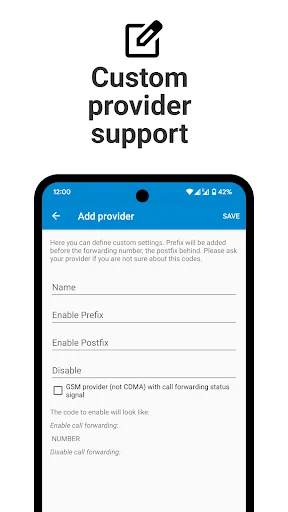
Tired of digging through endless menus or typing confusing codes just to forward a call? <b>Easy Call Forwarding</b> is your solution — a sleek, ad-free Android app that lets you configure call forwarding in just a few taps.
<b>✅ Effortless Setup</b>
No more hassle. Set up call forwarding with ease — no special codes, no tech knowledge required.
<b>📲 One-Tap Access</b>
Use the included widget to enable o…
Tired of digging through endless menus or typing confusing codes just to forward a call? Easy Call Forwarding is your solution — a sleek, ad-free Android app that lets you configure call forwarding in just a few taps.
✅ Effortless Setup No more hassle. Set up call forwarding with ease — no special codes, no tech knowledge required.
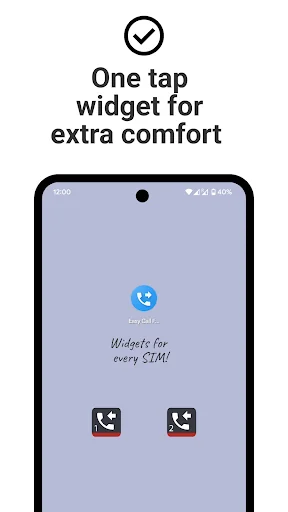
📲 One-Tap Access Use the included widget to enable or disable call forwarding right from your home screen. Fast, convenient, and always at your fingertips.
📶 Dual SIM? No Problem. Unique Dual-SIM support lets you manage call forwarding settings separately for each SIM card.
✨ Modern Design Crafted with the latest Material Design, the app looks and feels right at home on any modern Android device.
🎯 Try Free for 30 Days Experience the full power of Easy Call Forwarding with no ads, no limitations, and no interruptions for 30 days. Love it? Keep it going with a low annual fee via in-app purchase.
🛠️ How It Works Easy Call Forwarding uses industry-standard USSD codes to communicate directly with your mobile provider. Once activated, calls are forwarded before they ever reach your phone — even if your battery dies or you’re out of signal.
Note: Some providers may charge for call forwarding. Please confirm with yours.
⚠️ Important Notes • Unconditional forwarding only: The app currently supports only this mode.
• Android 14: Some users (e.g., on Verizon, Boost, Sprint) might need to manually confirm forwarding actions.
• Uninstalling the app will NOT stop call forwarding. Use the app or contact your provider to disable it.
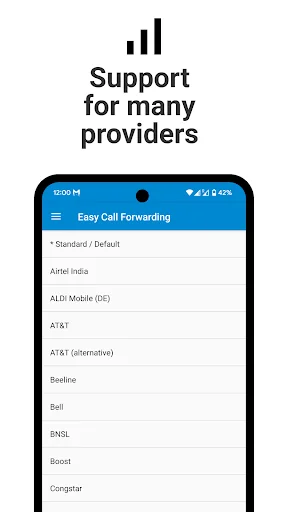
✅ Supported Providers (examples): • AT&T
• Verizon
• T-Mobile (Contract)
• Vodafone
• Orange
• Jio
• Airtel
• Telstra
• Singtel
• O2
• Most European providers
Not supported by: T-Mobile Prepaid US, Republic Wireless, MetroPCS (w/o Value Bundle), ALDI/Medion Mobile (Germany)
💡 Need Help? Help & Tutorial: www.simple-elements.com/apps/android/easy-call-forwarding/help
Still stuck? Email us at android-support@simple-elements.com or use the in-app feedback button.
Take control of your calls — the easy way. 🎉 Download Easy Call Forwarding today and enjoy hassle-free call management!
Comparable Android apps
The five apps in Productivity with the closest revenue to Easy Call Forwarding. Click any to see its detail page.
Each forecast combines App Store rating, ratings count, monetisation model, pricing tier, IAP signals and ad-supported flag.
The base estimate is then multiplied by a per-category scaling factor learned from apps with founder-verified MRR.
Every number on this page comes from public APIs and bumetric's own snapshot history.
Full methodology covers input variables, accuracy bands per category and how we treat apps without comparable anchors.
See also the live data on Easy Call Forwarding's tracker page for current rating, reviews and snapshot timeline.
Building something similar? Get a free AI audit with $-revenue forecasts for every recommendation.

 My Files
 DynamicG Google Drive Plugin
 myFPT
myFPT
 RNP MOVIL
 Create My Notes - Notes, Diary