Live screenshots from the App Store, captured by our snapshot worker. Tap any image to enlarge.
Evernote is your second brain — the place to keep everything that matters and find it again the moment you need it.
"…an invaluable tool for organizing a messy digital life." — The New York Times
Capture a thought, a to-do, a photo, or a whole project, then let Evernote help you organize it, make sense of it, transcribe a meeting or tidy up a rough draft, and bring it back exactly when it counts. From the first spark of an idea to the finished plan, it all lives in one calm, searchable place —…
Read full description →
Evernote is your second brain — the place to keep everything that matters and find it again the moment you need it.
"…an invaluable tool for organizing a messy digital life." — The New York Times
Capture a thought, a to-do, a photo, or a whole project, then let Evernote help you organize it, make sense of it, transcribe a meeting or tidy up a rough draft, and bring it back exactly when it counts. From the first spark of an idea to the finished plan, it all lives in one calm, searchable place — at work, at home, and everywhere in between.
CAPTURE ANYTHING
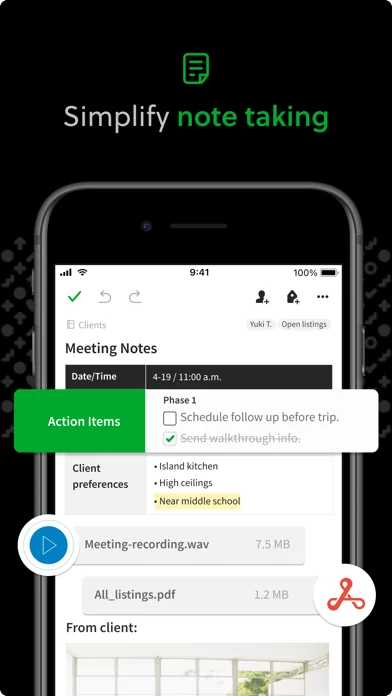
Jot a quick note, build a checklist, save a photo, an email or a PDF, or clip an article from the web before it disappears. Type it out, write by hand, snap a picture, or record a voice memo — whatever's fastest in the moment. Your ideas land in one place, ready when you are, so nothing gets lost on a sticky note or buried in your inbox.
STAY ORGANIZED, EFFORTLESSLY
Sort notes into notebooks and add tags, or just start writing and let structure follow. Group related notes together, pin the ones you reach for most, and keep work, school, and life neatly apart — without spending your day tidying up. Evernote keeps things in order so you can stay focused on the thinking.
FIND WHAT YOU NEED, FAST
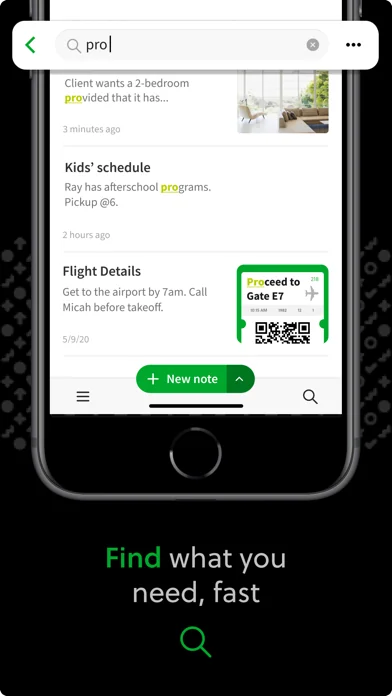
Search across everything you've saved — including the text inside your images and PDFs. Ask in plain language and Semantic Search surfaces the right note, even when you can't remember the exact words or where you put it. The more you save, the more useful it becomes.
MEET YOUR AI ASSISTANT
Your AI Assistant clears away the busywork so you can stay in the thinking, working quietly alongside you. Record a conversation and Evernote AI transcribes and summarizes it for you; AI Transcription turns audio, images, and video into text; and AI Edit cleans up a rough draft, shortens it, or changes the tone while keeping it in your own voice.
PLAN YOUR DAY
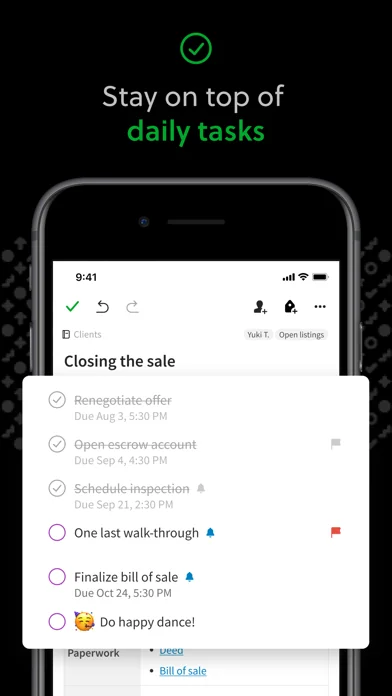
Add due dates, reminders, and to-dos right inside your notes, so the next step is always clear and nothing slips through the cracks. Check things off as you go and keep momentum without switching apps.
WORK EVERYWHERE
Your notes sync automatically across iPhone, iPad, Mac, Windows, and the web — start on one device and pick up right where you left off on another. Evernote works offline too, so you're never locked out of your own ideas, even when you're far from a signal.
FOR WORK, SCHOOL, AND LIFE
- Plan projects, prep meetings, and keep every detail in one place.
- Take lecture notes, organize research, and study smarter for exams.
- Save recipes, plan trips, track goals, and remember the little things that matter.
- Keep a journal, draft your next big idea, and capture inspiration whenever it strikes.
"Its magic lies in its flexibility." — PCMag
However you think, and whatever you're working on, Evernote helps you remember everything and get it done. Capture today's idea — and find it the moment you need it.
The five apps in Productivity with the closest revenue to Evernote - Notes Organizer. Click any to see its detail page.
Each forecast combines App Store rating, ratings count, monetisation model, pricing tier, IAP signals and ad-supported flag.
The base estimate is then multiplied by a per-category scaling factor learned from apps with founder-verified MRR.
Every number on this page comes from public APIs and Bumetric's own snapshot history.



 TOR Browser: OrNET Onion + VPN
 Opal: Wenig Bildschirmzeit
 Paper: Sketch, Draw & Create
 Swann Security
 Poe – Fast AI Chat