What Float Tube – Floating Player actually does (from store listing)
Float Tube - Floating Popup Video Player & PiP Overlay
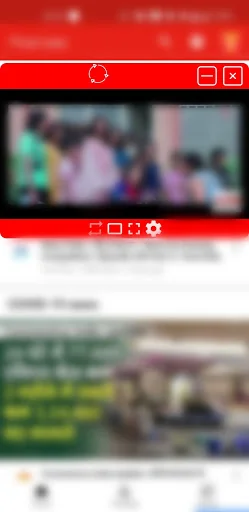
Float Tube is a floating video player and popup PiP player that lets you watch videos in a mini overlay window while using any other app. Chat, browse, scroll, or work - your video keeps playing on top, never paused, never minimized.
Whether you need a picture-in-picture player for tutorials, a floating mini player for music videos, or a popup overlay for podcasts, Float Tube is the lightest and fastest floating video player on Android…
Float Tube - Floating Popup Video Player & PiP Overlay
Float Tube is a floating video player and popup PiP player that lets you watch videos in a mini overlay window while using any other app. Chat, browse, scroll, or work - your video keeps playing on top, never paused, never minimized.
Whether you need a picture-in-picture player for tutorials, a floating mini player for music videos, or a popup overlay for podcasts, Float Tube is the lightest and fastest floating video player on Android.
★ KEY FEATURES ★
• Floating popup video player - watch videos in a movable window
• Picture-in-Picture (PiP) mode - true PiP overlay player
• Background video playback - audio keeps playing with screen off
• Mini player window - resize and drag anywhere on screen
• Always-on-top overlay - stays above every other app
• One-tap lock - pin the floating window in place
• Minimize mode - continue audio without the window
• Full playlist support - queue videos and play non-stop
• Smart playback controls - play, pause, seek from the floating bar
• Lightweight & fast - minimal battery and RAM usage
★ PERFECT FOR ★
• Watching tutorials while taking notes
• Following lectures while messaging classmates
• Listening to music videos in the background
• Multitasking with podcasts and interviews
• Floating player while browsing or chatting on WhatsApp, Instagram, Chrome
• Playing video while using other apps - no interruptions
★ WHY FLOAT TUBE? ★
Most video apps stop the moment you switch screens. Float Tube changes that. With its floating popup player and PiP overlay mode, your video stays visible and audible no matter what you're doing on your phone.
The popup video player floats above every app. The mini player is fully resizable. The PiP mode works system-wide. And background video playback keeps audio running even when the screen is off.
It's the ultimate float player and popup video player for Android multitasking.
★ HOW IT WORKS ★
1. Open Float Tube
2. Search or paste a video link
3. Tap to launch the floating popup player
4. Drag, resize, or lock the mini window
5. Switch to any other app – the video keeps playing on top
★ FLOATING PLAYER. POPUP MODE. PIP OVERLAY. ★
Float Tube combines all three in one lightweight app:
• Floating Window - move and resize freely
• Popup Player - always on top of other apps
• PiP Mode - true picture-in-picture overlay
• Mini Player - compact view for one-hand use
• Background Mode - audio-only playback
★ FREE & LIGHTWEIGHT ★
Float Tube is free, fast, and built to be the simplest way to watch video while multitasking. No bloated features. No complicated setup. Just a clean floating video player that works.
★ PERMISSIONS ★
Float Tube needs the "Display over other apps" permission to show the floating popup window above other apps. This is required for any floating player or PiP overlay app on Android.
★ SUPPORT ★
Have a feature request or found a bug? Email us at floatingutub@gmail.com - we read and reply to every message.
Download Float Tube now and turn your phone into a true multitasking machine with the best floating video player, popup PiP player, and mini overlay window for Android.
Comparable Android apps
The five apps in Music & Audio with the closest revenue to Float Tube – Floating Player. Click any to see its detail page.
Each forecast combines App Store rating, ratings count, monetisation model, pricing tier, IAP signals and ad-supported flag.
The base estimate is then multiplied by a per-category scaling factor learned from apps with founder-verified MRR.
Every number on this page comes from public APIs and bumetric's own snapshot history.
Full methodology covers input variables, accuracy bands per category and how we treat apps without comparable anchors.
See also the live data on Float Tube – Floating Player's tracker page for current rating, reviews and snapshot timeline.
Building something similar? Get a free AI audit with $-revenue forecasts for every recommendation.





 Loud Volume Booster Upto 200%
 Live French Radio FM Online
 Volume Booster Plus
 Super Voice Changer - Editor
 WavePad Audio Editor