Live screenshots from the App Store, captured by our snapshot worker. Tap any image to enlarge.
Managing Google Forms on iPhone has never been easier.
Whether you're a teacher building a classroom quiz, a business owner collecting customer feedback, or an event organizer tracking registrations — Forms for Google Drive puts the full power of form creation right in your pocket.
Create forms anywhere, anytime
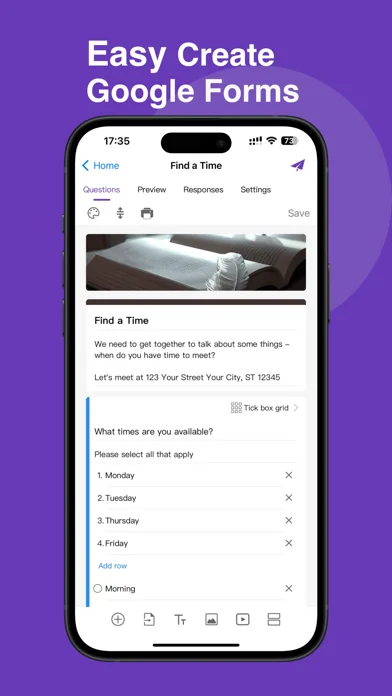
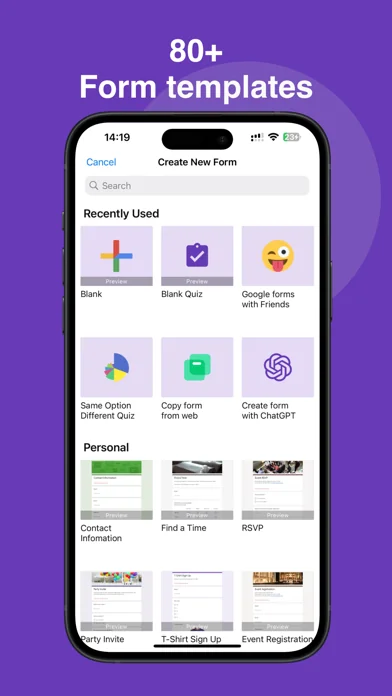
Stop being chained to your laptop. With Forms for Google Drive, you can create a brand new form directly from your iPhone in minutes. Choose from a wide range of templates for surveys, …
Read full description →
Managing Google Forms on iPhone has never been easier.
Whether you're a teacher building a classroom quiz, a business owner collecting customer feedback, or an event organizer tracking registrations — Forms for Google Drive puts the full power of form creation right in your pocket.
Create forms anywhere, anytime
Stop being chained to your laptop. With Forms for Google Drive, you can create a brand new form directly from your iPhone in minutes. Choose from a wide range of templates for surveys, quizzes, polls, order forms, event sign-ups, feedback forms, and more. Edit questions, reorder sections, add images, and customize themes — all without opening a browser.
Built for teachers and students
Running a classroom quiz or end-of-term exam? Need students to fill out a registration or attendance form? Forms for Google Drive is designed with educators in mind. Create multiple-choice quizzes, assign point values, set correct answers, and review student responses — all from your Phone. Share forms instantly via QR code or link so students can respond from any device.
Perfect for teams and businesses
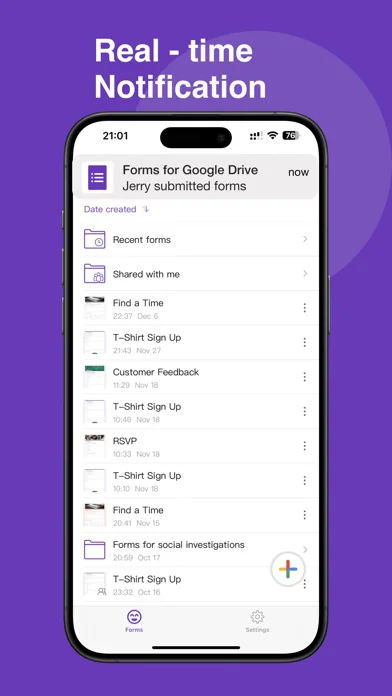
Collecting employee feedback, running a workplace survey, or managing event registrations? Forms for Google Drive makes it simple to build professional forms and distribute them to your entire team. Assign collaborators, track who has responded, and get notified the moment a new submission comes in. No more waiting until you're back at your desk to stay on top of responses.
Real-time responses, beautiful insights
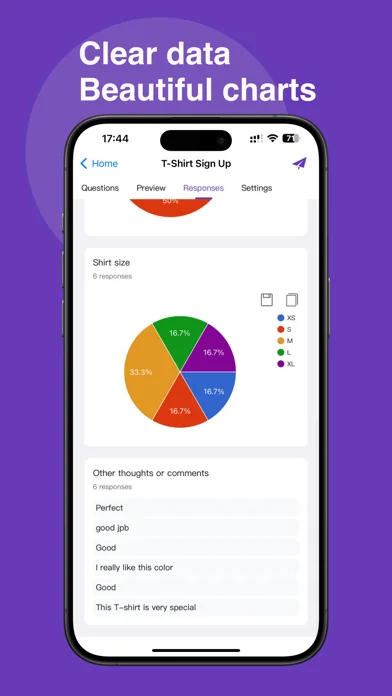
The moment someone fills out your form, you'll know. Real-time push notifications alert you to every new submission. Open the app to see responses visualized in clear, intuitive charts and graphs — broken down by question, by individual, or as an overall summary. Filter responses by date, email, or score to find exactly what you're looking for.
Export and share with ease
Need to dig deeper into your data? Export responses directly to Google Sheets for advanced analysis, or download as CSV or Excel for use in any spreadsheet tool. Share your form via email, WhatsApp, Slack, Facebook, LinkedIn, iMessage, or any other platform — or generate a custom QR code that anyone can scan to jump straight to your form.
Seamlessly connected to Google
Forms for Google Drive works in harmony with your entire Google Workspace. Your forms sync instantly with Google Drive, Google Sheets, and Google Docs. Open any existing form from your Drive, make edits on the go, and changes reflect everywhere automatically. Whether you're managing one form or fifty, everything stays organized and up to date.
Who is this app for?
* Teachers creating quizzes, exams, and classroom surveys
* HR teams running employee satisfaction surveys and onboarding forms
* Event planners collecting RSVPs and registration data
* Small business owners managing order forms and customer feedback
* Researchers and students conducting academic surveys and questionnaires
* Anyone who manages forms in Google Drive and wants to work entirely from iPhone
Disclaimer: This is an independent third-party application and is not affiliated with, endorsed by, or associated with Google. All trademarks are the property of their respective owners.
Terms of Service: https://gformsfree.com/Terms.html
Privacy Policy: https://gformsfree.com/PrivacyPolicy.html
Contact: blueberryjamapps@gmail.com
Forms Pro Subscription $5.99/week · $59.99/year · $99.99 lifetime
Payment is charged to your iTunes account upon purchase confirmation.
Subscriptions automatically renew unless cancelled at least 24 hours before the end of the current billing cycle. To cancel, go to Settings → Apple ID → Subscriptions on your iOS device.
The five apps in Productivity with the closest revenue to Forms for Google Drive. Click any to see its detail page.
Each forecast combines App Store rating, ratings count, monetisation model, pricing tier, IAP signals and ad-supported flag.
The base estimate is then multiplied by a per-category scaling factor learned from apps with founder-verified MRR.
Every number on this page comes from public APIs and Bumetric's own snapshot history.


 winSIM Servicewelt
 My Calendar - Shift schedule
 Video downloader with VPN
 Auto Klicker・Auto-Scrollen Pro
 Xtreme Connected Simple Home