What GS Watchfaces actually does (from store listing)
🚨 Important Compatibility Note 🚨
The classic watch faces managed by this app are NOT compatible with newer Wear OS watches (like Galaxy Watch 7 or Pixel Watch 3).
Upgraded your watch? Keep your favorite features! Add our live weather, tide charts, and custom data to any modern watch face with Wear OS Toolset:
https://play.google.com/store/apps/details?id=com.gs.complications.suite
ATTENTION!
To be able to use this application you'll need to have installed a compatible watchface on you…
🚨 Important Compatibility Note 🚨
The classic watch faces managed by this app are NOT compatible with newer Wear OS watches (like Galaxy Watch 7 or Pixel Watch 3).
Upgraded your watch? Keep your favorite features! Add our live weather, tide charts, and custom data to any modern watch face with Wear OS Toolset:
https://play.google.com/store/apps/details?id=com.gs.complications.suite
ATTENTION!
To be able to use this application you'll need to have installed a compatible watchface on your Samsung or WearOS smartwatch.
Try the app functionality now with one of the free compatible watchfaces. (links inside the app).
To be able to show notifications from watchfaces, this application needs to be excluded from battery optimizations and also show a persistent notification. For TizenOS smartwatches, this is also needed for the phone battery to sync with the watchface.
The above notification will only be shown when you're using a supported watchface. It will be removed and reappear automatically when the watchface will disconnect/connect.
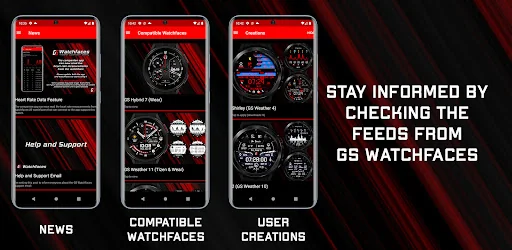
Check the app for a list of compatible watchfaces.
The app is fully translated into English, Čeština, Dansk, Ελληνικά, Français, 한국인, and Русский. (if you want to help in translating the app check the translation button in the app)
Application functions
- Edit available watchface settings. You can completely customize the watchface from here without entering its settings menu.
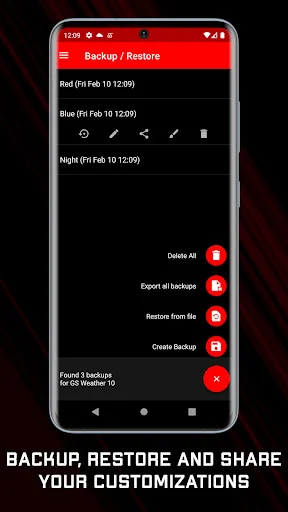
- Backup up different customizations per watchface and restore them whenever you want.
- Check the weather downloaded by the watchface on your phone's screen (only for supporting watchfaces).
- Check the Tides downloaded by the watchface on your phone's screen (only for supporting watchfaces).
- Check heart rate data recorded by the watchfaces.
- GS Watchfaces news feed
- Check and use submitted customizations by other users.
- FAQs in the app
- Send phone battery info to the watchface (for TizenOS smartwatches)
- Send a notification to watch when the phone battery reaches a specified limit.
- Receive notifications from the watchface about the watch battery and your heart rate. You can set when and if you want to receive them.
- Share your customizations with others using the same watchface.
Full version
The full version of the app does all of the above and:
- Edit the watchface settings directly on the app in a live preview. Create the customization you want and then send it to the watchface in one go. This makes the whole process way easier and consumes less battery on the watch as it doesn't need the watch screen to remain turned on while you edit its settings.
- Edit the backups you have previously created.
- No ads.
- Ability to change the time axis of the weather charts inside the weather page.
Creations Disclaimer
Your backups can be sent to GS Watchfaces so they can be added to the creations page of the app so that other users can use them.
The customization file will be sent to GS Watchfaces and nothing else, so please name the backup, with the name you want it to appear in the creations feed, prior to sending it, and also allow some time before it actually appears on the feed, as this is done manually.
Comparable Android apps
The five apps in Tools with the closest revenue to GS Watchfaces. Click any to see its detail page.
Each forecast combines App Store rating, ratings count, monetisation model, pricing tier, IAP signals and ad-supported flag.
The base estimate is then multiplied by a per-category scaling factor learned from apps with founder-verified MRR.
Every number on this page comes from public APIs and Bumetric's own snapshot history.
Full methodology covers input variables, accuracy bands per category and how we treat apps without comparable anchors.
See also the live data on GS Watchfaces's tracker page for current rating, reviews and snapshot timeline.
Building something similar? Get a free AI audit with $-revenue forecasts for every recommendation.




 Self Storage Management Of Cal
 Aluminium Rate Calculator
 Lucky Draw - Random game
 慈濟系統登入工具
 Matrix- QR Code Scanner