How much does Ham Log | QTH Locator | My UTC earn?
Android app
from Muhammad Zakwan
· Tools
ML forecast★ 4.1 · 666Free
~402/mo
ML revenue forecast.
Calibrated against 77129 apps in this category.
Confidence band
±15%
High — many comparable apps with verified data
At a glance
Earns 2.13× more than the category median (189/mo).
Ranks #14,892 of 77,129 in Tools (top 19.3% by revenue).
Launched Dec 20, 2015 · last updated Jul 18, 2024.
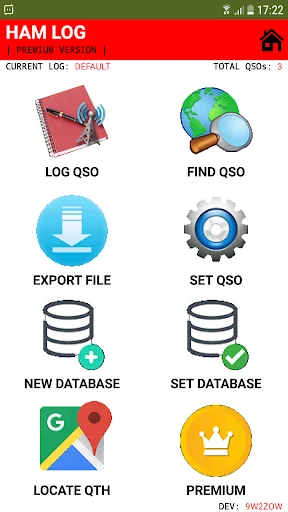
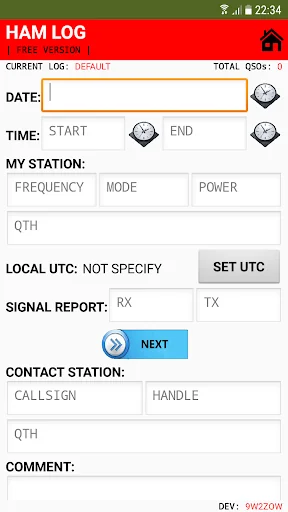
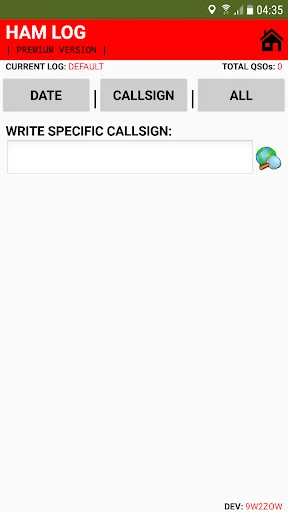
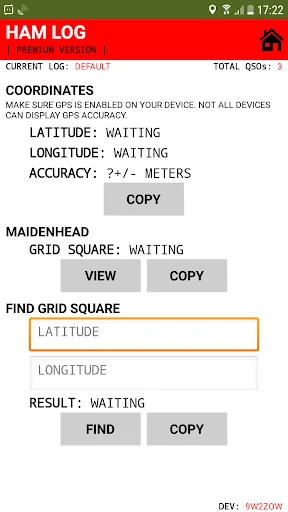
What the app looks like
Live screenshots from the Play Store, captured by our snapshot worker. Tap any image to enlarge.
Ham Log | QTH Locator | My UTC's revenue trajectory
Forecast revenue from snapshot history. Last 1 months.
Where Ham Log | QTH Locator | My UTC sits in Tools
Revenue distribution of 77129 comparable apps. Ham Log | QTH Locator | My UTC highlighted.
Ham Log | QTH Locator | My UTC vs comparable apps
Revenue trajectory side-by-side. Bold = Ham Log | QTH Locator | My UTC, ghosted = peers.
App spec
Version
2.8
Last update
Jul 18, 2024
Launched
Dec 20, 2015
Price
Free
Monetization
Free
What Ham Log | QTH Locator | My UTC actually does (from store listing)
[INTRO]
Ham log will allow user to log, delete or edit your amateur radio communication.
[MULTIPLE LANGUAGES]
Currently HamLog support 8 different languages. All languages database is updated automatically. No need to update HamLog app. Just wait for the pop-up update notification.
1. English.
2. Malay.
3. German.
4. Polish.
5. French.
6. Spanish.
7. Japanese.
8. Italian.
If you want to help to translate HamLog into your language, just let me know.
[IMPORTA…
Ham log will allow user to log, delete or edit your amateur radio communication.
[MULTIPLE LANGUAGES]
Currently HamLog support 8 different languages. All languages database is updated automatically. No need to update HamLog app. Just wait for the pop-up update notification.
1. English.
2. Malay.
3. German.
4. Polish.
5. French.
6. Spanish.
7. Japanese.
8. Italian.
If you want to help to translate HamLog into your language, just let me know.
[IMPORTANT]
All the datas is saved in the HamLog app virtually. So do not clear your app cached data.
[PERMISSION REQUIRED]
HamLog can be used without need any important permissions. Below permission can be disabled at any time.
1. External storage: No longer needed.
2. Location: Only required when you want to use “Locate QTH” feature.
[FEATURES]
1. “Find Grid” feature. Just fill in correct latitude and longitude.
2. “Auto Time Sequence” feature for each log when using “Next” button. So, you don’t need to add end time button to save the log.
3. “New Database” feature that support multiple QSO log.
4. “Contest” feature option when create new QSO log. Next you can export your log in “Cabrillo” format. The file will be named HamLog.log file and located in your HamLog folder.
5. “Set Database” feature for finding specific QSO log.
6. “Pending” feature to prevent lost QSO when you forgot to save it.
7. Auto fill function for the date and time. Just click the “Clock” button once.
8. Log multiple contacts just by using “Next” button function.
9. You can use comma in the “My QTH“, “Contact QTH” and “Comment” textbox.
10. Find “Local UTC” function. This feature do not require internet connection. You can also choose your local UTC manually.
11. Edit or replace the saved log.
12. Deleted the saved log.
13. “Pop-Up List” for the radio mode.
14. “Find QSO” feature. Its have 3 major button. “Callsign” button which allow user to search via callsign. “Date” button that allow user to search via specific date. Lastly, is “All” button which will list out all the saved dates. So, user just need to choose which date to review all the saved QSO for that date.
15. “Relist” feature. Just long click, “Callsign“, “Date” or “All” button to relist again current database tag.
16. Detect “Dupe” feature. Now, you can know if the callsign entered is already is your log or not.
17. Auto “QTH Locator” feature to know your latitude, longitude and and 6 digit maidenhead locator. Yet, it required your phone GPS function to be switched on first.
18. “Export” log in CSV or ADIF format.
19. Backup all your datas. Now, you can transfer all the datas from your HamLog app to another phone.
20. “Import” log from CSV or ADIF file.
21. Pick your own file path to “Restore” or “Import” your QSO datas.
22. Option to have “Locate My QTH” button in logging page.
[HOW TO SEARCH USING KEYWORDS]
User can search using three different symbols which are “*“, “_” or “+“.
2. Just add star “*” symbol after any keywords. This function allow user to find specific item that must have this one piece of text.
3. Just add underscore “_” symbol between two keywords. This function allow user to find specific item that must have this two pieces of text.
4. Just add plus “+” symbol between two keywords. This function allow user to find specific item that have one of this two pieces of text.
5. For dates must include separator symbol “/” or “–“:
– To find specific day use 12/* or -12*.
– To find specific month use /4/* or -04-*.
– To find specific year use /2021* or 2021-*.
[HOW TO EXPORT ADIF FILE]
Kindly visit zmd94.com/log to learn more.
[HOW TO RESTORE DATABASE]
1. To restore old database, just click “Restore File” button in the set QSO page.
2. Next, select your restore file.
[HOW TO IMPORT ADIF FILE]
Kindly visit zmd94.com/log to learn more.
[HOW TO IMPORT CSV FILE]
Kindly visit zmd94.com/log to learn more.
Ham log is fully designed by using MIT App Inventor 2. Regards, 9W2ZOW.
Comparable Android apps
The five apps in Tools with the closest revenue to Ham Log | QTH Locator | My UTC. Click any to see its detail page.
Each forecast combines App Store rating, ratings count, monetisation model, pricing tier, IAP signals and ad-supported flag.
The base estimate is then multiplied by a per-category scaling factor learned from apps with founder-verified MRR.
Every number on this page comes from public APIs and bumetric's own snapshot history.
Full methodology covers input variables, accuracy bands per category and how we treat apps without comparable anchors.
See also the live data on Ham Log | QTH Locator | My UTC's tracker page for current rating, reviews and snapshot timeline.
Building something similar? Get a free AI audit with $-revenue forecasts for every recommendation.


 PRE StudBook app
 Apollo VPN: Fast Unlimited VPN
 MAX! Heating control
 Live Now - Live Stream
 Apa Nova București