What HandCalendar (Handwriting) actually does (from store listing)
You can take a memo by hand and save it to the calendar.
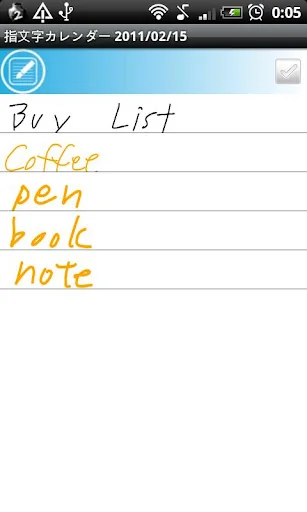
Write a diary, take a memo, make a shopping and todo list by hand.
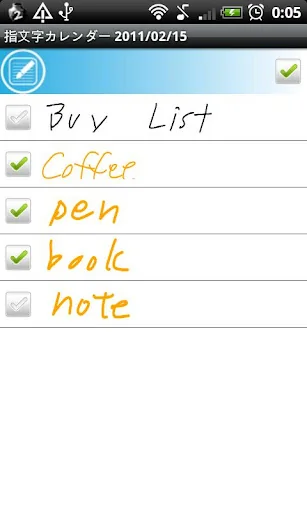
You can insert check box in your handwritten memo.
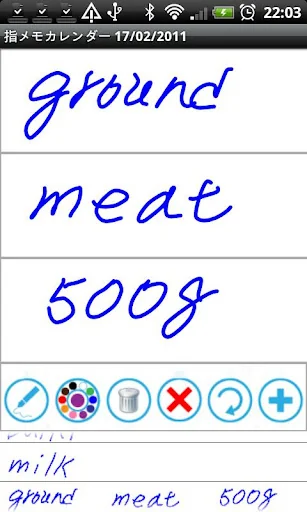
The screen of handwritten memo is divided in three lines and those three make one row of a memo.
You can add memo by hand without limit.
Your handwritten memo will be displayed in the list of the calendar when you register.
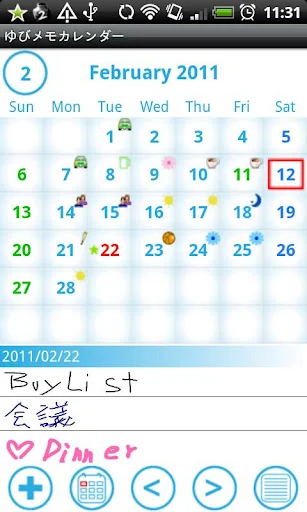
When there is the handwritten memo on a date, you can see an icon on the calendar.
Select one …
You can take a memo by hand and save it to the calendar.
Write a diary, take a memo, make a shopping and todo list by hand.
You can insert check box in your handwritten memo.
The screen of handwritten memo is divided in three lines and those three make one row of a memo.
You can add memo by hand without limit.
Your handwritten memo will be displayed in the list of the calendar when you register.
When there is the handwritten memo on a date, you can see an icon on the calendar.
Select one memo from the list and your handwritten memo will be displayed to another
screen. Then press "Menu" button, select "Mail" to send your handwritten memo by email.
There are 10 colors to choose from, so let's enjoy making your colorful memo by hand!
There are 3 types of pen to choose for making memo by hand.
*Use the white color as eraser.
*Undo up to 3 times.
Menu
・Add a memo by hand.
・Move to today's date.
・Go to previous day of the calendar.
・Go to next day of the calendar.
・The list of saved handwritten memo.
You can add and save tag name for your handwritten memo, for example, "Shopping List",
"Todo" or "Meeting", and search it later by the tag name.
Add icons (symbols) on your calendar: press "Menu", select "Icon", select a icon you like and tap the
date on which you want to add.
You can select the beginning of the week from "Setting".
※Pay version:No ads display
Comparable Android apps
The five apps in Lifestyle with the closest revenue to HandCalendar (Handwriting). Click any to see its detail page.
Each forecast combines App Store rating, ratings count, monetisation model, pricing tier, IAP signals and ad-supported flag.
The base estimate is then multiplied by a per-category scaling factor learned from apps with founder-verified MRR.
Every number on this page comes from public APIs and bumetric's own snapshot history.
Full methodology covers input variables, accuracy bands per category and how we treat apps without comparable anchors.
See also the live data on HandCalendar (Handwriting)'s tracker page for current rating, reviews and snapshot timeline.
Building something similar? Get a free AI audit with $-revenue forecasts for every recommendation.


 사업 수입지출 손익 관리
 Vashikaran (वशीकरण) Mantra Hin
 Zitate Sprüche Leben
 PapillApp
 State Quarters