What HEIC to JPG Converter actually does (from store listing)
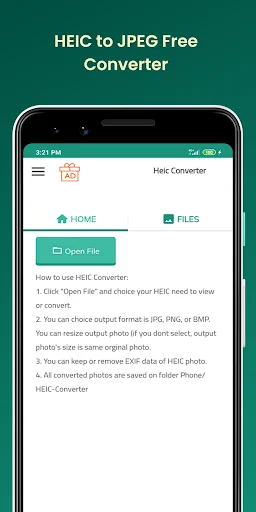
How to use HEIC Converter:
1. Click "Open File" and choice your HEIC need to view or convert.
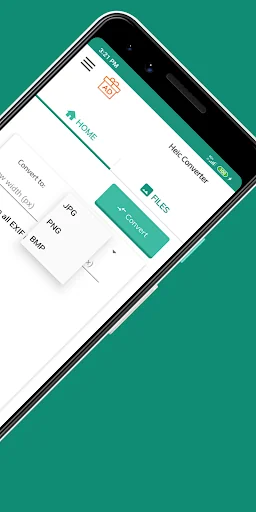
2. You can choice output format is JPG, PNG, or BMP. You can resize output photo (if you dont select, output photo's size is same orginal photo.
3. You can keep or remove EXIF data of HEIC photo.
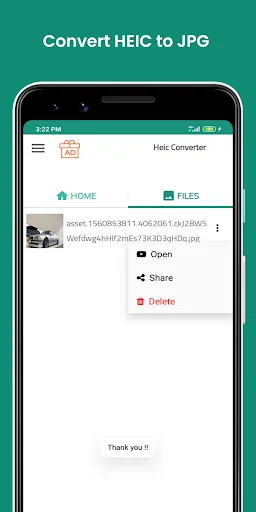
4. All converted photos are saved on folder Phone/HEIC-Converter
Features:
- Keep or remove EXIF metadata
Most cameras embed hidden information, called metadata, into every photograph taken. With our c…
How to use HEIC Converter:
1. Click "Open File" and choice your HEIC need to view or convert.
2. You can choice output format is JPG, PNG, or BMP. You can resize output photo (if you dont select, output photo's size is same orginal photo.
3. You can keep or remove EXIF data of HEIC photo.
4. All converted photos are saved on folder Phone/HEIC-Converter
Features:
- Keep or remove EXIF metadata
Most cameras embed hidden information, called metadata, into every photograph taken. With our converter, you can remove EXIF metadata from your iPhone pictures to save more storage space on your device.
- Keep original size & quality
Maintain good quality of converted files, while preserving their full resolution and quality — your photos will keep original DPI and dimensions after being converted to JPEG or PNG.
- No registration required
We don’t need your e-mail, name, location or any other personal data. We collect only file name and associated type of file conversion for each uploaded file.
- Change Your HEIC files to JPEG or PNG
Convert your MacOS and iOS photos to widely used JPEG or PNG without compromising quality or changing your workflow! With our file converter app, you can take up Apple’s new HEIC (HEIF) format without worrying about compatibility with other devices or software.
Nowadays JPEG is present in every image workflow, from image editors social networks, browsers, email clients, and virtually every piece of hardware or software that can show pictures. JPEG is an open file format standard and still the most popular image format on the web. Moreover, HEIF and HEVC is clouded by expensive patent licensing concerns, which means there could be legal implications to implementing HEIF support, particularly in paid software or a hardware product.
Q: What can I do with this service?
You can convert HEIC images to JPEG or PNG file format.
Q: What image formats can I convert?
Currently, images in HEIC and HEIF format are supported.
Q: What image formats can I convert to?
Our HEIC converter supports JPEG, PNG and BMP as output formats.
Q: What is HEIF format?
HEIF is short for High Efficiency Image Format. HEIF uses video compression technology called HEVC (High Efficiency Video Coding). It is a standard developed by MPEG, the committee who developed all of the standard video compression technologies — MPEG-1, MPEG-2, MPEG-4, H.264/AVC and the newest codec HEVC also known as H.265. Images are compressed as HEIF, which is saved with extension .heic. In addition, HEIF can be used to capture iPhone burst photography (multi-exposure shots), “live” photos and more .
Q: What is HEIC file?
HEIC file is a raster image saved in the High Efficiency Image Format (HEIF). HEIC is a format that contains one or multiple HEIF image sequences. Released on September 19, 2017, mobile operating system iOS 11 introduced it as the new alternative to default image format for iPhone. Apple Inc. announced that it was replacing JPEG files with this new image format. It has a more advanced and modern compression algorithms which allow digital photographs to be taken in smaller file sizes, and retain much higher image quality than JPEGs.
Q: What is Exif metadata?
The Exchangeable image file format (EXIF) is a standard that defines the formats of image, audio, and metadata tags used by cameras, phones, and other digital recording devices. Exif metadata, which can be found if you open image file’s properties, includes a range of settings such as ISO speed, shutter speed, aperture, white balance, camera model, date and time, lens type, focal length and more.
Comparable Android apps
The five apps in Photography with the closest revenue to HEIC to JPG Converter. Click any to see its detail page.
Each forecast combines App Store rating, ratings count, monetisation model, pricing tier, IAP signals and ad-supported flag.
The base estimate is then multiplied by a per-category scaling factor learned from apps with founder-verified MRR.
Every number on this page comes from public APIs and bumetric's own snapshot history.
Full methodology covers input variables, accuracy bands per category and how we treat apps without comparable anchors.
See also the live data on HEIC to JPG Converter's tracker page for current rating, reviews and snapshot timeline.
Building something similar? Get a free AI audit with $-revenue forecasts for every recommendation.


 Eye Color Changer Photo Editor
 Collage Maker & Photo Editor
 village life: farm game
 Magic Nikon ViewFinder
 Photo Mate R3

