What Hourly Reminder Alarm Pro actually does (from store listing)
It's really easy to use!
Just power on(right of top) the app then will speak/talk the time with text from 8am to 10 pm everyday automatically.
(Don't worry! Nothing to set except clicking Power On('Activated Speak hours(time)').)
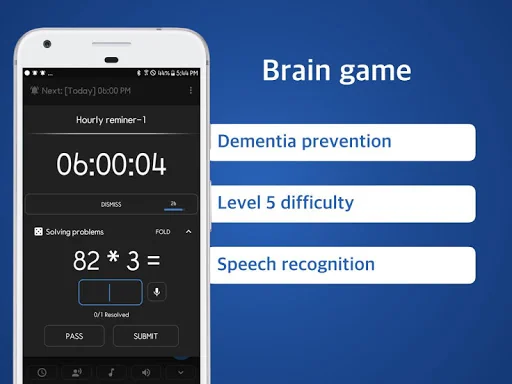
■ Math problems to improve brain and prevent dementia
-Solve various math problems games with 5 levels of difficulty every hour.
-Improve your memory and concentration!
Listen your own text with voice every hour on hours.
Simple and Lite Alarm.
■ 2 diffe…
It's really easy to use!
Just power on(right of top) the app then will speak/talk the time with text from 8am to 10 pm everyday automatically.
(Don't worry! Nothing to set except clicking Power On('Activated Speak hours(time)').)
■ Math problems to improve brain and prevent dementia
-Solve various math problems games with 5 levels of difficulty every hour.
-Improve your memory and concentration!
Listen your own text with voice every hour on hours.
Simple and Lite Alarm.
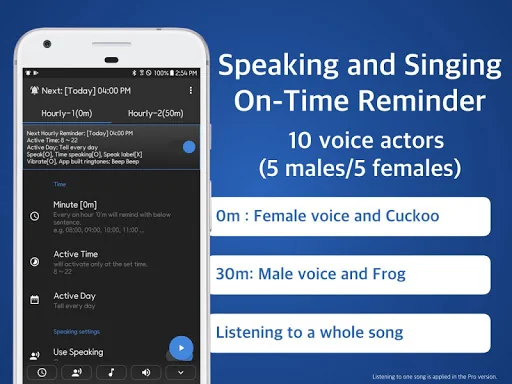
■ 2 different Free O’clock setting
- (0 to 59 minutes)
- Work 50 min and Rest 10 min
- Completely independent setup
- Hourly-1(0m) : Cuckoo and Voice
- Hourly-2(50m): Frog and Vibration
- Hourly-2(50m): Listen a song
- Hourly-2(50m): Speak in Spanish(another language)
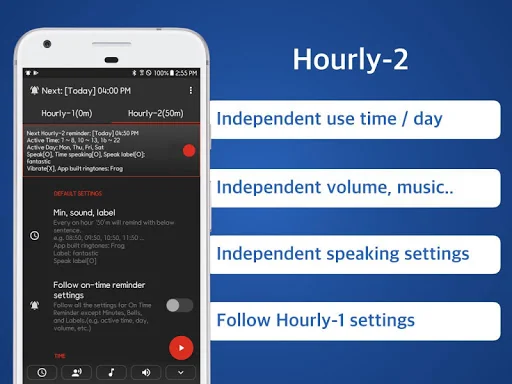
- Independent use day
- Independent use time
- Independent volume, music..
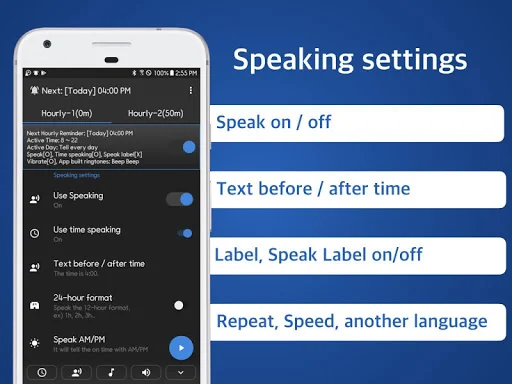
- Independent speaking settings
- Follow Hourly-1 settings
- Various vibration patterns
On time notification
Your own notification combination
- Ring the bell / Speak current time and label / Vibration / Turn on screen
hourly reminder schedule chime clock alarm!
■ Battery saving optimization(When reminders don't work well)
Go on the Device's Settings.
Apps > Speaking Alarm Clock > Battery > Optimise battery usage > Click App not optimised > Click All >
Speaking Alarm Clock - Switch off
** this app never collect any user information !!
** picture/media/file permission; because use data base table for this app.
** device id and call info; because this app can control volume or vibration during in-call.
** internet/network; just for advertisement
** Loading time may vary depending on the manufacturer or the devices.(tts engine: text to speech)
Comparable Android apps
The five apps in Lifestyle with the closest revenue to Hourly Reminder Alarm Pro. Click any to see its detail page.
Each forecast combines App Store rating, ratings count, monetisation model, pricing tier, IAP signals and ad-supported flag.
The base estimate is then multiplied by a per-category scaling factor learned from apps with founder-verified MRR.
Every number on this page comes from public APIs and bumetric's own snapshot history.
Full methodology covers input variables, accuracy bands per category and how we treat apps without comparable anchors.
See also the live data on Hourly Reminder Alarm Pro's tracker page for current rating, reviews and snapshot timeline.
Building something similar? Get a free AI audit with $-revenue forecasts for every recommendation.

 미가엘 성경 (개역개정)
 LG ThinQ
 by.U Affordable Internet Card
 Quran, Athan, Prayer and Qibla
 Poll Pay: Earn Money & Cash