What i-PRO Mobile APP actually does (from store listing)
- Outline
i-PRO Mobile APP is a smartphone application that makes possible to view videos from/in the following i-PRO devices. (Hereinafter referred to as this app)
・ Network Camera (Hereinafter referred to as camera)
・ Network Interface Unit (Hereinafter referred to as encoder)
・Digital Disk Recorder (Hereinafter referred to as recorder)
・Network Disk Recorder
For further information about compatible devices, refer to the website of this app.
“i-PRO Mobile APP”
https://i-pro.com/product…
- Outline
i-PRO Mobile APP is a smartphone application that makes possible to view videos from/in the following i-PRO devices. (Hereinafter referred to as this app)
・ Network Camera (Hereinafter referred to as camera)
・ Network Interface Unit (Hereinafter referred to as encoder)
・Digital Disk Recorder (Hereinafter referred to as recorder)
・Network Disk Recorder
For further information about compatible devices, refer to the website of this app.
“i-PRO Mobile APP”
https://i-pro.com/products_and_solutions/en/surveillance/products/nvr-system/i-pro-mobile-app
Camera images taken with Remote Monitoring as a cloud service for P2P functions can be
displayed by this app.
For further information about Remote monitoring, refer to our website below.
https://i-pro.com/products_and_solutions/en/RemoteMonitoring/en/html/RemoteMonitoring_
webguide_en/index.html
Viewing of live video from a camera or playback of video in a recorder will become available
by connecting with 3G/4G/5G/LTE line or wireless LAN (Wi-Fi).
When using via the Internet, set the port forwarding function of the router. Refer to the manuals provided with the router for further information.
Automatic setting with the router is possible by setting the UPnp (auto port forwarding) of the camera to “On”. (Only when a router supporting UPnp is in use)
For how to configure, refer to the manual of the camera in use that is available to downloaded from the URL below.
https://i-pro.com/products_and_solutions/en/surveillance/documentation-database#network_cameras
Please use the DDNS service below.
https://www.viewnetcam.com/ip_ddns/
- Features
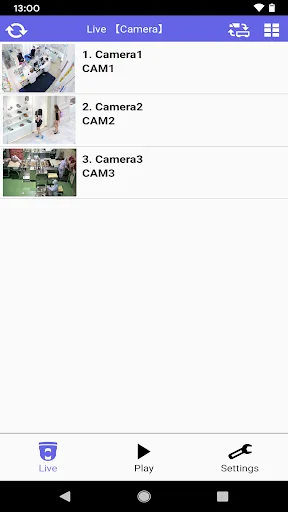
Check live video
Check live video from an independent camera, a camera connected to a recorder, and cameras via Remote Monitoring. To check live video, switch between the camera list screen and the live screen.
Control live video
Perform PanTilt/ Zoom/ Preset/ Resolution/ Focus Dewarp operation.
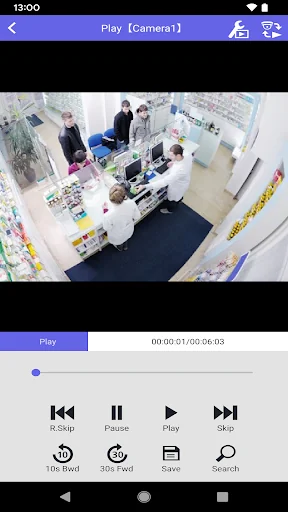
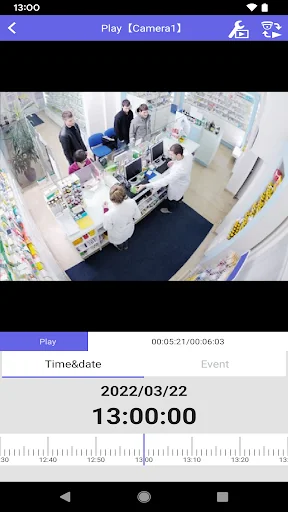
Play recorded video
Play videos recorded in the SD memory card (SD recording) on the camera or videos
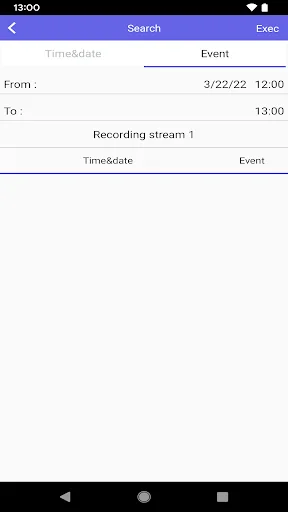
recorded in a recorder (recorder recording) with the device type as camera, recorder, or Remote Monitoring. Search recorded video by date, time or event and play.(The event search is available only at the time of SD recording playback.)
Download playback video
Download video recorded in an SD memory card on the camera (SD recording) or video
recorded in a recorder (recorder recording) to the smartphone in MP4 format.
Check the statistics in a graph
Check the person count information including the number of visiting and staying persons with graphs when the extension software is installed on the camera in use.
Alarm notification function
Alarms from the cameras and recorders are displayed in a pop-up display.
By tapping the pop-up display, you can check the live video of the camera where the alarm occurred.
Each forecast combines App Store rating, ratings count, monetisation model, pricing tier, IAP signals and ad-supported flag.
The base estimate is then multiplied by a per-category scaling factor learned from apps with founder-verified MRR.
Every number on this page comes from public APIs and bumetric's own snapshot history.
Full methodology covers input variables, accuracy bands per category and how we treat apps without comparable anchors.
See also the live data on i-PRO Mobile APP's tracker page for current rating, reviews and snapshot timeline.
Building something similar? Get a free AI audit with $-revenue forecasts for every recommendation.


 Plant Viewer for Mobile
 Software Update Latest: Apps
 ASUS OmniStor
 Memo Calculator – FusionCalc
 LogMeOnce Password Manager