What Internet Speed Monitor actually does (from store listing)
<b>Real-Time Internet Speed Monitor with Overlay Display</b>
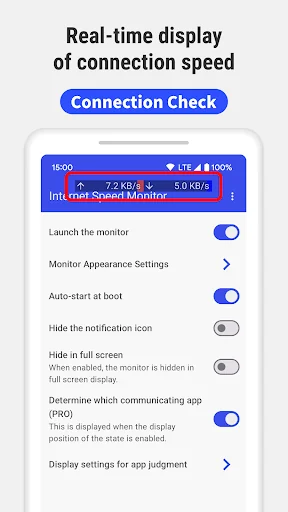
Monitor your internet speed in real time with our lightweight Android app. Internet Speed Meter Live provides continuous monitoring with an overlay display that works while you use other apps.
<b>Key Features</b>
• Real-time speed measurement with overlay display
• Battery-efficient lightweight design
• Monitor upload and download speeds separately
• WiFi and mobile data (4G/5G) network detection
• VPN compatible speed test …
Real-Time Internet Speed Monitor with Overlay Display
Monitor your internet speed in real time with our lightweight Android app. Internet Speed Meter Live provides continuous monitoring with an overlay display that works while you use other apps.
Key Features • Real-time speed measurement with overlay display
• Battery-efficient lightweight design
• Monitor upload and download speeds separately
• WiFi and mobile data (4G/5G) network detection
• VPN compatible speed test results
Always-Visible Speed Monitoring The overlay display lets you monitor internet speed while using any other app. Perfect for video calls, streaming, or file downloads. No need to constantly switch between apps for speed tests.
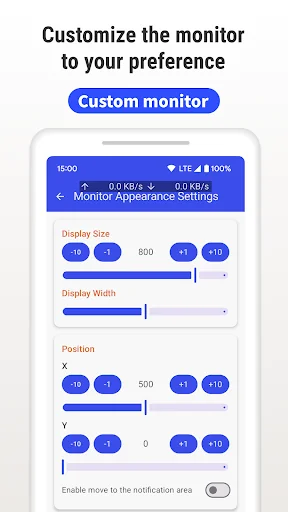
Customization Options • Adjust display position, size, color, and transparency
• Choose display format and update intervals
• Measurement units and notification settings
• Auto-start on device boot
• Pause function for flexible control
Free Version Features • Real-time internet speed monitoring and display
• Upload and download speed measurements
• WiFi and mobile data detection
• Notification panel controls
• Minimal battery usage
• Customizable overlay display
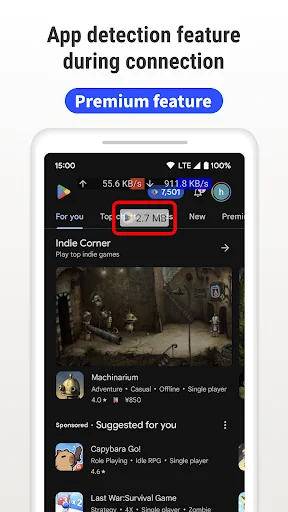
PRO Version Features • Identify which apps use your network
• Complete ad removal
Real-World Use Cases Remote Work Monitor speed during video calls to ensure stable connection
Streaming Keep an eye on bandwidth during movies or gaming to avoid buffering
Mobile Hotspot Monitor data usage when sharing your connection
Troubleshooting Track speed variations to identify patterns and resolve issues
Technical Requirements • Android 5.0 and above
• VPN environment support (Ver 1.0.4+)
• Works with all major carriers and WiFi networks
Required Permissions Display over other apps Required for overlay display functionality
Network access Essential for measuring internet speed and analytics
Device ID Used by PRO version to identify network usage by apps
WiFi connection info Needed to distinguish between WiFi and mobile data
Run at startup Enables automatic monitoring when device boots
Privacy & Security We prioritize your privacy. The app only processes speed measurement data and does not access your internet communications. Your personal information remains completely private.
Important Note When overlay display is active, you may need to temporarily disable it to enter passwords in browsers. You can easily pause through the notification panel.
Why Choose Our Speed Monitor? Unlike basic speed test apps that only work when actively run, our monitor provides continuous, real-time monitoring that integrates seamlessly with daily device usage.
Comparable Android apps
The five apps in Tools with the closest revenue to Internet Speed Monitor. Click any to see its detail page.
Each forecast combines App Store rating, ratings count, monetisation model, pricing tier, IAP signals and ad-supported flag.
The base estimate is then multiplied by a per-category scaling factor learned from apps with founder-verified MRR.
Every number on this page comes from public APIs and bumetric's own snapshot history.
Full methodology covers input variables, accuracy bands per category and how we treat apps without comparable anchors.
See also the live data on Internet Speed Monitor's tracker page for current rating, reviews and snapshot timeline.
Building something similar? Get a free AI audit with $-revenue forecasts for every recommendation.


 TW LOTTO
 Deleted Media File Recovery
 bedr alarm clock radio
 File Explorer
 Grapher - Equation Plotter