What Inventory, expense tracking an actually does (from store listing)
Simple & powerful multi user & multi-platform inventory management solution.
<b>MAJOR MODULES:</b>
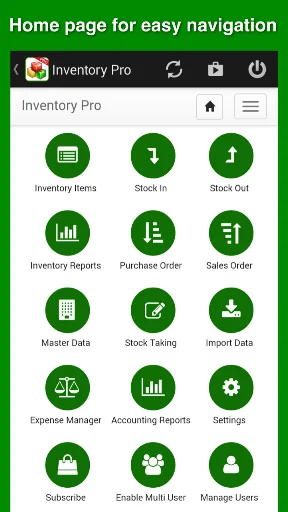
1) Inventory Management
2) Purchase Order & Sales Order Management
3) Supplier & Customer Management
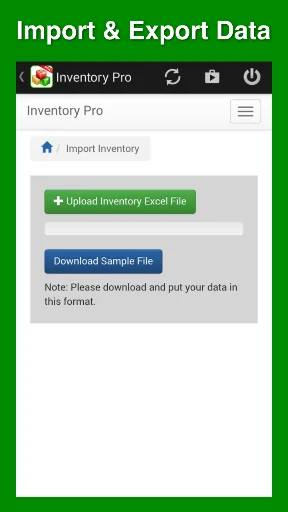
4) Import Data & Export Data
5) Extensive Reporting with export to Excel/CSV
6) Inventory related Income & Expense Management
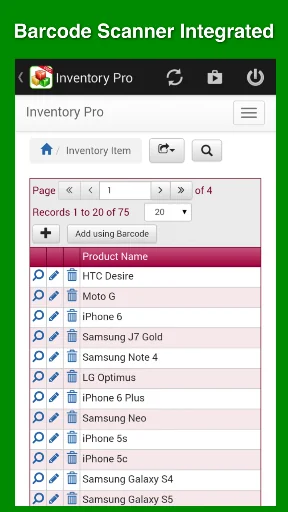
7) Barcode Scanning
<b>With Inventory Pro,</b>
- People from your organization can access company inventory data from their mobile devices and desktops.
- …
Simple & powerful multi user & multi-platform inventory management solution.
MAJOR MODULES:
1) Inventory Management
2) Purchase Order & Sales Order Management
3) Supplier & Customer Management
4) Import Data & Export Data
5) Extensive Reporting with export to Excel/CSV
6) Inventory related Income & Expense Management
7) Barcode Scanning
With Inventory Pro,
- People from your organization can access company inventory data from their mobile devices and desktops.
- It offers complete inventory management features including barcode scanning, stock taking, stock adjustments, inventory valuation, inventory movement, low stock alerts, graphical reports, dashboards etc.
- You can generate, manage and print purchase orders and sales orders.
- You can manage and communicate with your suppliers and customers.
- You can record partial or full delivery against purchase order or sales order.
- You can also manage other income and expenses of your organization.
Noteworthy Features:
- Create Purchase Order or Sales Order and print with your company logo, name, and address etc.
- Get email notification when any item goes into low stock.
- Low Stock quantity can be configured for each item separately.
- Multi level taxes, item level tax & discount can be added to Purchase order and Sales Order.
HOW DOES IT WORK?
With 3 simple steps you can start using Inventory Pro for your organization.
STEP 1: Download Inventory Pro App and register as an administrator of your organization (You can also register by visiting https://app.inventorypro.co/signup/plans.php)
STEP 2: Choose the plan as per number of users you need. We offer 7 days free trial period.
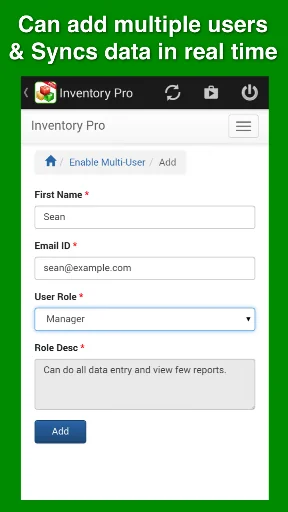
STEP 3: Invite users of your organization from the menu. They receive link in emails to join.
Please note that, the invited users don't need to subscribe. Your plan includes access for the selected number of users.
Contact us on support@inventorypro.co for any questions.
UPGRADE FROM INSTANT INVENTORY APP:
Our existing subscribers of Instant Inventory App can upgrade to this enterprise edition by contacting us at support@inventorypro.co. We will assist in migrating their existing inventory data to Inventory Pro.
Feel free to contact us via email. We have excellent support record and no questions will be ignored – support@inventorypro.co
Official Website: https://www.inventorypro.co
YouTube: https://www.youtube.com/channel/UC_fTMXejfpOp5GXbYDqVf6w
Like us on Facebook: https://www.facebook.com/InventoryProApp
Download Inventory Pro app now & manage inventory on your fingertips.
Change Logs:
Version 2.1 (March 06, 2019)
- Added print functionality.
Version 2.0.2 (February 21, 2019)
- Improvements to barcode scanning feature.
- Updated build tools.
Version 2.0 (January 05, 2018)
- Added support for Android 8 and above
Version 1.9.1.1 (September 11, 2017)
- Minor bug fixes.
Version 1.9.1 (February 07, 2017)
- Added support for Android 6 and above.
Version 1.9 (June 01, 2016)
- Added inventory import with Selling Price.
- Minor bug fixes.
Version 1.8 (April 14, 2016)
- Added Import Income and Expense feature.
Version 1.7 (March 27, 2016)
- Performance & UI improvements.
Version 1.6 (March 1, 2016)
- Brand new home page for easy navigation.
- Other minor UI improvements.
Version 1.5 (Jan 29, 2016)
- Now supports Android 6.0
- Auto populate Product ID by enabling it from Settings.
- Added Delivery date in Purchase/Sale orders.
Version 1.4 (Dec 24, 2015)
- Search products while adding items in Purchase/Sale orders.
- Added Shipping Cost while adding Purchase/Sale orders.
- Added Selling Price for Inventory Items.
- Can choose date for Stock In/Out transactions.
- Company admin can configure who all should receive low stock emails.
Comparable Android apps
The five apps in Productivity with the closest revenue to Inventory, expense tracking an. Click any to see its detail page.
Each forecast combines App Store rating, ratings count, monetisation model, pricing tier, IAP signals and ad-supported flag.
The base estimate is then multiplied by a per-category scaling factor learned from apps with founder-verified MRR.
Every number on this page comes from public APIs and bumetric's own snapshot history.
Full methodology covers input variables, accuracy bands per category and how we treat apps without comparable anchors.
See also the live data on Inventory, expense tracking an's tracker page for current rating, reviews and snapshot timeline.
Building something similar? Get a free AI audit with $-revenue forecasts for every recommendation.


 부릉 매니저앱
 TrackDirect - NAIPS Briefing
 KSB Sonolyzer
 Financial Calculators
 Win-Digipet Mobile