What iRig Recorder 3 actually does (from store listing)
***COMPLETELY REDESIGNED — NEW EFFECTS, VIDEO RECORDING, MARKERS AND SHARING OPTIONS! IRIG RECORDER 3 IS THE PERFECT PROFESSIONAL FIELD RECORDER FOR ANDROID!***
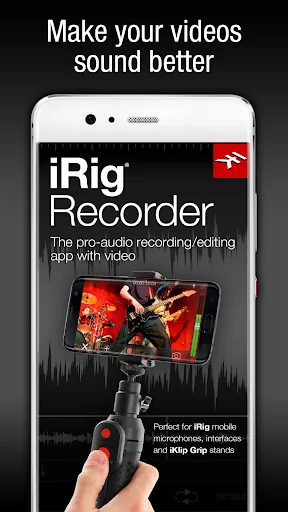
iRig Recorder 3 is a completely redesigned powerful, flexible and easy-to-use audio and video recording app for Android. It provides you with a professional stereo audio and video recording tool that you can use anytime and anywhere your mobile life takes you. Use its powerful recording, editing and export features to create and share…
***COMPLETELY REDESIGNED — NEW EFFECTS, VIDEO RECORDING, MARKERS AND SHARING OPTIONS! IRIG RECORDER 3 IS THE PERFECT PROFESSIONAL FIELD RECORDER FOR ANDROID!***
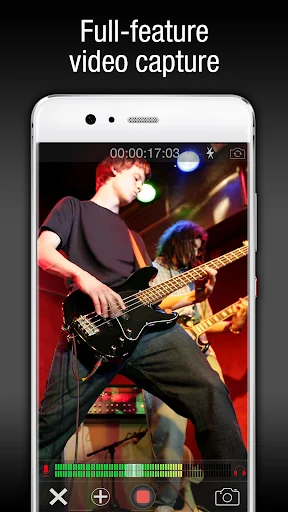
iRig Recorder 3 is a completely redesigned powerful, flexible and easy-to-use audio and video recording app for Android. It provides you with a professional stereo audio and video recording tool that you can use anytime and anywhere your mobile life takes you. Use its powerful recording, editing and export features to create and share great sounding audio and video while on the go.
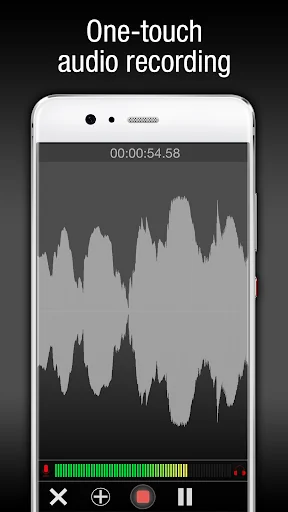
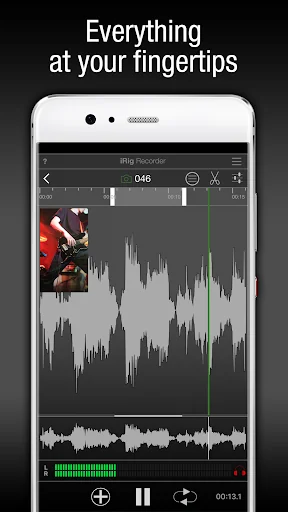
iRig Recorder 3 is extremely simple to use: click on the “record” button at the bottom of the screen to immediately start recording. To capture and monitor video, simply click on the camera icon then tap record.
But don’t let iRig Recorder 3’s streamlined design fool you… iRig Recorder 3 is a full-fledged, professional audio and video recorder that lets you edit waveforms, apply creative and professional effects as well as share your recordings with the rest of the world.
Want to add a reference marker to your audio? Hey presto! iRig Recorder 3 now lets you add photo and text markers that can be applied in real time or in the editing timeline for quick access to important content.
iRig Recorder 3 is the perfect companion to IK Multimedia’s full line of Android compatible digital microphones and audio interfaces. iRig Recorder 3 automatically activates the stereo option whenever a stereo recording interface is connected and supports both landscape and portrait orientations.
Once you've captured your audio, you can use iRig Recorder 3’s intuitive editing tools to cut, crop or loop it. You can even do Waveform editing, choose among 16 studio-quality effects to optimize sound for speech, clean up background noise, increase clarity and presence, change speed without altering the pitch, apply creative effects, fades and a whole lot more.
iRig Recorder 3 organizes your recordings by date and time and also tags them with geolocation for easy and reliable file management. Share your creations via DropBox™, Google Drive™, SoundCloud®, Twitter®, Facebook® and WhatsApp™ with friends, family, colleagues and so on. iRig Recorder 3 makes it fast, intuitive and fun.
iRig Recorder 3 features:
• Convenient, easy-to-use stereo audio and video mobile recording and editing app
• Completely redesigned, streamlined elegant interface
• Perfect companion for all IK Multimedia microphones and mobile audio interfaces
• One-touch recording/capture with real-time monitoring
• Landscape and portrait mode
• Intuitive editing tools: cut, crop and loop your recordings
• Waveform editing
• Text and Photo marker support with real time application
• 17 Intelligent effect processors to automatically optimize or creatively manipulate your recordings — Clean up, Brighten Voice, Smooth Voice, Speed Up, Speed Down, Pitch Shift, Morph, Reverb, Chorus, Delay, Normalize, Compressor, Stereo Imager, 3-Band EQ, Fade, Optimize Tone, Optimize Volume
• Organize your recordings by creation date and geolocation tags
• Export files as compressed .m4a or uncompressed .wav
For more information:
www.ikmultimedia.com/irigrecorder
Comparable Android apps
The five apps in Music & Audio with the closest revenue to iRig Recorder 3. Click any to see its detail page.
Each forecast combines App Store rating, ratings count, monetisation model, pricing tier, IAP signals and ad-supported flag.
The base estimate is then multiplied by a per-category scaling factor learned from apps with founder-verified MRR.
Every number on this page comes from public APIs and bumetric's own snapshot history.
Full methodology covers input variables, accuracy bands per category and how we treat apps without comparable anchors.
See also the live data on iRig Recorder 3's tracker page for current rating, reviews and snapshot timeline.
Building something similar? Get a free AI audit with $-revenue forecasts for every recommendation.

 WBEZ
WBEZ
 Arizona Sports
 Shree Suktam
 Antena Radio Krusevac
 Bangla Karaoke