What JotterPad - Writer, Screenplay actually does (from store listing)
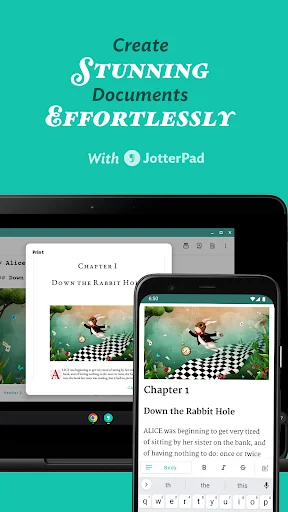
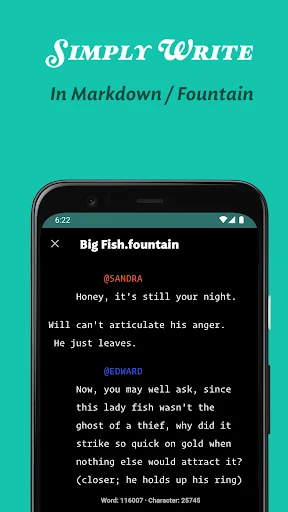
From reed and papyrus, pen to keyboard, and now to our smartphones; the way we write has evolved. JotterPad strives to be an all-encompassing writing tool for writers, screenwriters, screenplay writers, authors, book writers, bloggers and storytellers of all kinds. Jotterpad is a WYSIWYG Markdown and Fountain editor that aids with planning, writing, formatting and publishing your work, ridding you of the hassles and fuss of traditional word processors.
Use Markdown and Fountain syntax to writ…
From reed and papyrus, pen to keyboard, and now to our smartphones; the way we write has evolved. JotterPad strives to be an all-encompassing writing tool for writers, screenwriters, screenplay writers, authors, book writers, bloggers and storytellers of all kinds. Jotterpad is a WYSIWYG Markdown and Fountain editor that aids with planning, writing, formatting and publishing your work, ridding you of the hassles and fuss of traditional word processors.
Use Markdown and Fountain syntax to write to your heart’s content, and leave the technical know-how’s of formatting to us. No more fussing over the layout and structure of your writing, and shape your thoughts into words with ease. Have beautifully structured documents at your fingertips.
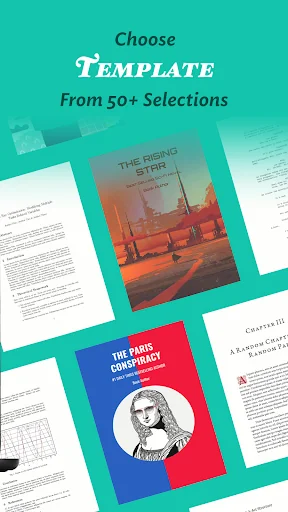
Over 60 Writing Templates For You To Choose From Choose from a wide variety of templates to guide you with the formatting of your work. Use the templates as a guide for your creativity, and let your ideas & words flow unhindered. Because all that's left for you to do is focus on your content. Once you're done, convert your writing into novels, books, articles, reports and even presentation slides.
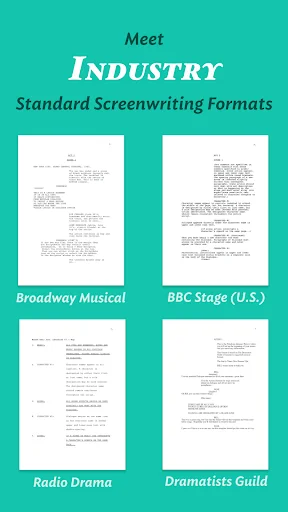
Meet Industry-Standard Screenwriting Formats Without Fuss Have your pick from a range of Fountain screenwriting templates, such as Broadway Musical, Podcasts scripts, Radio Sitcom, BBC Stage Play, Dramatists Guild Modern Musical, and many more to make your next story come alive. Let your creativity take the forefront, and the formatting to your writing tool, JotterPad.
Sync Your Work To The Cloud Seamlessly JotterPad offers automatic sync and offline-functioning capacities. Sync your files on Google Drive, Dropbox and OneDrive on your Android and Chromebook. Seamlessly convert the abstractions of your thoughts into words wherever you want, whenever you want.
Continue to work even offline. And fret not, as JotterPad syncs your work to the cloud services once you are back online.
Supports Mathematical Language Adding and formatting mathematical equations will not be cumbersome anymore. Effortlessly add intricate mathematical expressions and formulae with LaTex or TeX equations and have them perfectly rendered in your document.
Simply insert your equations into your document with the click of a button, or use equation-typing syntax of LaTeX.
Share Your Works With Anyone Export your written work into multiple formats; Word, PDF, HTML, rich text, Final Draft (.fdx), Fountain and Markdown without complications.
Publish your work to Tumblr, Ghost, or Wordpress for anyone to enjoy.
Get Your Work Out There With JotterPad, there is no unnecessary drama. Export your written work into PDF, HTML, rich text, Final Draft, Fountain and Markdown without messing up… the only drama you need is the drama you've written about in your stories.
You can now instantly publish whatever you've written on JotterPad to Tumblr, Wordpress and Ghost in the exact format you've written it in, without having to worry.
Spruce Up your Work with Images Access millions of high-resolution, editorial images on Unsplash, or your very own images from your gallery and weave them into your writings.
Never Panic Again The in-built Version Control automatically backs up your work as you write. Put your mind at ease, and write with confidence. Write, review and edit to your heart's content without worrying about losing even a single word from previous draft versions.
JotterPad also offers many features such as:
- Dictionary
- Thesaurus
- Search & Replace
- Rhyming Dictionary
- Light/dark theme
- Night light
- In-app file manager
- Custom fonts
- Upload images
- Cross-platform support
Permissions
READ_EXTERNAL_STORAGE: Access text files.
WRITE_EXTERNAL_STORAGE: Create and save text files.
Comparable Android apps
The five apps in Productivity with the closest revenue to JotterPad - Writer, Screenplay. Click any to see its detail page.
Each forecast combines App Store rating, ratings count, monetisation model, pricing tier, IAP signals and ad-supported flag.
The base estimate is then multiplied by a per-category scaling factor learned from apps with founder-verified MRR.
Every number on this page comes from public APIs and bumetric's own snapshot history.
Full methodology covers input variables, accuracy bands per category and how we treat apps without comparable anchors.
See also the live data on JotterPad - Writer, Screenplay's tracker page for current rating, reviews and snapshot timeline.
Building something similar? Get a free AI audit with $-revenue forecasts for every recommendation.

 Calculator Pro
 Storage Analyzer & Disk Usage
 Arabic for ai.type keyboard
 AutoCAD - DWG Viewer & Editor
 Sectograph. Day & Time planner