What JSON & XML Tool - JSON Editor actually does (from store listing)
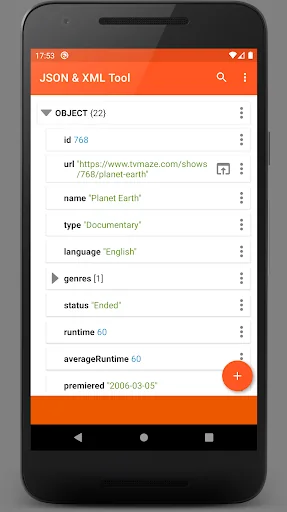
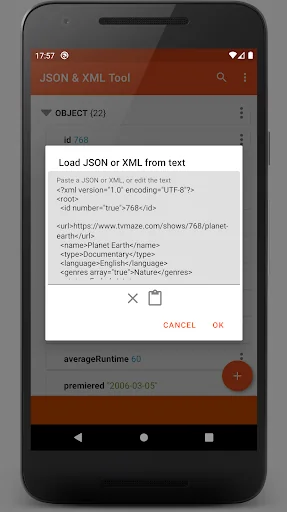
The JSON & XML Tool app lets you view, create and edit JSON and XML files with ease, by using its simple hierarchical view. The tool is useful for various scenarios, for example, it lets you edit and make game addons. In addition, the app can be used for conversion between types, for example, loading a JSON and then saving it as an XML. Both formats are supported interchangeably by the hierarchical view, it acts as the XML viewer to display XML documents and as the JSON viewer to visualize JSON …
The JSON & XML Tool app lets you view, create and edit JSON and XML files with ease, by using its simple hierarchical view. The tool is useful for various scenarios, for example, it lets you edit and make game addons. In addition, the app can be used for conversion between types, for example, loading a JSON and then saving it as an XML. Both formats are supported interchangeably by the hierarchical view, it acts as the XML viewer to display XML documents and as the JSON viewer to visualize JSON trees.
Introduction to JSON & XML Tool This JSON & XML Tool app is very simple to use:
• The data can be created using the JSON creator and the XML creator
• Alternatively, existing data can be loaded using the internal JSON reader and the XML reader
• Once the data is ready, it can viewed by the built-in JSON viewer and the XML viewer
• Edit the data using the JSON editor and the XML editor provided by the app
• Save the work to a JSON / XML file or share it as text to your favorite text editor or a file reader app
The app uses the file viewer (storage browser) provided by the Storage Access Framework and does not require storage permissions (read-and-write access). However, the app will request storage permissions in some cases, such as when a JSON / XML file was loaded using an external file viewer without providing proper access.
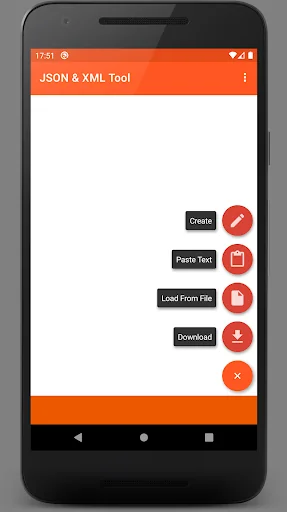
Create a JSON / XML file using this JSON Creator and XML Creator • Create a new file from scratch with the built-in XML / JSON creator
• Choose between object and array root element types when creating your JSON or XML files
View a JSON / XML file using this JSON Viewer and XML Viewer • Load a JSON or an XML file using the internal file picker (Storage Access Framework)
• Load a JSON or an XML file using an external file picker (might require storage permissions)
• Download from the web by providing a URL
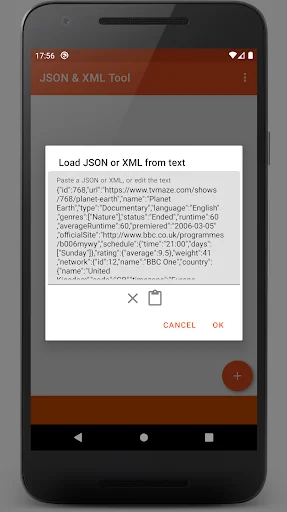
• Paste a JSON or an XML text and parse it
• Receive the text of the file from other file reader applications (via ACTION_SEND)
Edit a JSON / XML file using this JSON Editor and XML Editor • Add, duplicate & remove JSON and XML elements
• Rename elements using the XML / JSON editor
• Modify element values with the JSON / XML editor
• Easily switch between primitive value types: Boolean, Number & String
• Move elements up & down within an array
• Save as a new JSON or an XML file, or easily overwrite the current file
Additional Features • Dark theme support
• Share the JSON / XML text to an external application (via ACTION_SEND), e.g., a file reader or a text editor
• Preview the work as text while using the JSON Editor or the XML Editor
• Formatted text output instead of a single line when exporting or saving the JSON & XML data
• The app registers itself as a JSON viewer and an XML viewer upon installation
If you have any feedback or suggestions regarding our JSON Editor or XML Editor, please feel free to contact us. Please share this app with your friends who may need this JSON & XML Tool - JSON Reader and XML Reader app.
Comparable Android apps
The five apps in Productivity with the closest revenue to JSON & XML Tool - JSON Editor. Click any to see its detail page.
Each forecast combines App Store rating, ratings count, monetisation model, pricing tier, IAP signals and ad-supported flag.
The base estimate is then multiplied by a per-category scaling factor learned from apps with founder-verified MRR.
Every number on this page comes from public APIs and bumetric's own snapshot history.
Full methodology covers input variables, accuracy bands per category and how we treat apps without comparable anchors.
See also the live data on JSON & XML Tool - JSON Editor's tracker page for current rating, reviews and snapshot timeline.
Building something similar? Get a free AI audit with $-revenue forecasts for every recommendation.


 Zuppometro
 Orange Business Lounge
 Oriya Keyboard - Odia Typing K
 Fliq Notes Notepad
 Nexti
Nexti