ML revenue forecast.
Calibrated against 2990 apps in this category.
Confidence band
±15%
High — many comparable apps with verified data
At a glance
Earns 6.57× more than the category median (1.4K/mo).
Ranks #297 of 2,990 in Utilities (top 9.9% by revenue).
Launched May 29, 2024 · last updated Jun 10, 2026.
24 months of snapshot history tracked.
What the app looks like
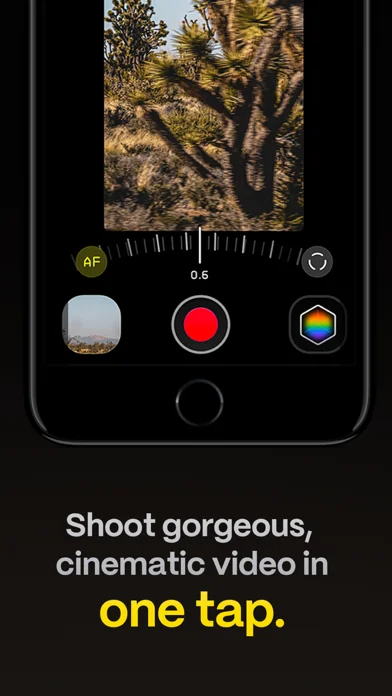
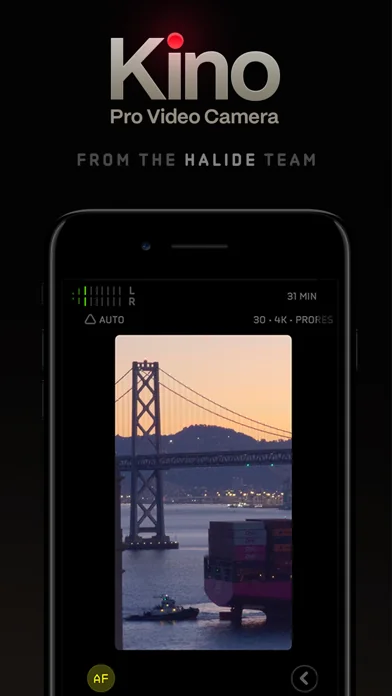
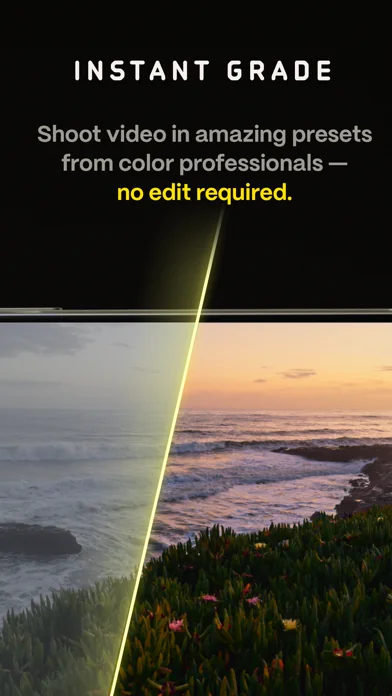
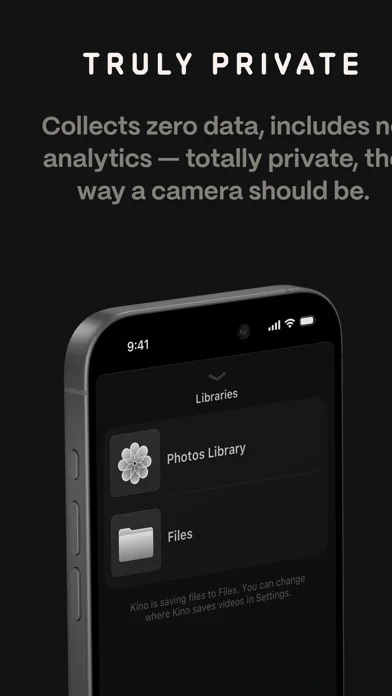
Live screenshots from the App Store, captured by our snapshot worker. Tap any image to enlarge.
Kino - Pro Video Camera's revenue trajectory
Forecast revenue from snapshot history. Last 24 months.
Where Kino - Pro Video Camera sits in Utilities
Revenue distribution of 2990 comparable apps. Kino - Pro Video Camera highlighted.
Kino - Pro Video Camera vs comparable apps
Revenue trajectory side-by-side. Bold = Kino - Pro Video Camera, ghosted = peers.
App spec
Version
1.4.3
Last update
Jun 10, 2026
Launched
May 29, 2024
Min OS
17.0
Rating
4+
Price
$9.99
Monetization
Paid
Languages
NL, EN, FR, DE +8
What Kino - Pro Video Camera actually does (from App Store listing)
Make great video easy! Kino lets you just press record and create cinematic video with color presets created by expert filmmakers—no edit required. Plus, with “AutoMotion,” the app automatically creates that smooth "film look" you see at the movies. Shoot great video with no film school required.
Are you an experienced filmmaker? Kino includes all the features you need to shoot like a Pro, such as a full manual mode, focus peaking, color waveform, audio meters, and more. If you’re experienced i…
Make great video easy! Kino lets you just press record and create cinematic video with color presets created by expert filmmakers—no edit required. Plus, with “AutoMotion,” the app automatically creates that smooth "film look" you see at the movies. Shoot great video with no film school required.
Are you an experienced filmmaker? Kino includes all the features you need to shoot like a Pro, such as a full manual mode, focus peaking, color waveform, audio meters, and more. If you’re experienced in color, you can import LUTs quickly and use the same powerful Instant Grade feature to output video with baked in LUTs.
Regardless of your skill level, Kino adapts to your needs. Pick your experience level when setting up the app to dial things in your way or go with recommended, simple settings. The beautiful, simple interface shows only essential things, while keeping powerful features under thumb’s reach.
INSTANT GRADE
Kino comes packed with pro color presets by experts like Stu Maschwitz, Sandwich Video, Evan Schneider, Tyler Stalman and Kevin Ong. With one tap, you can shoot video with cinematic, film-like color by selecting a Grade preset. With Instant Grade, you don’t have to apply it later or do any editing steps: Kino just saves the processed video for you, ready to share.
LEARN ALONG
Getting started with video? The Kino team has a free series of lessons prepared you can dive into right away to learn filmmaking with the app. Start out with our simple recommended settings and enroll in a lesson plan to get lessons emailed to you that are easy to follow and let you unlock every feature of the app to use for making better videos.
PRO TOOLS
Kino’s simple interface does not mean it lacks in powerful pro tools. Start out with automatic exposure with EV adjustment and AE and WB lock, or drop into full manual mode with shutter speed, angle and ISO adjustment. Compose a shot with the grid with built in level, check exposure with the RGB waveform, and pull focus with focus peaking. Kino can store your recordings in Files instead of Photos for better and easy shot management, and even features a screen lock to prevent inadvertent taps messing up your shot. Set custom recording settings (like 4K 60FPS Apple Log ProRes422HQ on iPhone 15 Pro) or get started with presets for flexibiltiy.
BEAUTIFUL INTERFACE
Thoughtful touches are abound in Kino: from a screen-wide telltale ring to show you are recording, to beautiful custom typography throughout with our own bespoke fonts, Kino balances beauty and simplicity with flexibility and control for users of any skill level.
AUTOMOTION
Get cinematic motion like in feature films. Introducing: AutoMotion. Kino biases exposure towards a 180° shutter speed by default. If you land in this sweet spot, and available light supports it, the ‘Auto’ label turns green — showing you are in the sweet spot for great cinematic motion. Bright day out? Pop an ND filter on your iPhone and don’t worry about adjusting manual settings: Kino will take care of prioritizing shutter angle so you can just shoot and get great results.
LUT FRIENDLY
One of the powerful aspects of Kino is being able to download new looks from your favorite creators or your own making. Author .cube LUT files in Pixelmator Pro, Davinci Resolve, or other apps (up to 33x33) and open them in Kino with a tap.
TRULY PRIVATE
None of our apps gather or collect data, or analyze your videos and photos. We believe the most important thing a camera can be is private.
CREATOR SPECIAL
Are you a creator or filmmaker and want to get started with or love using Kino? Get in touch with us to get our ‘Creator Kit’: see the Kino website for more details. When sharing your work, tag it #shotwithkino so we can feature it online.
Thanks for making it this far! Kino is made by friends — Ben Sandofsky and Sebastiaan de With, with the help of Katie-Rose Summerfield and Doug Broussard. We made this app with love and care and we hope you love it.
🆕 What's new · v1.4.3
Now that Halide Mark III is out, we're going to spend a bit of time digging into how we can make Kino even better. We're starting with a small update that fixes an issue with the VU Meters caused by an iOS update.
- Team Kino
Comparable iOS apps
The five apps in Utilities with the closest revenue to Kino - Pro Video Camera. Click any to see its detail page.
Each forecast combines App Store rating, ratings count, monetisation model, pricing tier, IAP signals and ad-supported flag.
The base estimate is then multiplied by a per-category scaling factor learned from apps with founder-verified MRR.
Every number on this page comes from public APIs and Bumetric's own snapshot history.
Full methodology covers input variables, accuracy bands per category and how we treat apps without comparable anchors.
See also the live data on Kino - Pro Video Camera's tracker page for current rating, reviews and snapshot timeline.
Building something similar? Get a free AI audit with $-revenue forecasts for every recommendation.


 Clean Up Now: AI Cleaner
 Voice Intercom for Sonos
 BlazeAuth - Authentifizierungs
 Pythonista 3
 Pro Dokumentenscanner