iOS app
from INTERACTIVE UNIVERSE CREATIVE SOFTWARES EIRELI
· Photo & Video
ML forecast★ 3.9 · 1K→ StablePaid
~7.5K/mo
ML revenue forecast.
Calibrated against 1777 apps in this category.
Confidence band
±15%
High — many comparable apps with verified data
At a glance
Earns 5.23× more than the category median (1.4K/mo).
Ranks #294 of 1,777 in Photo & Video (top 16.5% by revenue).
Launched Jun 22, 2012 · last updated Oct 23, 2019.
24 months of snapshot history tracked.
What the app looks like
Live screenshots from the App Store, captured by our snapshot worker. Tap any image to enlarge.
Lapse It Pro's revenue trajectory
Forecast revenue from snapshot history. Last 24 months.
Where Lapse It Pro sits in Photo & Video
Revenue distribution of 1777 comparable apps. Lapse It Pro highlighted.
Lapse It Pro vs comparable apps
Revenue trajectory side-by-side. Bold = Lapse It Pro, ghosted = peers.
App spec
Version
5.02
Last update
Oct 23, 2019
Launched
Jun 22, 2012
Min OS
13.0
Rating
4+
Price
Free
Monetization
Paid
Languages
EN, PT
What Lapse It Pro actually does (from App Store listing)
FEATURED IN THE MEDIA:
• Featured on the English TV Show "The Gadget Show" http://youtu.be/QjjayQVHnrk
• You can watch a great video review at http://youtu.be/8jhIyDYcumM
••••••••••••••••••••••••••••••••••
Lapse It is intuitive and simple to use, you will be able to capture and edit your time-lapse or stop-motion projects powered by unique features available in your device.
No need for expensive photography equipment, you just need Lapse It.
POWERFUL AND UNIQUE FEATURES:
• Create time la…
• Featured on the English TV Show "The Gadget Show" http://youtu.be/QjjayQVHnrk
• You can watch a great video review at http://youtu.be/8jhIyDYcumM
••••••••••••••••••••••••••••••••••
Lapse It is intuitive and simple to use, you will be able to capture and edit your time-lapse or stop-motion projects powered by unique features available in your device. No need for expensive photography equipment, you just need Lapse It.
POWERFUL AND UNIQUE FEATURES:
• Create time lapse and stop motion projects using the full potential of your device
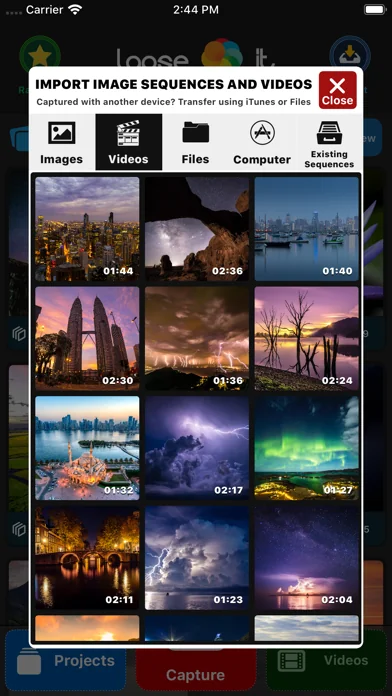
• Import multiple images and videos from multiple sources to compose a new project using many editing tools
• Instant preview and fast export of your compositions creating gorgeous UHD 4K+ videos
CAMERA FEATURES:
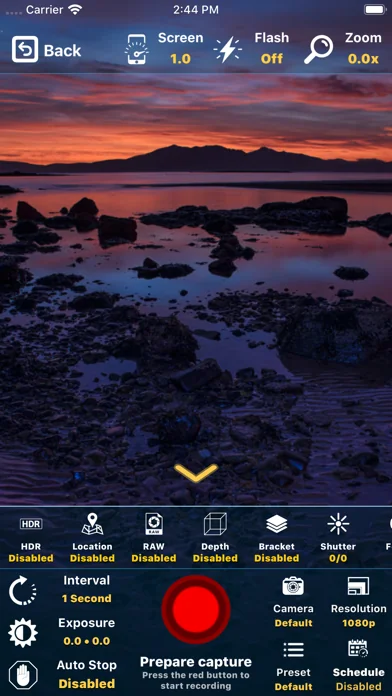
• Capture sequences of pictures using powerful camera and timings features.
• Camera can be easily adjusted to capture images using all the powerful features your device has to offer.
• Include capturing in HDR ( High Dynamic Range ), GPS ( Location ), RAW ( Unprocessed image ), Depth ( 3D Map ), Bracket ( Multiple instant shots )
• Schedule a time for the capture to start automatically
• Define when the capture should stop ( after a number of frames or a time length )
• Manual camera controls for exposure, focus, ISO and white balance
• Remote live access to the captured images while recording using iCloud
• Zoom can be adjusted over time while recording including remotely using Apple Watch
• Stop motion mode with extra features: onion skin ( previous image as 'ghost' for the next ) and touch-less capture using sound ( for example a 'clap' )
• Resume previous captures for multiple days recording or to continue a project on a different location
• Other options are low-lightning mode, color space, image format, onion skin and grid
EDITING FEATURES:
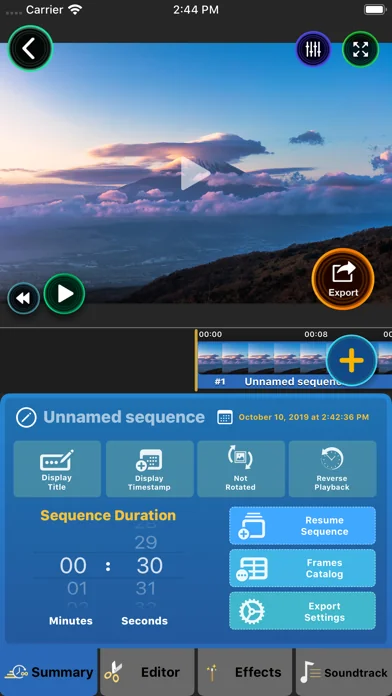
• Play and export sequences of images as videos including advanced editor tools
• Define the duration of your time lapse with millisecond precision, easily making it play slower or faster
• Stylize your compositon choosing from the unique 50 stunning filters, including the miniaturization tilt-shift effect
• Image color post-processing controls for saturation, brightness, contrast, opacity, blur and more
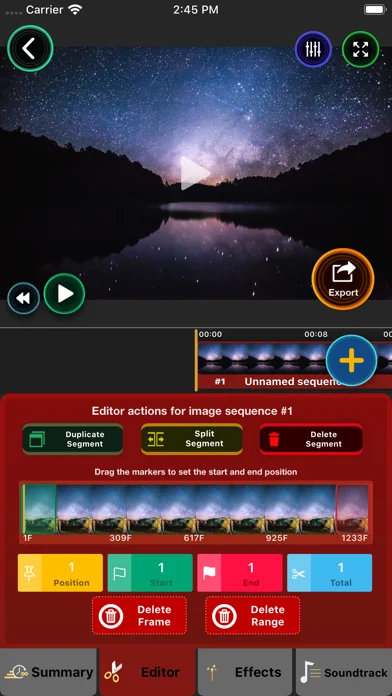
• Duplicate or exclude single or a range of images and just export the shots that are perfect
• The order of the images that compose can be changed and easily time reversed
• Every frame that compose your video is editable and exportable as single image
• Advanced render modes include customized resolution, frame rate, bitrate and format ( H.264 MP4 or H.265 HEIC )
• Share directly to Instagram, Messenger, Whatsapp, YouTube, Facebook, Vimeo and many others
• Add multiple audio tracks for a more immersive result, use any song from your Music library or any MP3 or WAVE using Files, search from a free music online catalog, there is even a voice recorder included, that will serve for multiple purposes
MORE FEATURES:
• The only time lapse and stop motion app that you will ever need
• Image sequence real time lapse and not just accelerated videos
• Video tutorials are included so you learn to make use of all the features
• Can use all the cameras on your device and captures from multiple cameras at once
• Real-time capture information on the screen during capture
• No restrictions for capture length or frames
• Tested and approved by more than 10.000.000 people with 4.5+ rating
• Some features may just available on the Professional version
••••••••••••••••••••••••••••••••••
WHAT IS TIME LAPSE ?
Time Lapse is a photography technique that gives an accelerated view of slowly changing events.
Events such as movement of clouds, the rising and setting of the sun, animal life, a party with your friends, even individual activities like drawing or playing sports or anything else that you can imagine.
You will see them in a new way and otherwise undetectable patterns will emerge.
🆕 What's new · v5.02
CAMERA NEW FEATURES:
• Support for capturing images in 4K Ultra High Definition ( 3840x2160 pixels )
• New camera modes including RAW, HDR, Depth Map, Location.
• RAW will capture images without any post-processing maintaining the full quality and editing possibilities.
• Depth Map will generate a 3D map of the scene, you can use different effects for what is on the front or in the background.
• Bracket mode will capture multiple shots using different exposures at once.
• Location will collect the GPS information for every captured image, can be used to generate a moving map of the recorded scene.
• Presets can be created for your favorite camera configurations and used later on different ocasions.
• Schedule a capture to start in a future time.
• Support for the newest cameras available on modern devices.
• Save your captures directly to iCloud so you can use the images in real time without having to move the capturing device.
• Support for the modern image format HEIC that uses less space in disk maintaning quality.
It also includes: low lightning boost, image stabilization, color space and more.
EDITOR NEW FEATURES:
• Import any video or image sequence captured with your iOS device or any other camera.
• Projects now support multiple segments, each with it's own configuration for effects and other settings.
• Image frames can now be easily exported using different methods including AirDrop, useful if you captured with your iOS device and want edit your project on the Mac for example.
• Duplicate or split your captures in multiple parts, exclude a single frame or a range of frames that are not useful for your project.
• Animate effects over time like a professional video editor.
• Professional color grading features including animatable saturation, brightness, constrant, opacity and blur.
• Multiple soundtrack supporting audio files from any source using Files or from your music library.
• Include a voice recorder so you can add a voice-over to your projects.
• Thousands of soundtracks you can use in your projects for free, included advanced search for content on Jamendo.
• Modern render engine using Metal ( Apple most advanced image processing for your device ). Previews now are in real-time and exporting is super fast.
OTHER FEATURES:
• New friendly and intuitive interface, you can do more than professional photographers ever could in a very simple and easy way.
• Lapse It is now available for Mac, you can edit your projects with the full power of this machine.
• How to use video tutorials demonstrate all the features so you can make the most use of Lapse It.
Comparable iOS apps
The five apps in Photo & Video with the closest revenue to Lapse It Pro. Click any to see its detail page.
Each forecast combines App Store rating, ratings count, monetisation model, pricing tier, IAP signals and ad-supported flag.
The base estimate is then multiplied by a per-category scaling factor learned from apps with founder-verified MRR.
Every number on this page comes from public APIs and bumetric's own snapshot history.
Full methodology covers input variables, accuracy bands per category and how we treat apps without comparable anchors.
See also the live data on Lapse It Pro's tracker page for current rating, reviews and snapshot timeline.
Building something similar? Get a free AI audit with $-revenue forecasts for every recommendation.


 Pixelmator Classic iOS
 ArtFlow: KI Video Generator
 AI-Video-Generator-HiCut
 LumaBooth Event-Fotobox App
 Canva: AI Video & Photo Editor