What Lock My Touch actually does (from store listing)
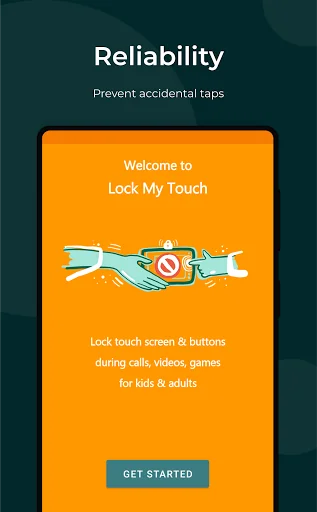
<b>Lock My Touch 🤟 app is designed to prevent accidental taps while using popular applications.</b>
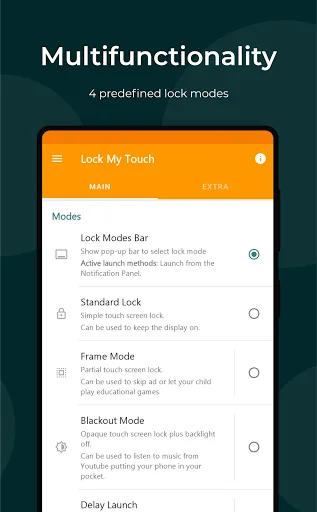
<b>4 smart lock modes</b> allow to disable touch screen and buttons <u>for any kind of apps: toddler game, video chat, YouTube</u>. <b>Quick launch by 1-tap / shake / voice</b> simplify using touch lock for different devices: <u>smartphones, tablets, smart watches</u>.
<b>★ Standard Lock Mode</b>
✓ Lock touchscreen, gestures, status / navigation bars, hardware buttons (home, back, volume co…
Lock My Touch 🤟 app is designed to prevent accidental taps while using popular applications.
4 smart lock modes allow to disable touch screen and buttons for any kind of apps: toddler game, video chat, YouTube. Quick launch by 1-tap / shake / voice simplify using touch lock for different devices: smartphones, tablets, smart watches.
★ Standard Lock Mode ✓ Lock touchscreen, gestures, status / navigation bars, hardware buttons (home, back, volume control, recent apps, except power button).
✓ Unlocking by simple swipe
✓ Keep display on while reading text, recipes or other content.
✓ Transform tablet into a drawing board to improve your drawing skills.
✓ Use standard lock mode without any ads.
★ Partial Screen Lock ✓ Make only part of the screen untouchable with Frame Mode.
✓ Manage video and audio avoiding accidental touches.
✓ Make your gadget like a baby gallery, keeping the possibility of swiping and scaling photos, but locking unnecessary features.
✓ Let your child 😻 watch movies and play educational games; no more accidental stopping or exiting due to touching screen or buttons.
★ Blackout & Screen Off Mode ✓ Enjoy YouTube, Netflix, Disney Now, Amazon Prime Video and other video services, by having such features as Blackout Mode, Delayed Start.
✓ Transform your phone into a pocket music player.
✓ Save battery charge upon watching videos (proximity sensor).
✓ Feel free to put your phone in your pocket with the GPS navigation on.
★ Kids Mode & Timer ✓ Protect the screen unlock by fingerprint, graphical key, or gesture 8.
✓ Keep your applications and settings away from kids.
✓ Enjoy your time using baby screen lock and kids timer while your kid is watching cartoons (parental control).
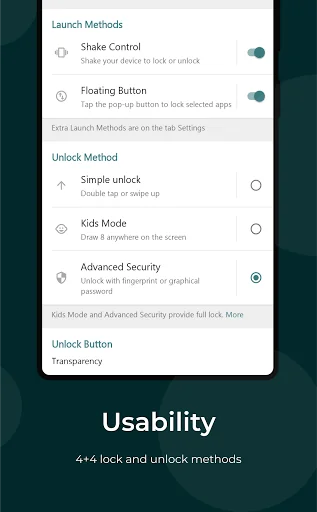
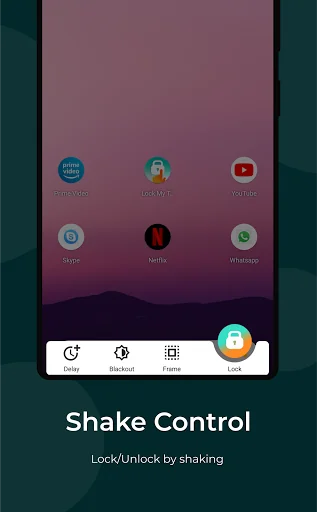
★ Shake Control (launch by shake) ✓ Set up the shake sensitivity to lock/unlock your device with a minimum risk of triggering the lock accidentally
✓ Enjoy 😃 the one-handed cinema: watch your favorite TV series while walking without a need to use the other hand.
✓ Prevent ghost / false touches caused by water that gets on the screen upon the rain or shower.
✓ Lock the screen and use your phone as a fluorescent stick at a music concert.
★ One-tap Launch ✓ Lock the screen quickly by pressing the pop-up button in the active app.
✓ Launch the lock from the notification panel 💪 and/or from the quick settings at any time.
✓ Use any voice assistants, automation tools such as Tasker, Macrodroid, AutomateIt to lock the screen.
★ Call Protect & Security ✓ Prevent face touching while calling (accidental hang ups, clicks, disconnects).
✓ You can turn off the rotating of the screen and volume buttons during video calls in Skype, Viber, Zoom, Google Hangouts, Whatsapp ✓ Give your friend a chance to look at only one photo excluding the possibility of swiping the other ones.
👉 Enjoy your time using our application, we are always in touch!
Limitations - Touch Lock does not make your device waterproof or water resistant.
- Navigation gestures can be completely blocked starting from Android 10+.
- Lock My Touch needs active accessibility service to lock physical buttons.
Comparable Android apps
The five apps in Personalization with the closest revenue to Lock My Touch. Click any to see its detail page.
Each forecast combines App Store rating, ratings count, monetisation model, pricing tier, IAP signals and ad-supported flag.
The base estimate is then multiplied by a per-category scaling factor learned from apps with founder-verified MRR.
Every number on this page comes from public APIs and bumetric's own snapshot history.
Full methodology covers input variables, accuracy bands per category and how we treat apps without comparable anchors.
See also the live data on Lock My Touch's tracker page for current rating, reviews and snapshot timeline.
Building something similar? Get a free AI audit with $-revenue forecasts for every recommendation.

 Cute Theme-Starry Heavens-
 Doodle Sms Keyboard Theme
 Space wallpapers 4K
 Ultra Watch Face
 LED Flash Keyboard Background