How much does Lockscreen Japanese Word Alarm earn?
Android app
from Wafour Edu
· Education
ML forecast★ 4.2 · 3KFree
~680/mo
ML revenue forecast.
Calibrated against 120891 apps in this category.
Confidence band
±15%
High — many comparable apps with verified data
At a glance
Earns 4.26× more than the category median (159/mo).
Ranks #5,986 of 120,891 in Education (top 5.0% by revenue).
Launched Nov 16, 2018.
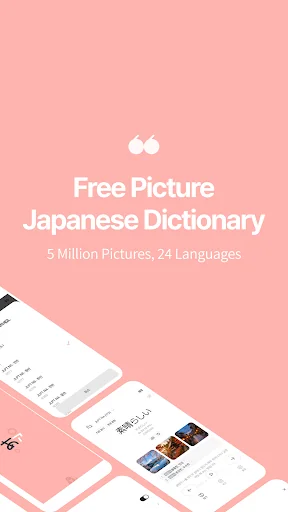
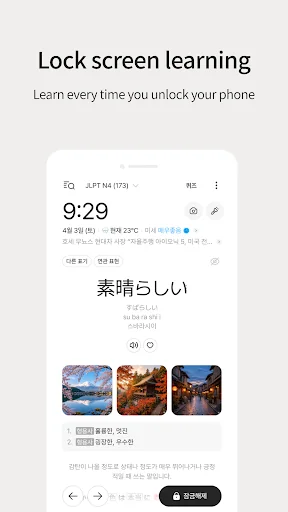
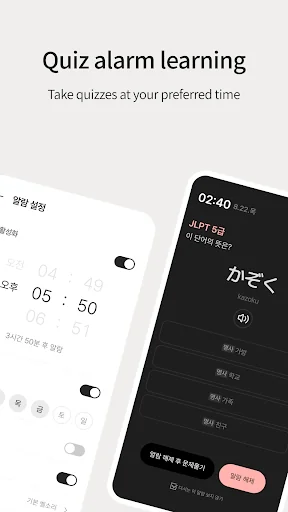
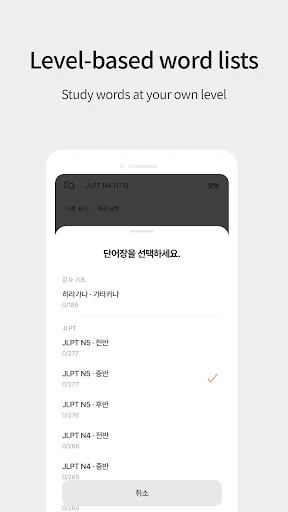
What the app looks like
Live screenshots from the Play Store, captured by our snapshot worker. Tap any image to enlarge.
Lockscreen Japanese Word Alarm's revenue trajectory
Forecast revenue from snapshot history. Last 1 months.
Where Lockscreen Japanese Word Alarm sits in Education
Revenue distribution of 120891 comparable apps. Lockscreen Japanese Word Alarm highlighted.
Lockscreen Japanese Word Alarm vs comparable apps
Revenue trajectory side-by-side. Bold = Lockscreen Japanese Word Alarm, ghosted = peers.
App spec
Version
Varies with device
Launched
Nov 16, 2018
Price
Free
Monetization
Free
What Lockscreen Japanese Word Alarm actually does (from store listing)
<strong><font color="#be671a">✔</font> Why is 'Lockscreen Japanese' different?</strong>
Simultaneously stimulating the left brain (language) and right brain (images) drastically accelerates memorization. Move beyond boring, text-only methods and imprint words and context directly into your brain with 5 million vivid photos. Experience an intuitive learning effect as if you were actually in Japan.
<strong><font color="#be671a">✔</font> Smart Features for 200% Efficiency</strong>
• <strong>…
✔ Why is 'Lockscreen Japanese' different? Simultaneously stimulating the left brain (language) and right brain (images) drastically accelerates memorization. Move beyond boring, text-only methods and imprint words and context directly into your brain with 5 million vivid photos. Experience an intuitive learning effect as if you were actually in Japan.
✔ Smart Features for 200% Efficiency
• Lock Screen Memorization Check Japanese words every time you turn on your phone. Learn naturally in your daily life right from your lock screen.
• Dark Mode Support Study comfortably anytime, day or night, with a dark theme that's easy on the eyes.
• Slideshow (Advanced Feature) Review words hands-free with an automated card-flipping feature. Customize the number of pronunciations and the speed of card transitions to suit your pace.
✔ Personalized Learning Management
• Quiz Alarm Receive quiz alarms at your preferred time to review and track your progress with detailed learning statistics.
• Vocabulary by Level Access a wide range of vocabulary lists, from basic Hiragana and Katakana to JLPT N5~N1 and business expressions.
• My Vocabulary Save difficult or frequently missed words by tapping the heart icon to focus on intensive review.
• Hide Mastered Words Clearly distinguish words you’ve already memorized with a strike-through effect and exclude them from future study sessions.
✔ Rich Learning Content
• Practical Examples Learn how words are used in real-life situations with useful example sentences and native audio pronunciations.
• Integrated Search Instantly search for any word to see its definition, pronunciation, and example sentences all at once.
✔ Troubleshooting: No Sound? If you cannot hear the Japanese audio, please follow these steps:
1. Install "Google TTS" from the Play Store.
2. Go to Settings > Language & Input > Text-to-Speech (TTS) settings.
3. Change the preferred engine to Google TTS.
4. Go to Google TTS settings and install the (Japanese) voice data.
5. Check your device's media volume.
※ If the problem persists, try deleting and reinstalling the Japanese voice data.
✔ App Permission Guide • SYSTEM_ALERT_WINDOW (Required): To display Japanese words on the lock screen.
• READ_PHONE_STATE (Optional): To pause the app during phone calls to avoid interruptions.
• ACCESS_FINE_LOCATION (Optional): To provide weather information based on your current location.
• POST_NOTIFICATION (Optional): To receive quiz and learning-related alerts.
✔ Notice The primary purpose of this app is to help users memorize Japanese words on the lock screen.
Lockscreen Japanese also provides location-based weather information for your convenience.
✔ Customer Center E-Mail: support@wafour.com
Phone: +82-70-4336-1593
Comparable Android apps
The five apps in Education with the closest revenue to Lockscreen Japanese Word Alarm. Click any to see its detail page.
Each forecast combines App Store rating, ratings count, monetisation model, pricing tier, IAP signals and ad-supported flag.
The base estimate is then multiplied by a per-category scaling factor learned from apps with founder-verified MRR.
Every number on this page comes from public APIs and bumetric's own snapshot history.
Full methodology covers input variables, accuracy bands per category and how we treat apps without comparable anchors.
See also the live data on Lockscreen Japanese Word Alarm's tracker page for current rating, reviews and snapshot timeline.
Building something similar? Get a free AI audit with $-revenue forecasts for every recommendation.

 EdLink
 DeltaStep
 Arvind Academy
 Sakshieducation CurrentAffairs
 Learn Python Tutorial -ApkZube