What Logcat Reader actually does (from store listing)
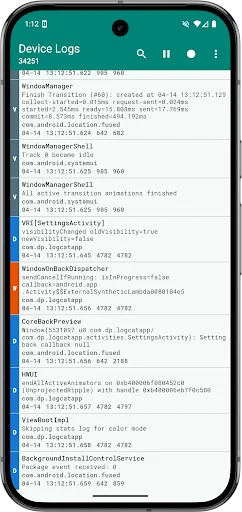
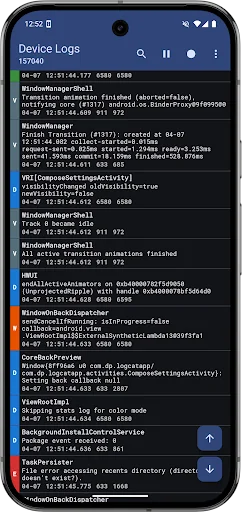
Logcat Reader makes it easy to view and save the device logs. The source code is available at github.com/darshanparajuli/LogcatReader.
<b>Features:</b>
• Color coded logs based on log priority
• Search through log messages and tags (supports highlighting)
• Option to select from available log buffers*
• Save logs as a simple text file (as you would see via logcat)
• Material theme (includes dark mode and dynamic color options)
• Compact view option
*<i>May not work on all devices, in…
Logcat Reader makes it easy to view and save the device logs. The source code is available at github.com/darshanparajuli/LogcatReader.
Features: • Color coded logs based on log priority
• Search through log messages and tags (supports highlighting)
• Option to select from available log buffers*
• Save logs as a simple text file (as you would see via logcat)
• Material theme (includes dark mode and dynamic color options)
• Compact view option
*May not work on all devices, in which case, the option will simply not be present in Settings.
Permissions: android.permission.WRITE_EXTERNAL_STORAGE
Needed for saving logs.
android.permission.READ_LOGS
Required for showing all of the logs, not just the ones produced by the Logcat Reader app itself; instructions to grant this permission will show every time the app is opened.
Each forecast combines App Store rating, ratings count, monetisation model, pricing tier, IAP signals and ad-supported flag.
The base estimate is then multiplied by a per-category scaling factor learned from apps with founder-verified MRR.
Every number on this page comes from public APIs and bumetric's own snapshot history.
Full methodology covers input variables, accuracy bands per category and how we treat apps without comparable anchors.
See also the live data on Logcat Reader's tracker page for current rating, reviews and snapshot timeline.
Building something similar? Get a free AI audit with $-revenue forecasts for every recommendation.




 Alarm Clock
 Ava VPN - Safer & Faster VPN
 ADFM Streaming Tulungagung
 Inventory Editor BE
 WCVR-Dual