What The Majestic Reading - Quran actually does (from store listing)
The Majestic Reading is a direct English translation of the Quran.
Read the The Majestic Reading translation & the Arabic text of the Quran online or offline! Choose from numerous English fonts and Arabic fonts. Listen to the English and Arabic reading by streaming over the internet, or by downloading the readings for offline listening. Search the English translation and Arabic text instantly.
Use the read & listen modes to streamline & customize the application! Listen mode makes it easy …
The Majestic Reading is a direct English translation of the Quran.
Read the The Majestic Reading translation & the Arabic text of the Quran online or offline! Choose from numerous English fonts and Arabic fonts. Listen to the English and Arabic reading by streaming over the internet, or by downloading the readings for offline listening. Search the English translation and Arabic text instantly.
Use the read & listen modes to streamline & customize the application! Listen mode makes it easy to listen to any Sign by simply clicking it. Read mode maximizes the screen space, and enables select, define, & search features.
Read the Quran:
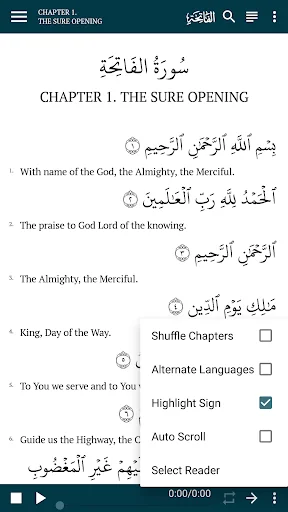
• Display the English Translation and/or Arabic Quran
• Choose from 9 English fonts,
• Choose from 4 Arabic fonts (Original, Original v2, Uthmani Hafs & Indo Pak)
• Change the text size independently for the English and Arabic text
• Choose from 6 different themes, including day and night themes
Listen to the Quran:
• Stream the audio over the internet, or optionally download for offline use.
• Select from 3 English effects (Asad Sirohey: No Effect, Low Echo, High Echo),
• Select from 6 different Arabic reciters (Asad Sirohey, Mishary Alafasy, Aby Bakr Ash-Shaatree, Abdullah Basfar, Ahmed Neana, Khalifa Al Tunaiji)
• Listen to any English or Arabic Sign by simply clicking it
• Leverage features to Shuffle Chapters, Auto-Scroll, Alternate Languages, and Highlight the Sign
Search the Quran:
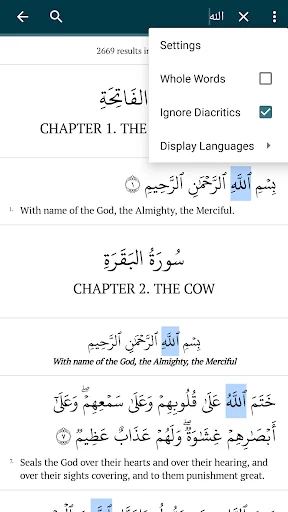
• Search the English Translation and Arabic Text
• Use Whole Word, Case Sensitive, and Ignore Punctuation settings for English
• Use Whole Word, and Ignore Diacritics settings for Arabic
• Filter the Search by any Chapter(s)
• Add Arabic keyboard: https://support.google.com/gboard/answer/7068494
• Use the Search Widget to navigate search results
• In Read Mode, select any word or phrase (in English or Arabic) and search directly
Navigate the Quran:
• Jump to any Sign
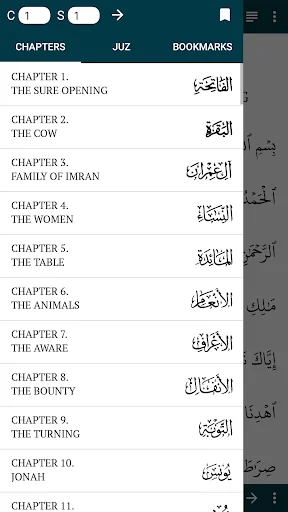
• View list of Chapters and jump to any Chapter
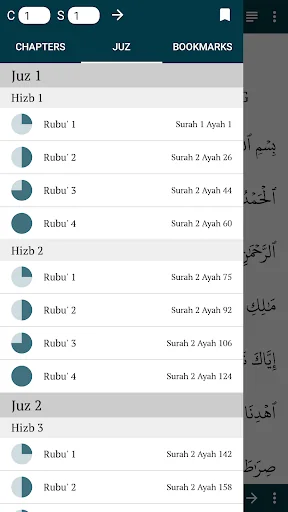
• View list of Juz, Hizb, and Rubu', and jump to any Juz, Hizb, or Rubu'
• Bookmark any Sign
• View list of Bookmarks, and jump to any Bookmark
• Add notes or comments to your Bookmark
• All Signs can also be bookmarked by clicking (in Read Mode) or long clicking (in Listen Mode)
• Search for any Chapter, Juz/Hizb/Rubu', or Bookmark
• Copy & Share any Sign (or range of Signs) by clicking (in Read Mode) or long clicking (in Listen Mode)
• Copy the sign(s) as text, or
• Generate a high-resolution image!
Comparable Android apps
The five apps in Books & Reference with the closest revenue to The Majestic Reading - Quran. Click any to see its detail page.
Each forecast combines App Store rating, ratings count, monetisation model, pricing tier, IAP signals and ad-supported flag.
The base estimate is then multiplied by a per-category scaling factor learned from apps with founder-verified MRR.
Every number on this page comes from public APIs and bumetric's own snapshot history.
Full methodology covers input variables, accuracy bands per category and how we treat apps without comparable anchors.
See also the live data on The Majestic Reading - Quran's tracker page for current rating, reviews and snapshot timeline.
Building something similar? Get a free AI audit with $-revenue forecasts for every recommendation.


 Pashto Proverbs
 Panduan Ziarah Kubur Dan Doa
 每日天糧語音版
 رواية القاسي العنيد
 Berdikari Book