What AR Ruler App: Tape Measure Cam actually does (from store listing)
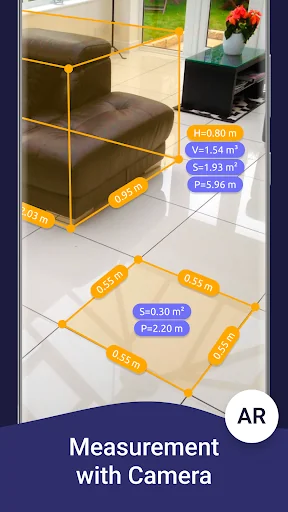
<b>AR Ruler</b> app uses augmented reality technology (AR) to tape measure room, home, house, homescapes with your phone camera. Target aim on the detected plane and start to use AR tape measurement tool. Try to room scan and floor plan your house with a new computer technology.
iPhone lidar scanner & iPad lidar version:
https://itunes.apple.com/us/app/ar-ruler-app-tape-measure/id1326773975?mt=8
1) <b>AR Ruler app</b> – allows to tape measure linear sizes in cm, m (meter), mm, inches, fee…
AR Ruler app uses augmented reality technology (AR) to tape measure room, home, house, homescapes with your phone camera. Target aim on the detected plane and start to use AR tape measurement tool. Try to room scan and floor plan your house with a new computer technology.
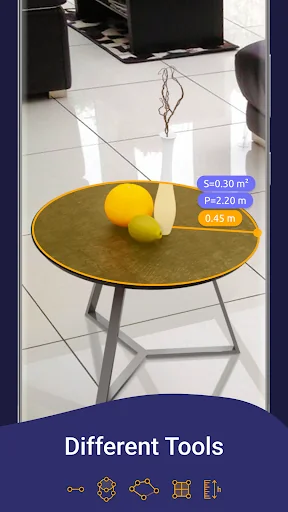
1) AR Ruler app – allows to tape measure linear sizes in cm, m (meter), mm, inches, feet, yard.
2) Distance meter – allows to tape measure distance from device camera to a fixed point on the detected 3D plane.
3) Angle – allows to tape measuring corners on 3D planes.
4) Area and Perimeter – allows to tape room measurement and area of the house.
5) Volume scanner – allows to tape measure size of 3D objects.
6) Path scan – allows to calculate the length of the photo path.
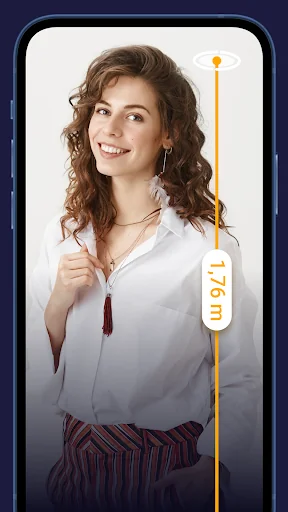
7) Height measure – allows to tape measure height relative to the recognized surface.
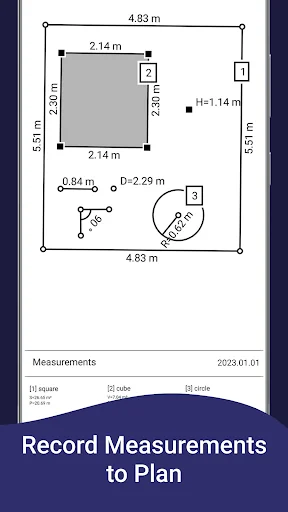
8) Room Planner and Home Design – generates a room plan projection for drawn objects and exports the floor plan to PDF format.
9) On-screen Ruler app – measuring small objects directly on the phone screen.
10) Photo measure app.
Note: Some features are Core only.
Need to measure room with phone, scan room in 3D, or calculate wall area in
seconds? With the AR Ruler app, you can use AR ruler app to measure height with camera, measure distance in AR, and scan objects with lidar for accurate results. Quickly create floor plan AR, measure furniture size, and design home in AR using your phone. This smart tool helps you get room dimensions, calculate area fast, and measure space accurately anytime, anywhere.
Try AR Ruler app now and make your little homescapes – we’d love to hear your feedback!
Note: Please note that AR Ruler app requires ARCore (aka lidar iOS) library produced by Google. ARCore is constantly improving, which, in turn, positively affects the room scanner quality and photo measurements accuracy of AR Ruler app in units of measurement such as cm, m (meter), mm, inch, feet, yard.
Customer Support: Should you have any questions about Augmented Reality Ruler app or need help, please do not hesitate to contact us via developer email: support@grymalaltd.com.
Comparable Android apps
The five apps in Tools with the closest revenue to AR Ruler App: Tape Measure Cam. Click any to see its detail page.
Each forecast combines App Store rating, ratings count, monetisation model, pricing tier, IAP signals and ad-supported flag.
The base estimate is then multiplied by a per-category scaling factor learned from apps with founder-verified MRR.
Every number on this page comes from public APIs and bumetric's own snapshot history.
Full methodology covers input variables, accuracy bands per category and how we treat apps without comparable anchors.
See also the live data on AR Ruler App: Tape Measure Cam's tracker page for current rating, reviews and snapshot timeline.
Building something similar? Get a free AI audit with $-revenue forecasts for every recommendation.


 Applock
 VPN secure fast proxy by GOVPN
 Blink Home Monitor
 Voice Translator All Languages
 Lantern: Fast, Secure VPN